Sign In Start Free Trial
Account

Add to playlist

Create a Playlist

Modal Close icon
You need to login to use this feature.
  • Book Overview & Buying App Inventor 2 Essentials
  • Table Of Contents Toc
  • Feedback & Rating feedback
App Inventor 2 Essentials

App Inventor 2 Essentials

By : Kamriani, Roy
4.2 (9)
close
close
App Inventor 2 Essentials

App Inventor 2 Essentials

4.2 (9)
By: Kamriani, Roy

Overview of this book

App Inventor 2 will take you on a journey of mobile app development. We begin by introducing you to the functionalities of App Inventor and giving you an idea about the types of apps you can develop using it. We walk you through the technical set up so you can take advantage of the interactive development environment (live testing). You will get hands-on, practical experience building three different apps using tutorials. Along the way, you will learn computer science principles as well as tips to help you prepare for the creative process of building an app from scratch. By the end of the journey, you will learn how to package an app and deploy it to app markets. App Inventor 2 Essentials prepares you to amass a resource of skills, knowledge and experience to become a mobile app developer
Table of Contents (10 chapters)
close
close
9
Index

App Inventor extras


We'd like to introduce you to some App Inventor features that you may not know about.

Shortcuts

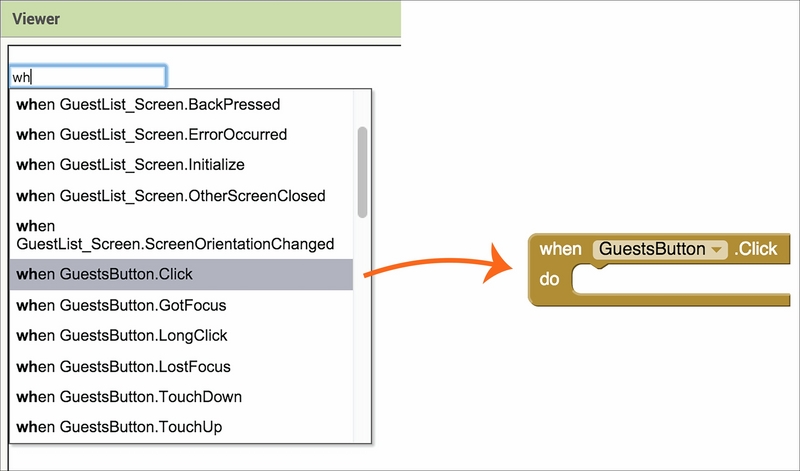
In this book, we showed you how to find and select blocks in the Blocks Editor. But, if you already know the block you want, there is a quick way to get it. All you have to do is click anywhere on the white space of the Viewer window and start typing. For example, if you want the When GuestsButton.Click event block, begin typing the word when and a drop-down list will appear, allowing you to choose the block you want among other blocks beginning with wh. Once you select the block, it will appear in the Viewer.

We didn't give you this shortcut initially because we wanted you to become familiar with where blocks were housed and how they were grouped (not because we wanted to make you work harder).

Help

There are a variety of ways to get help while you are using App Inventor. In the Designer, you may or may not have noticed little questions marks on the right-hand side of the Components...

Visually different images
CONTINUE READING
83
Tech Concepts
36
Programming languages
73
Tech Tools
Icon Unlimited access to the largest independent learning library in tech of over 8,000 expert-authored tech books and videos.
Icon Innovative learning tools, including AI book assistants, code context explainers, and text-to-speech.
Icon 50+ new titles added per month and exclusive early access to books as they are being written.
App Inventor 2 Essentials
notes
bookmark Notes and Bookmarks search Search in title playlist Add to playlist font-size Font size

Change the font size

margin-width Margin width

Change margin width

day-mode Day/Sepia/Night Modes

Change background colour

Close icon Search
Country selected

Close icon Your notes and bookmarks

Confirmation

Modal Close icon
claim successful

Buy this book with your credits?

Modal Close icon
Are you sure you want to buy this book with one of your credits?
Close
YES, BUY

Submit Your Feedback

Modal Close icon
Modal Close icon
Modal Close icon