Sign In Start Free Trial
Account

Add to playlist

Create a Playlist

Modal Close icon
You need to login to use this feature.
  • Book Overview & Buying Dart By Example
  • Table Of Contents Toc
Dart By Example

Dart By Example

By : David Mitchell
3 (2)
close
close
Dart By Example

Dart By Example

3 (2)
By: David Mitchell

Overview of this book

Designed to create next generation apps, Google’s Dart offers a much more robust framework and also supersedes JavaScript in several aspects. Familiar yet innovative, compact yet scalable, it blows away the accumulated JavaScript legacy limitations. Dart was designed for great tool-ability and developer productivity, allowing you to create better application faster than before. Google chose it for their billion dollar advertising business and you have its power for your projects too. This book will introduce you the Dart language starting from its conception to its current form, and where it headed is through engaging substantial practical projects. You will be taken through building typical applications and exploring the exciting new technologies of HTML5. With example code projects such as a live data monitoring and viewing system, a blogging system, a slides presentation application, and more, then this book will walk you through step by step through building data-driven web applications with ease and speed.
Table of Contents (12 chapters)
close
close
11
Index

Debugging a Dart application

A good debugger is a key part of a productive development system. Let's step through our code so that we can look closely at what is going on.

To debug an application running in Dartium from WebStorm, we need to install a small browser extension to act as a bridge between the two applications.

Note

Follow the guide from JetBrains at the following web page:

https://www.jetbrains.com/webstorm/help/using-jetbrains-chrome-extension.html

The main section to be concerned with is the "Installing the JetBrains Chrome extension" section. This only has to be done once.

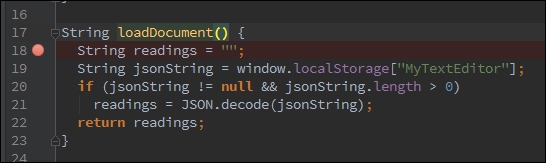
  1. Click on the first line of the loadDocument function.
  2. Next, open the Run menu and choose Toggle Line Breakpoint. A red circle will appear to the right of the line:
    Debugging a Dart application
  3. Select index.html in the Project tab, then open the Run menu and choose the Debug index.html menu.
  4. Once Dartium opens, the loadDocument function should run and the breakpoint should hit. The Debugger tab will appear in WebStorm.
  5. The Debugger tab shows the call stack and values of current variables. Under the Run menu and on the toolbar, the usual debug operations of Step Into, Step Over, and return are available.
  6. Before we take any steps, hover the pointer over the return statement line. A tool-tip will appear to show that the string variable readings is currently set to null.
  7. Choose Step Over and the execution will move onto the next line.
  8. Move the pointer over the return statement again, and the readings variable is shown to be an empty string object.
  9. Step Over until the end of the function, and the return variable will be set to the text retrieved from local storage.
  10. To get the application running again, use the Resume Program menu option from the Run menu, or to stop it from running, select the Terminate menu option.

Working in harmony with JavaScript

The clear button on the editor is a bit dangerous as it may wipe out some vital notes. We will provide the user with a simple Are you sure? prompt so that they have a chance to back out of the operation.

You are probably thinking that we could use the Dart equivalent of window.confirm to carry it out. We certainly could, but to demonstrate the ability to call JavaScript, we will use the non-Dart version to display a prompt to the user.

Open main.dart and add the following import to the top of the file:

import 'dart:js';

In the Dart Analysis tab directly below the Dart code editor window, you will see a warning that we have an unused import. This can be a useful tip once a project has grown and code has been moved around into separate packages and classes. Import lists can soon acquire clutter.

To call the JavaScript confirm dialog, we use the context object from dart:js in the button click event handler. The context object is a reference to JavaScript's global object:

void clearEditor(MouseEvent event) {
  var result = context.callMethod('confirm',
      ['Are you sure you want to clear the text?']);
  if (result == true) {
    theEditor.text = "";
    saveDocument();
  }
}

The callMethod method can be used to call any JavaScript function available in the scope of the page—not just built in objects. In this case, the first parameter is the name of the function we wish to call and the second parameter is the list of arguments for that method.

Commenting in the code

Our text editor foundation is looking complete at this point, but there is one important element that is missing from the main.dart file—code comments.

Dart uses the following familiar commenting syntax:

Comment Syntax

Description

// Your comment here.

A single line comment

/**

Your comment here.

*/

A multiple line comment

/// Your comment here.

A doc comment (the preferred method because it is more compact)

In mentioning an identifier, place square brackets around the name. For example:

/// Returns double of [a] input.
int doubleANumber(int a){
    //Assumes parameter valid.
     return a * 2;
}

Take a short time to comment each function with the above style. Use a sentence format and punctuation.

Tip

For more information on comment style and other coding conventions, see the guidelines for Doc comments: https://www.dartlang.org/articles/doc-comment-guidelines/, and the Dart coding style guide: https://www.dartlang.org/articles/style-guide/

CONTINUE READING
83
Tech Concepts
36
Programming languages
73
Tech Tools
Icon Unlimited access to the largest independent learning library in tech of over 8,000 expert-authored tech books and videos.
Icon Innovative learning tools, including AI book assistants, code context explainers, and text-to-speech.
Icon 50+ new titles added per month and exclusive early access to books as they are being written.
Dart By Example
notes
bookmark Notes and Bookmarks search Search in title playlist Add to playlist font-size Font size

Change the font size

margin-width Margin width

Change margin width

day-mode Day/Sepia/Night Modes

Change background colour

Close icon Search
Country selected

Close icon Your notes and bookmarks

Confirmation

Modal Close icon
claim successful

Buy this book with your credits?

Modal Close icon
Are you sure you want to buy this book with one of your credits?
Close
YES, BUY

Submit Your Feedback

Modal Close icon
Modal Close icon
Modal Close icon