Sign In Start Free Trial
Account

Add to playlist

Create a Playlist

Modal Close icon
You need to login to use this feature.
  • Book Overview & Buying Entity Framework Core Cookbook
  • Table Of Contents Toc
Entity Framework Core Cookbook

Entity Framework Core Cookbook - Second Edition

By : Ricardo Peres
2 (3)
close
close
Entity Framework Core Cookbook

Entity Framework Core Cookbook

2 (3)
By: Ricardo Peres

Overview of this book

Entity Framework is a highly recommended Object Relation Mapping tool used to build complex systems. In order to survive in this growing market, the knowledge of a framework that helps provide easy access to databases, that is, Entity Framework has become a necessity. This book will provide .NET developers with this knowledge and guide them through working efficiently with data using Entity Framework Core. You will start off by learning how to efficiently use Entity Framework in practical situations. You will gain a deep understanding of mapping properties and find out how to handle validation in Entity Framework. The book will then explain how to work with transactions and stored procedures along with improving Entity Framework using query libraries. Moving on, you will learn to improve complex query scenarios and implement transaction and concurrency control. You will then be taught to improve and develop Entity Framework in complex business scenarios. With the concluding chapter on performance and scalability, this book will get you ready to use Entity Framework proficiently.
Table of Contents (10 chapters)
close
close
9
Index

Unit testing and mocking

Software development is not just writing code. We also need to test it, to confirm that it does what is expected. There are several kinds of tests, and unit tests are one of the most popular. In this chapter, we will set up the unit test framework that will accompany us throughout the book. Another important concept is that of mocking; by mocking a class (or interface), we can provide a dummy implementation of it that we can use instead of the real thing. This comes in handy in unit tests, because we do not always have access to real-life data and environments, and this way, we can pretend we do.

Getting ready

We will be using the NuGet Package Manager to install the Entity Framework Core 1 package, Microsoft.EntityFrameworkCore. We will be using a SQL Server database for storing the data, so we will also need Microsoft.EntityFrameworkCore.SqlServer.

To mock interfaces and base classes, we will use Moq.

Finally, xunit is the package we will be using for the unit tests and dotnet-text-xunit adds tooling support for Visual Studio. Note that the UnitTests project is a .NET Core App 1.0 (netcoreapp1.0), that Microsoft.EntityFrameworkCore.Design is configured as a build dependency, and Microsoft.EntityFrameworkCore.Tools is set as a tool.

Open Using EF Core Solution from the included source code examples.

Execute the database setup script from the code samples included for this recipe. This can be found in the DataAccess project within the Database folder.

How to do it…

  1. Start by adding the required NuGet packages to the UnitTests project. We'll edit and add two dependencies, the main xUnit library and its runner for .NET Core, and then set the runner command.
  2. Now, let's add a base class to the project; create a new C# class file and call it BaseTests.cs:
    using Microsoft.Extensions.Configuration;
    namespace UnitTests
    {
        public abstract class BaseTest
        {
            protected BaseTest()
            {
                var builder = new ConfigurationBuilder()
                    .AddJsonFile("appsettings.json");
                Configuration = builder.Build();
            }
            protected IConfiguration Configuration{ get; private set; }
        }
    }
  3. Now, for a quick test, add a new C# file, called SimpleTest.cs, to the project, with this content:
    using Moq;
    using Xunit;
    namespace UnitTests
    {
        public class SimpleTest : BaseTest
        {
            [Fact]
            public void CanReadFromConfiguration()
            {
                var connectionString = Configuration["Data:Blog:ConnectionString"];
                Assert.NotNull(connectionString);
                Assert.NotEmpty(connectionString);
            }
            [Fact]
            public void CanMock()
            {
                var mock = new Mock<IConfiguration>();
                mock.Setup(x => x[It.IsNotNull<string>()]).Returns("Dummy Value");
                var configuration = mock.Object;
                var value = configuration["Dummy Key"];
                Assert.NotNull(value);
                Assert.NotEmpty(value);
            }
        }
    }
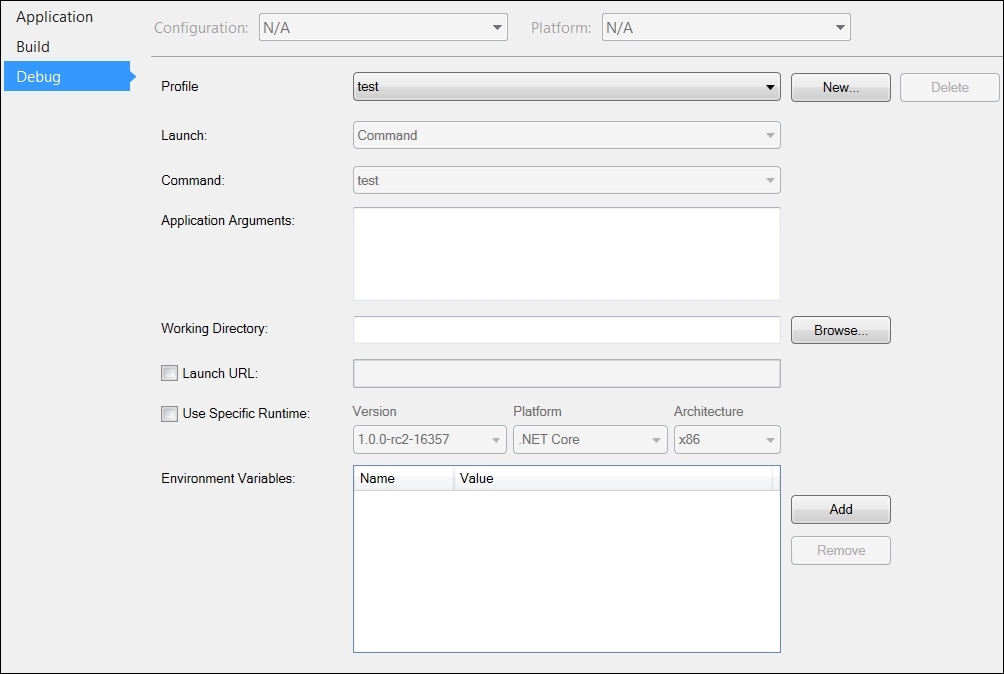
  4. If you want to have the xUnit runner running your unit tests automatically, you will need to set the test command as the profile to run in the project properties:
    How to do it…

    Project properties

How it works…

We have a unit tests base class that loads configuration from an external file, in pretty much the same way as the ASP.NET Core template does. Any unit tests that we will define later on should inherit from this one.

When the runner executes, it will discover all unit tests in the project—those public concrete methods marked with the [Fact] attribute. It will then try to execute them and evaluate any Assert calls within.

The Moq framework lets you define your own implementations for any abstract or interface methods that you wish to make testable. In this example, we are mocking the IConfiguration class, and saying that any attempt to retrieve a configuration value should have a dummy value as the result.

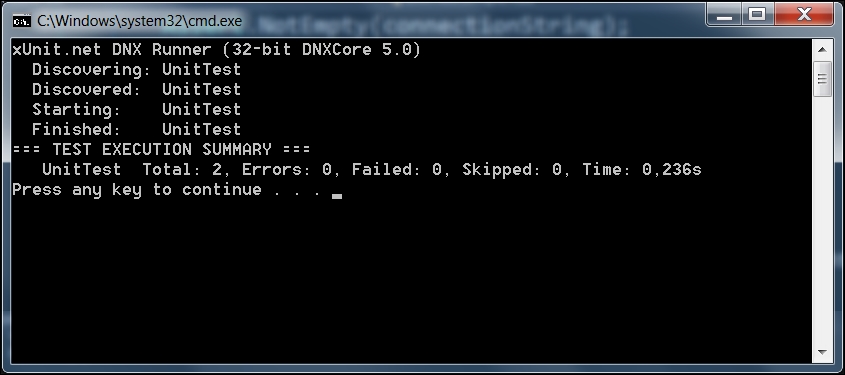
If you run this project, you will get the following output:

How it works…

Running unit tests

There's more…

Testing to the edges of an application requires that we adhere to certain practices that allow us to shrink the untestable sections of the code. This will allow us to unit test more code, and make our integration tests far more specific.

One class under test

An important point to remember while performing unit testing is that we should only be testing a single class. The point of a unit test is to ensure that a single operation of this class performs the way we expect it to.

This is why simulating classes that are not under test is so important. We do not want the behavior of these supporting classes to affect the outcomes of unit tests for the class that is being tested.

Integration tests

Often, it is equally important to test the actual combination of your various classes to ensure they work properly together. These integration tests are valuable, but are almost always more brittle, require more setup, and are run slower than the unit tests. We certainly need integration tests on any project of a reasonable size, but we want unit tests first.

Arrange, Act, Assert

Most unit tests can be viewed as having three parts: Arrange, Act, and Assert. Arrange is where we prepare the environment to perform the test, for instance, mocking the IDBContext with dummy data with the expectation that Set will be called. Act is where we perform the action under test, and is most often a singular line of code. Assert is where we ensure that the proper result was reached. Note the comments in the preceding examples that call out these sections. We will use them throughout the book to make it clear what the test is trying to do.

Mocking

Mocking and stubbing—providing a pre-built implementation for methods to intercept—is a very interesting topic. There are numberless frameworks that can provide mocking capabilities for even the most challenging scenarios, such as static methods and properties. Mocking fits nicely with unit tests because we seldom have an environment that is identical to the one where we will be deploying, but we don't have "real" data. Also, data changes, and we need a way to be able to reproduce things consistently.

CONTINUE READING
83
Tech Concepts
36
Programming languages
73
Tech Tools
Icon Unlimited access to the largest independent learning library in tech of over 8,000 expert-authored tech books and videos.
Icon Innovative learning tools, including AI book assistants, code context explainers, and text-to-speech.
Icon 50+ new titles added per month and exclusive early access to books as they are being written.
Entity Framework Core Cookbook
notes
bookmark Notes and Bookmarks search Search in title playlist Add to playlist download Download options font-size Font size

Change the font size

margin-width Margin width

Change margin width

day-mode Day/Sepia/Night Modes

Change background colour

Close icon Search
Country selected

Close icon Your notes and bookmarks

Confirmation

Modal Close icon
claim successful

Buy this book with your credits?

Modal Close icon
Are you sure you want to buy this book with one of your credits?
Close
YES, BUY

Submit Your Feedback

Modal Close icon
Modal Close icon
Modal Close icon