Sign In Start Free Trial
Account

Add to playlist

Create a Playlist

Modal Close icon
You need to login to use this feature.
  • Book Overview & Buying Mastering Microsoft Dynamics CRM 2016
  • Table Of Contents Toc
Mastering Microsoft Dynamics CRM 2016

Mastering Microsoft Dynamics CRM 2016

By : Deepesh Somani
close
close
Mastering Microsoft Dynamics CRM 2016

Mastering Microsoft Dynamics CRM 2016

By: Deepesh Somani

Overview of this book

Microsoft Dynamics CRM is the most trusted name in enterprise-level customer relationship management. The latest version of Dynamics CRM 2016 comes with some exciting extra features guaranteed to make your life easier with Dynamics CRM. This book provides a comprehensive coverage of Dynamics CRM 2016 and helps you make your tasks much simpler while elevating you to the level of an expert. The book starts with a brief overview of the functional features and then introduces the latest features of Dynamics CRM 2016. You will learn to create Word and Excel templates, using CRM data that will enable you to provide customized data analysis for your organization. You will understand how to utilize Dynamics CRM as an XRM Framework, gain a deep understanding about client-side scripting in Dynamics CRM, and learn creating client-side applications using JavaScript and Web API. We then introduce visual control frameworks for Dynamics CRM 2016 mobile and tablet applications. Business Process Flows, Business Rules, and their enhancements are introduced. By the end of this book, you will have mastered utilizing Dynamics CRM 2016 features through real-world scenarios.
Table of Contents (13 chapters)
close
close

Scenario 2


Contoso is launching a new product. They want to monitor the social channel to gather the runtime feedback on how the public is reacting to their product. They also want their marketing team to reply to the questions/feedback that people are putting regarding their product on a social platform.

Perform the following steps:

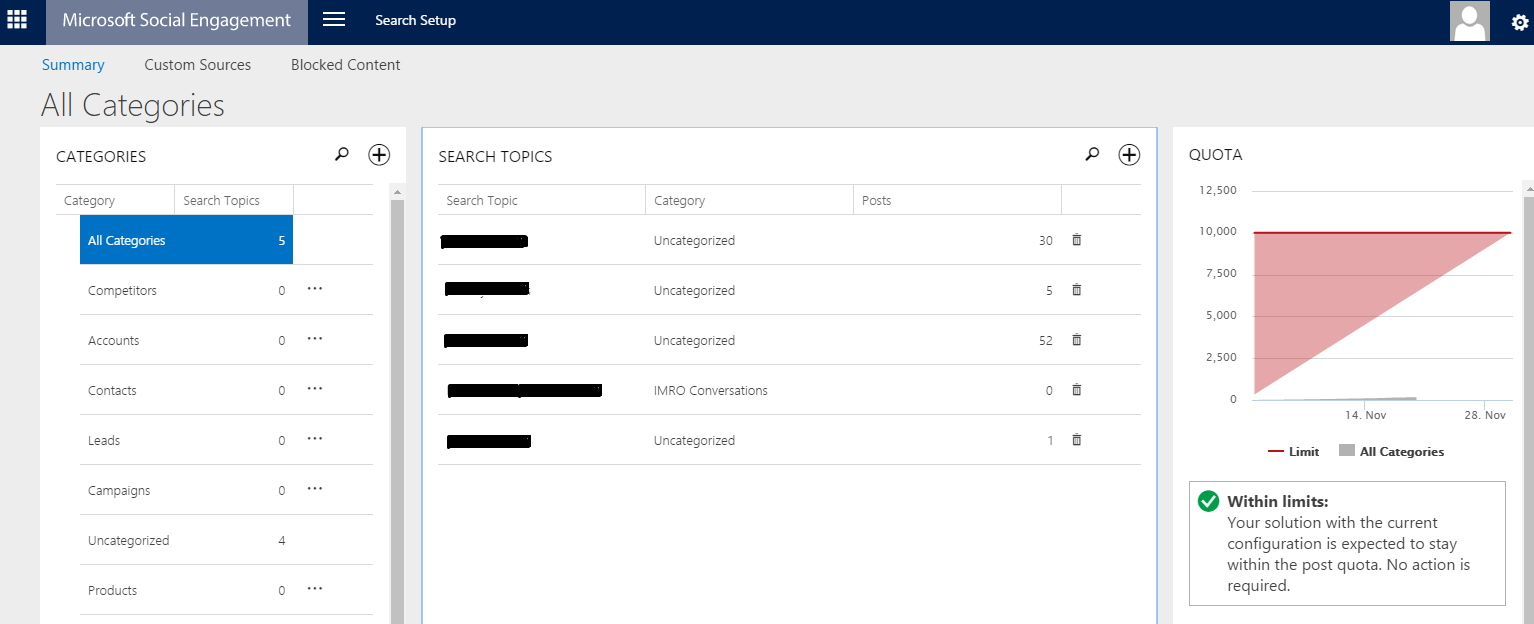
  1. Setting Up Microsoft Social Engagement: Microsoft Social Engagement helps users to track and analyze social communications across public networks about specific topics. This is how you can set up social feeds on Microsoft Social Engagement:
    1. Log in to Microsoft Social Engagement and navigate to Microsoft Social Engagement | Search Setup:
    1. You can then create new categories related to competitors, products, or any other required category:
    1. For any existing Category, you can add search feeds. Social listening will then monitor the social media for any activity related to these feeds. For doing so, you need to select the category and click the add (+) button on Search...
CONTINUE READING
83
Tech Concepts
36
Programming languages
73
Tech Tools
Icon Unlimited access to the largest independent learning library in tech of over 8,000 expert-authored tech books and videos.
Icon Innovative learning tools, including AI book assistants, code context explainers, and text-to-speech.
Icon 50+ new titles added per month and exclusive early access to books as they are being written.
Mastering Microsoft Dynamics CRM 2016
notes
bookmark Notes and Bookmarks search Search in title playlist Add to playlist download Download options font-size Font size

Change the font size

margin-width Margin width

Change margin width

day-mode Day/Sepia/Night Modes

Change background colour

Close icon Search
Country selected

Close icon Your notes and bookmarks

Confirmation

Modal Close icon
claim successful

Buy this book with your credits?

Modal Close icon
Are you sure you want to buy this book with one of your credits?
Close
YES, BUY

Submit Your Feedback

Modal Close icon
Modal Close icon
Modal Close icon