Sign In Start Free Trial
Account

Add to playlist

Create a Playlist

Modal Close icon
You need to login to use this feature.
  • Book Overview & Buying C# Programming Cookbook
  • Table Of Contents Toc
C# Programming Cookbook

C# Programming Cookbook

By : Dirk Strauss
close
close
C# Programming Cookbook

C# Programming Cookbook

By: Dirk Strauss

Overview of this book

During your application development workflow, there is always a moment when you need to get out of a tight spot. Through a recipe-based approach, this book will help you overcome common programming problems and get your applications ready to face the modern world. We start with C# 6, giving you hands-on experience with the new language features. Next, we work through the tasks that you perform on a daily basis such as working with strings, generics, and lots more. Gradually, we move on to more advanced topics such as the concept of object-oriented programming, asynchronous programming, reactive extensions, and code contracts. You will learn responsive high performance programming in C# and how to create applications with Azure. Next, we will review the choices available when choosing a source control solution. At the end of the book, we will show you how to create secure and robust code, and will help you ramp up your skills when using the new version of C# 6 and Visual Studio
Table of Contents (15 chapters)
close
close
14
Index

Index initializers

You need to remember that C# 6.0 does not introduce big new concepts, but small features designed to make your code cleaner and easier to read and understand. With index initializers, this is not an exception. You can now initialize the indices of newly created objects. This means you do not have to use separate statements to initialize the indexes.

Getting ready

The change here is subtle. We will create a method to return the day of the week based on an integer. We will also create a method to return the start of the financial year and salary increase month, and then set the salary increase month to a different value than the default. Finally we will use properties to return a specific type of species to the console window.

How to do it…

  1. Start off by creating a new class called Recipe4IndexInitializers and add a second class called Month to your code. The Month class simply contains two auto-implemented properties that have been initialized. StartFinancialYearMonth has been set to month two (February), and SalaryIncreaseMonth has been set to month three (March):
    public static class Recipe4IndexInitializers
    {
    
    }
        
    public class Month
    {
        public int StartFinancialYearMonth { get; set; } = 2;
        public int SalaryIncreaseMonth { get; set; } = 3;
    }
  2. Go ahead and add a method called ReturnWeekDay that takes an integer for the day number as a parameter, to the Recipe4IndexInitializers class:
    public static string ReturnWeekDay(int dayNumber)
    {
        Dictionary<int, string> day = new Dictionary<int, string>
        {
            [1] = "Monday",
            [2] = "Tuesday",
            [3] = "Wednesday",
            [4] = "Thursday",
            [5] = "Friday",
            [6] = "Saturday",
            [7] = "Sunday"
        };
    
        return day[dayNumber];
    }
  3. For the second example, add a method called ReturnFinancialAndBonusMonth to the Recipe4IndexInitializers class:
    public static List<int> ReturnFinancialAndBonusMonth()
    {
        Month currentMonth = new Month();
        int[] array = new[] { currentMonth.StartFinancialYearMonth, currentMonth.SalaryIncreaseMonth };
        return new List<int>(array) { [1] = 2 };  
    }
  4. Finally, add several auto-implemented properties to the class to contain species and a method called DetermineSpecies to the Recipe4IndexInitializers class. Your code should look like this:
    public static string Human { get; set; } = "Homo sapiens";
    public static string Sloth { get; set; } = "Choloepus hoffmanni";
    public static string Rabbit { get; set; } = "Oryctolagus cuniculus";
    public static string Mouse { get; set; } = "Mus musculus";
    public static string Hedgehog { get; set; } = "Erinaceus europaeus";
    public static string Dolphin { get; set; } = "Tursiops truncatus";
    public static string Dog { get; set; } = "Canis lupus familiaris";
    
    public static void DetermineSpecies()
    {
        Dictionary<string, string> Species =  new Dictionary<string, string>
        {
            [Human] = Human + " : Additional species information",
            [Rabbit] = Rabbit + " : Additional species information",
            [Sloth] = Sloth + " : Additional species information",
            [Mouse] = Mouse + " : Additional species information",
            [Hedgehog] = Hedgehog + " : Additional species information",
            [Dolphin] = Dolphin + " : Additional species information",
            [Dog] = Dog + " : Additional species information"
        };
    
        Console.WriteLine(Species[Human]);            
    }
  5. In your console application, add the following code to call the code in the Recipe4IndexInitializers class:
    int DayNumber = 3;
    string DayOfWeek = Chapter1.Recipe4IndexInitializers.ReturnWeekDay(DayNumber);
    Console.WriteLine($"Day {DayNumber} is {DayOfWeek}");
                            
    List<int> FinancialAndBonusMonth = Chapter1.Recipe4IndexInitializers.ReturnFinancialAndBonusMo nth();
    Console.WriteLine("Financial Year Start month and Salary Increase Months are:");
    for (int i = 0; i < FinancialAndBonusMonth.Count(); i++)
    {
        Console.Write(i == 0 ? FinancialAndBonusMonth[i].ToString() + " and " : FinancialAndBonusMonth[i].ToString());
    }
    
    Console.WriteLine();
    Chapter1.Recipe4IndexInitializers.DetermineSpecies();
    Console.Read();
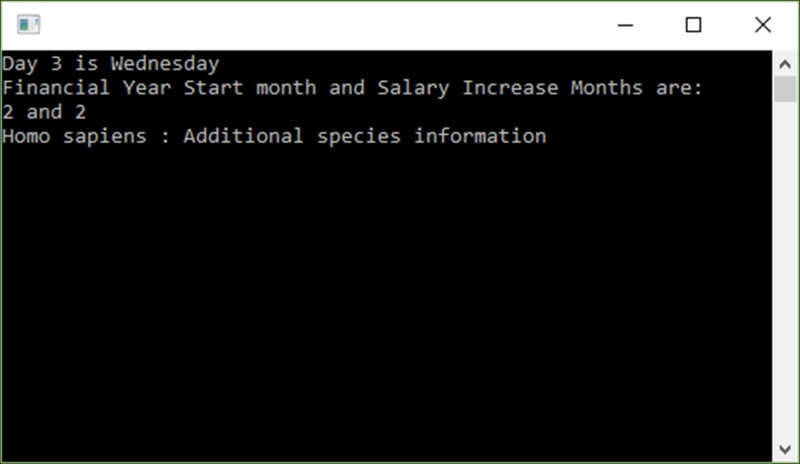
  6. Once you have added all your code, run your application. The output will look like this:
    How to do it…

How it works…

The first method ReturnWeekDay created a Dictionary<int, string> object. You can see how the indices are initialized with the day names. If we now pass the day integer to the method, we can return the day name by referencing the index.

Note

The reason for not using a zero-based index in ReturnWeekDay is because the first day of the week is associated to the numerical value 1.

In the second example, we called a method called ReturnFinancialAndBonusMonth that creates an array to hold the financial year start month and the salary increase month. Both properties of the Month class are initialized to 2 and 3, respectively. You can see that we are overriding the value of the SalaryIncreaseMonth property and setting it to 2. It is done in the following line of code:

return new List<int>(array) { [1] = 2 };

The last example uses the Human, Rabbit, Sloth, Mouse, Hedgehog, Dolphin, and Dog properties to return the correct index value of the Species object.

CONTINUE READING
83
Tech Concepts
36
Programming languages
73
Tech Tools
Icon Unlimited access to the largest independent learning library in tech of over 8,000 expert-authored tech books and videos.
Icon Innovative learning tools, including AI book assistants, code context explainers, and text-to-speech.
Icon 50+ new titles added per month and exclusive early access to books as they are being written.
C# Programming Cookbook
notes
bookmark Notes and Bookmarks search Search in title playlist Add to playlist download Download options font-size Font size

Change the font size

margin-width Margin width

Change margin width

day-mode Day/Sepia/Night Modes

Change background colour

Close icon Search
Country selected

Close icon Your notes and bookmarks

Confirmation

Modal Close icon
claim successful

Buy this book with your credits?

Modal Close icon
Are you sure you want to buy this book with one of your credits?
Close
YES, BUY

Submit Your Feedback

Modal Close icon
Modal Close icon
Modal Close icon