Sign In Start Free Trial
Account

Add to playlist

Create a Playlist

Modal Close icon
You need to login to use this feature.
  • Book Overview & Buying C# Programming Cookbook
  • Table Of Contents Toc
C# Programming Cookbook

C# Programming Cookbook

By : Dirk Strauss
close
close
C# Programming Cookbook

C# Programming Cookbook

By: Dirk Strauss

Overview of this book

During your application development workflow, there is always a moment when you need to get out of a tight spot. Through a recipe-based approach, this book will help you overcome common programming problems and get your applications ready to face the modern world. We start with C# 6, giving you hands-on experience with the new language features. Next, we work through the tasks that you perform on a daily basis such as working with strings, generics, and lots more. Gradually, we move on to more advanced topics such as the concept of object-oriented programming, asynchronous programming, reactive extensions, and code contracts. You will learn responsive high performance programming in C# and how to create applications with Azure. Next, we will review the choices available when choosing a source control solution. At the end of the book, we will show you how to create secure and robust code, and will help you ramp up your skills when using the new version of C# 6 and Visual Studio
Table of Contents (15 chapters)
close
close
14
Index

Exception filters

Exception filters have been around for some time. Visual Basic.NET (VB.NET) and F# devs have had this functionality for a while. Luckily for us, it has now been introduced in C# 6.0. Exception filters do more than what meets the eye. At first glance, it looks as if exception filters merely specify a condition when an exception needs to be caught. This is, after all, what the name "exception filter" implies. Upon closer inspection, however, we see that exception filters act as more than just syntactical sugar.

Getting ready

We will create a new class called Recipe8ExceptionFilters and call a method that reads an XML file. The file read logic is determined by a Boolean flag being set to true. Imagine here that there is some other database flag that when set, also sets our Boolean flag to true, and thus, our application knows to read the given XML file.

How to do it…

  1. Create a class called Recipe8ExceptionFilters that contains two methods. One method reads the XML file, and the second method logs any exception errors:
    public static class Recipe8ExceptionFilters
    {
        public static void ReadXMLFile(string fileName)
        {
            try
            {
                bool blnReadFileFlag = true;
                if (blnReadFileFlag)
                {
                    File.ReadAllLines(fileName);
                }
            }
            catch (Exception ex)
            {
                Log(ex);
                throw;
            }
        }
    
        private static void Log(Exception e)
        {
            /* Log the error */            
        }
    }
  2. In the console application, add the following code to call the ReadXMLFile method, passing it the file name to read:
    string File = @"c:\temp\XmlFile.xml";
    Chapter1.Recipe8ExceptionFilters.ReadXMLFile(File);

How it works…

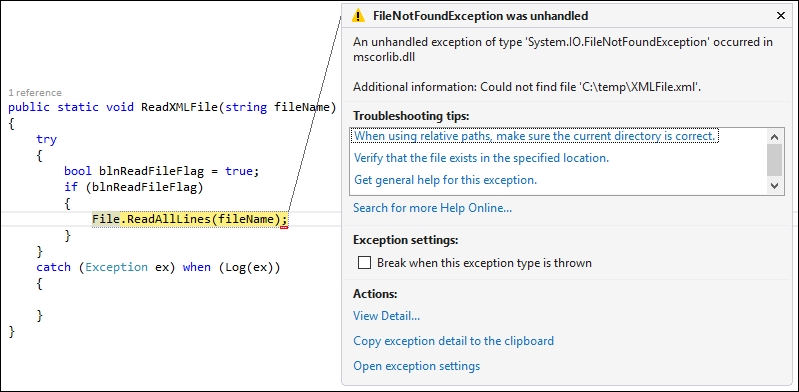
If we had to run our application now, we would obviously receive an error (this is assuming that you actually don't have a file called XMLFile.xml in your temp folder). Visual Studio will break on the throw statement:

How it works…

Note

You need to add the correct namespace using System.IO at the top of your code file.

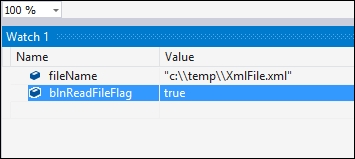
The Log(ex) method has logged the exception, but have a look at the Watch1 window. We have no idea what the value of blnReadFileFlag is. When an exception is caught, the stack is unwound (adding overhead to your code) to whatever the actual catch block is. Therefore, the state of the stack before the exception happened is lost. Modify your ReadXMLFile and Log methods as follows to include an exception filter:

public static void ReadXMLFile(string fileName)
{
    try
    {
        bool blnReadFileFlag = true;
        if (blnReadFileFlag)
        {
            File.ReadAllLines(fileName);
        }
    }
    catch (Exception ex) when (Log(ex))
    {

    }
}

private static bool Log(Exception e)
{
    /* Log the error */
    return false;
}

When you run your console application again, Visual Studio will break on the actual line of code that caused the exception:

How it works…

More importantly, the value of blnReadFileFlag is still in scope. This is because exception filters can see the state of the stack at the point where the exception occurred instead of where the exception was handled. Looking at the Locals window in Visual Studio, you will see that the variables are still in scope at the point where the exception occurred:

How it works…

Imagine being able to view the exception information in a log file with all the local variable values available. Another interesting point to note is the return false statement in the Log(ex) method. Using this method to log the error and return false will allow the application to continue and have the exception handled elsewhere. As you know, catching Exception ex will catch everything. By returning false, the exception filter doesn't run into the catch statement, and more specific catch exceptions (for example, catch (FileNotFoundException ex) after our catch (Exception ex) statement) can be used to handle specific errors. Normally, when catching exceptions, FileNotFoundException will never be caught in the following code example:

catch (Exception ex) 
{

}
catch (FileNotFoundException ex)
{

}

This is because the order of the exceptions being caught is wrong. Traditionally, developers must catch exceptions in their order of specificity, which means that FileNotFoundException is more specific than Exception and must therefore be placed before catch (Exception ex). With exception filters that call a false returning method, we can inspect and log an exception accurately:

catch (Exception ex) when (Log(ex))
{

}
catch (FileNotFoundException ex)
{

}

The preceding code will catch all exceptions, and in doing so log the exception accurately but not step into the exception handler because the Log(ex) method returns false.

Another implementation of exception filters is that they can allow developers to retry code in the event of a failure. You might not specifically want to catch the first exception, but implement a type of timeout element to your method. When the error counter has reached the maximum iterations, you can catch and handle the exception. You can see an example of catching an exception based on a try clauses' count here:

public static void TryReadXMLFile(string fileName)
{
    bool blnFileRead = false;
    do
    {
        int iTryCount = 0;
        try
        {
            bool blnReadFileFlag = true;
            if (blnReadFileFlag)                    
                File.ReadAllLines(fileName);                    
        }
        catch (Exception ex) when (RetryRead(ex, iTryCount++) == true)
        {
                    
        }                
    } while (!blnFileRead);
}

private static bool RetryRead(Exception e, int tryCount)
{
    bool blnThrowEx = tryCount <= 10 ? blnThrowEx = false : blnThrowEx = true;
    /* Log the error if blnThrowEx = false */
    return blnThrowEx;
}

Exception filtering is a very useful and extremely powerful way to handle exceptions in your code. The behind-the-scenes workings of exception filters are not as immediately obvious as one might imagine, but here lies the actual power of exception filters.

CONTINUE READING
83
Tech Concepts
36
Programming languages
73
Tech Tools
Icon Unlimited access to the largest independent learning library in tech of over 8,000 expert-authored tech books and videos.
Icon Innovative learning tools, including AI book assistants, code context explainers, and text-to-speech.
Icon 50+ new titles added per month and exclusive early access to books as they are being written.
C# Programming Cookbook
notes
bookmark Notes and Bookmarks search Search in title playlist Add to playlist download Download options font-size Font size

Change the font size

margin-width Margin width

Change margin width

day-mode Day/Sepia/Night Modes

Change background colour

Close icon Search
Country selected

Close icon Your notes and bookmarks

Confirmation

Modal Close icon
claim successful

Buy this book with your credits?

Modal Close icon
Are you sure you want to buy this book with one of your credits?
Close
YES, BUY

Submit Your Feedback

Modal Close icon
Modal Close icon
Modal Close icon