Sign In Start Free Trial
Account

Add to playlist

Create a Playlist

Modal Close icon
You need to login to use this feature.
  • Book Overview & Buying Salesforce CRM - The Definitive Admin Handbook
  • Table Of Contents Toc
Salesforce CRM - The Definitive Admin Handbook

Salesforce CRM - The Definitive Admin Handbook - Fourth Edition

By : Paul Goodey
3 (6)
close
close
Salesforce CRM - The Definitive Admin Handbook

Salesforce CRM - The Definitive Admin Handbook

3 (6)
By: Paul Goodey

Overview of this book

Salesforce CRM’s Winter ’17 release offers a host of new features for CRM designed to transform your sales and marketing requirements. With this comprehensive guide to implementing Salesforce CRM, administrators of all levels can easily acquire deep knowledge of the platform. The book begins by guiding you through setting up users and the security settings and then progresses to configuration, data management, and data analytics. We swiftly move on to the setting up of organization wide features that affect the look and feel of the application. Process automation and approval mechanisms are covered next, along with the functional areas of Sales Cloud, Service Cloud, Marketing Cloud, and Salesforce Chatter. This book details Salesforce CRM system administration in a practical way and is an invaluable reference for both new administrators and experienced professionals. At the end of the book, techniques to further enhance the system and improve the return on investment Salesforce mobile apps and mobile administration are covered, along with Salesforce Adoption Manager. Every chapter is complete with a section containing example questions of the type that you might encounter in the certification examination.
Table of Contents (12 chapters)
close
close

The Salesforce Setup menu

Depending upon your organization's user interface settings, you will access the Setup menu from either the drop-down menu under your name or as a top-level setup link, as shown in the following screenshot.

Looking at the top of the Salesforce page you should see the Setup link, as shown in the following screenshot:

The Salesforce Setup menu

If you do not see the Setup link at the top of the Salesforce page then click on your name and you will then see the setup option, as shown in the following screenshot:

The Salesforce Setup menu

This setting is controlled by the Enable Improved Setup User Interface setting, which is covered later in this chapter.

Note

As a system administrator, you will use the Setup menu so frequently that it is recommended that you enable Improved Setup User Interface.The Improved Setup User Interface setting is activated by default for all new instances. Existing Salesforce instance admins should be aware that this user interface setting determines how everyone in your organization accesses the Setup menu.

When describing any setup steps within this book, we will begin the navigation path from Setup. For example, to enable the Improved Setup User Interface, we will present the navigation path as Setup | Customize | User Interface | Enable Improved Setup User Interface.

The Setup menu appears on the left side of the page. Clicking the menu option text, (or the drop-down icon to the left of a menu option), expands the menu where you can then select the required menu item link; the following screenshot shows the Setup | Manage Users | Users setup page:

The Salesforce Setup menu

Clicking the down arrow icon to the left of the expanded menu option collapses the menu option. You can also expand or collapse all the menu options by clicking the Expand All or Collapse All links as shown in the following screenshot:

The Salesforce Setup menu

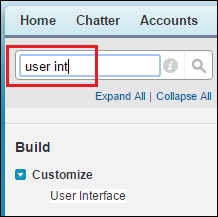
To quickly find a Setup menu item, type the first few characters of the setup name in the Quick Find search box. As you type, any options that match your search term appear in the Setup menu. For example, to find the User Interface page, start to type user interface in the Quick Find box as shown in the following screenshot:

The Salesforce Setup menu

We will now look at how user's login requests are verified and authorized by the Salesforce CRM application.

Visually different images
CONTINUE READING
83
Tech Concepts
36
Programming languages
73
Tech Tools
Icon Unlimited access to the largest independent learning library in tech of over 8,000 expert-authored tech books and videos.
Icon Innovative learning tools, including AI book assistants, code context explainers, and text-to-speech.
Icon 50+ new titles added per month and exclusive early access to books as they are being written.
Salesforce CRM - The Definitive Admin Handbook
notes
bookmark Notes and Bookmarks search Search in title playlist Add to playlist font-size Font size

Change the font size

margin-width Margin width

Change margin width

day-mode Day/Sepia/Night Modes

Change background colour

Close icon Search
Country selected

Close icon Your notes and bookmarks

Confirmation

Modal Close icon
claim successful

Buy this book with your credits?

Modal Close icon
Are you sure you want to buy this book with one of your credits?
Close
YES, BUY

Submit Your Feedback

Modal Close icon
Modal Close icon
Modal Close icon