





In .NET Core 2.1 (or any previous version of .NET), we could legitimately type the following code and run it:
string test = null;
Console.WriteLine(test.Length);
And, of course it would crash. Obviously, no-one familiar with the language would write this; however, they might write something as follows:
string test = FunctionCanReturnNull();
Console.WriteLine(test.Length);
Nullable reference types are an opt-in feature (that is, you have to explicitly turn it on) that simply gives a warning to say that you have a potential for a reference type to be null. Let's try turning this on for our Ebook Manager. It can be turned on a class-by-class basis by adding the following directive to the top of a file:
#nullable enable
However, you can also switch it on for the entire project by adding the following line to the .csproj file:
<PropertyGroup>
    <TargetFramework>netcoreapp3.0</TargetFramework>
    <LangVersion>8.0</LangVersion>
    <Nullable>enable</Nullable>
</PropertyGroup>
At the time of writing, this property will be automatically added to the .csproj file.
https://docs.microsoft.com/en-us/dotnet/csharp/nullable-references
This is a granular feature, so it can be turned off or on for specific sections of code. There are a few warnings that pop up, so let's focus on StorageSpace.cs:
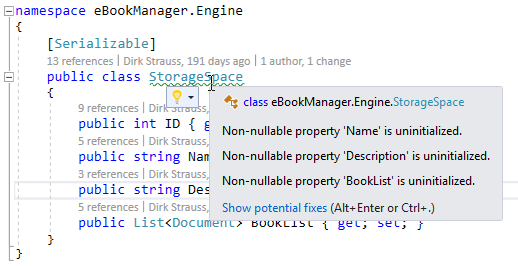
So, what exactly is this telling us?
To answer that, let's look first at ID. ID is a value type, and therefore cannot be null. If nothing is assigned to ID, it will have the default value: 0. Name, however is a string (which is a reference type), and therefore can be null and, in fact, will be null unless we set it otherwise. If we want one of these fields to be nullable, then we can certainly do that (and in the case of Description, we probably should):
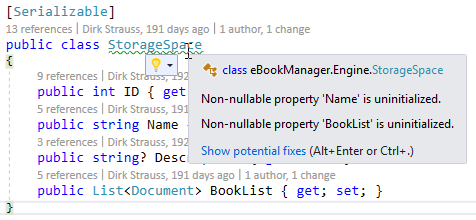
But what about Name? We would probably not want that to be null. There's a couple of options here; one is to add a blank string as a default initializer as follows:
public string Name { get; set; } = string.Empty;
This isn't ideal. In fact, getting a null reference exception might actually be preferable to it being blank and bypassing that.
This is just my opinion, but it is much better to have software crash at runtime and alert you to an error in the logic than to soldier on and potentially corrupt data or, worse, request or update data in a third-party system!
Another option is to add a constructor. The following is an example:
[Serializable]
public class StorageSpace
{
    public StorageSpace(string name)
    {
        Name = name;
    }
    public int ID { get; set; }
    public string Name { get; set; }
    public string? Description { get; set; }
    public List<Document>? BookList { get; set; }
}
This clears up the warnings and ensures that anyone creating the class provides a name, which we are saying can never be null. This is instantiated in ImportBooks.cs, so now we'll have to provide that parameter:
private void btnSaveNewStorageSpace_Click(object sender, EventArgs e)
{
    try
    {
        if (txtNewStorageSpaceName.Text.Length != 0)
        {
            string newName = txtNewStorageSpaceName.Text;


            // null conditional operator: "spaces?.StorageSpaceExists(newName) ?? false"
            // throw expressions: bool spaceExists = (space exists = false) ? return false : throw exception
            // Out variables
            bool spaceExists = (!spaces.StorageSpaceExists(newName, out int nextID)) ? false : throw new Exception("The storage space you are trying to add already exists.");

            if (!spaceExists)
            {
                StorageSpace newSpace = new StorageSpace(newName);
                newSpace.ID = nextID;
                newSpace.Description = txtStorageSpaceDescription.Text;
                spaces.Add(newSpace);
Now we know that the Name property can never be null, it's worth remembering that the warnings that you get here are just that, warnings; and, like all warnings, it is your prerogative to ignore them. However, C# 8 does have a feature (which I've heard referred to as the dammit operator) that allows you to insist that, despite what the compiler believes, you know the variable will not be null; it looks as follows:
string test = null;

Console.WriteLine(test!.Length);
Console.ReadLine();
Obviously, if you do this, the preceding code will crash, so if you do decide that you know better than the compiler, be sure!



