Sign In Start Free Trial
Account

Add to playlist

Create a Playlist

Modal Close icon
You need to login to use this feature.
  • Book Overview & Buying Kotlin Programming Cookbook
  • Table Of Contents Toc
  • Feedback & Rating feedback
Kotlin Programming Cookbook

Kotlin Programming Cookbook

By : Aanand Shekhar Roy , Rashi Karanpuria
3.3 (3)
close
close
Kotlin Programming Cookbook

Kotlin Programming Cookbook

3.3 (3)
By: Aanand Shekhar Roy , Rashi Karanpuria

Overview of this book

The Android team has announced first-class support for Kotlin 1.1. This acts as an added boost to the language and more and more developers are now looking at Kotlin for their application development. This recipe-based book will be your guide to learning the Kotlin programming language. The recipes in this book build from simple language concepts to more complex applications of the language. After the fundamentals of the language, you will learn how to apply the object-oriented programming features of Kotlin 1.1. Programming with Lambdas will show you how to use the functional power of Kotlin. This book has recipes that will get you started with Android programming with Kotlin 1.1, providing quick solutions to common problems encountered during Android app development. You will also be taken through recipes that will teach you microservice and concurrent programming with Kotlin. Going forward, you will learn to test and secure your applications with Kotlin. Finally, this book supplies recipes that will help you migrate your Java code to Kotlin and will help ensure that it's interoperable with Java.
Table of Contents (16 chapters)
close
close

Creating Kotlin Android project

Getting started with Kotlin is really easy, especially after Google has added official support for the language. You can use Kotlin directly with Android Studio 3. Android Studio 3 is still in Beta version at the time of writing this book. The best thing about using Kotlin for Android is that it is interoperable with your existing code, be it Java or C++. While working with Kotlin, you will realize that code in Kotlin is concise, extensible, and powerful. It really makes Android development more fun. Let's see how we can start working in Kotlin by first creating a Kotlin project in Android Studio 3.

Getting ready

To get started with this recipe, you will need Android Studio installed on your computer. Android Studio has both Android SDK and Android Virtual device in it. Ensure that you have Java Development Kit installed on your system. You will need an android phone or Emulator for debugging your project. You will also need at least one Android Virtual Device installed, of your desired specifications if you are not using an Android phone.

So basically, here's the checklist of the things that need to be installed before you move on to the next section:

  • Java Development Kit (use the latest)
  • Android Studio 3+
  • Android phone or emulator

How to do it...

Creating a project in Android Studio is very simple and to create it in Kotlin just requires one extra click. Here's a step-by-step process of doing it:

  1. In Android Studio, in the menu, click on File | New | New Project. Alternatively, if you've just opened Android Studio and see the Welcome to Android Studio window, click on Start a new Android Studio project.
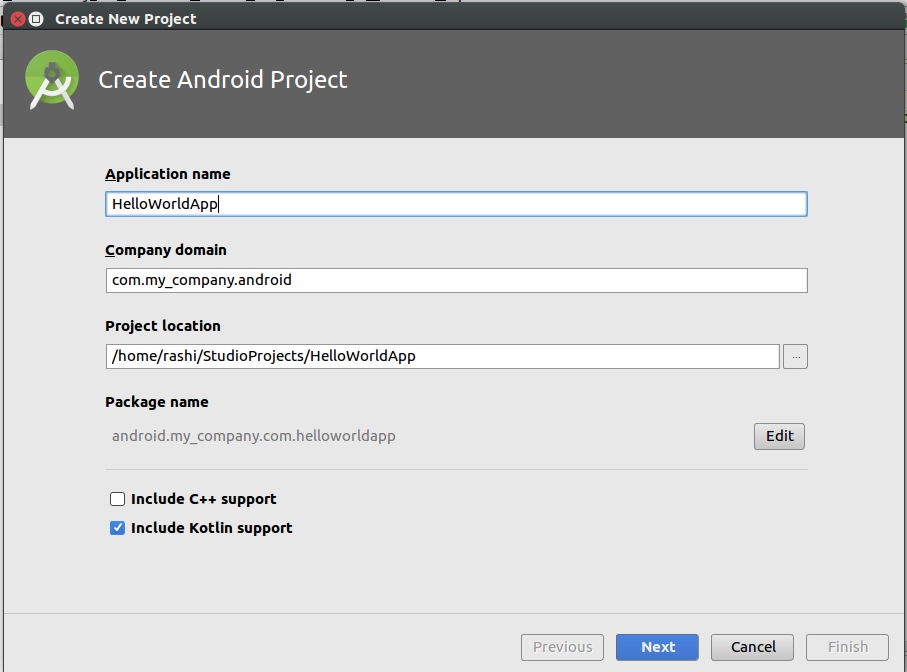
  1. In the wizard, add your Application name and Company domain, and simply check the box that says Include Kotlin support. Click on Next:
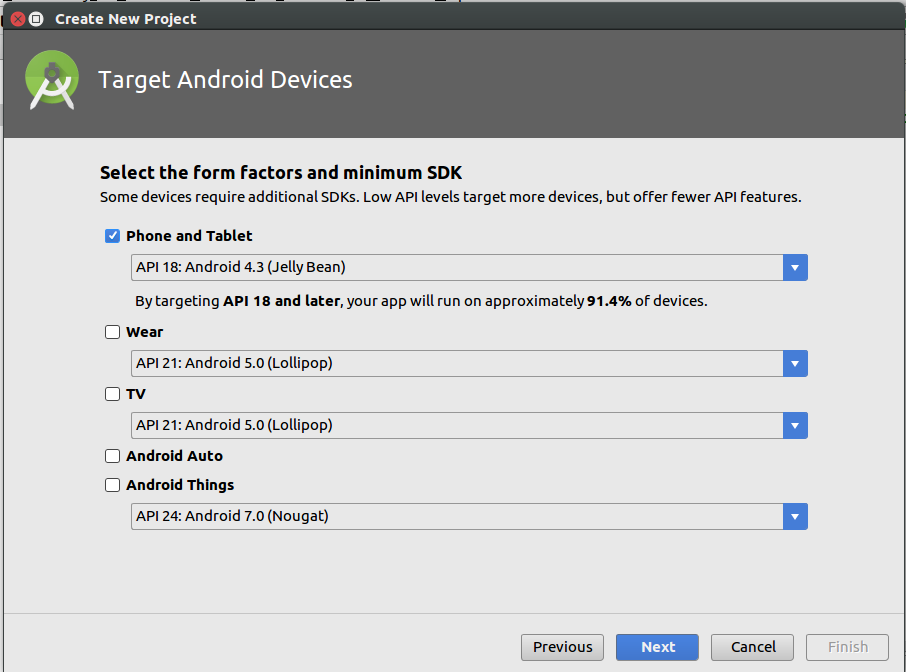
  1. On the next screen, you will be asked to choose your target devices and the minimum SDK support. So basically, it asks things like, "Do you want the application to run on both phone and android wear?" and "Do you want to support from Jelly Bean up or KitKat and up?":
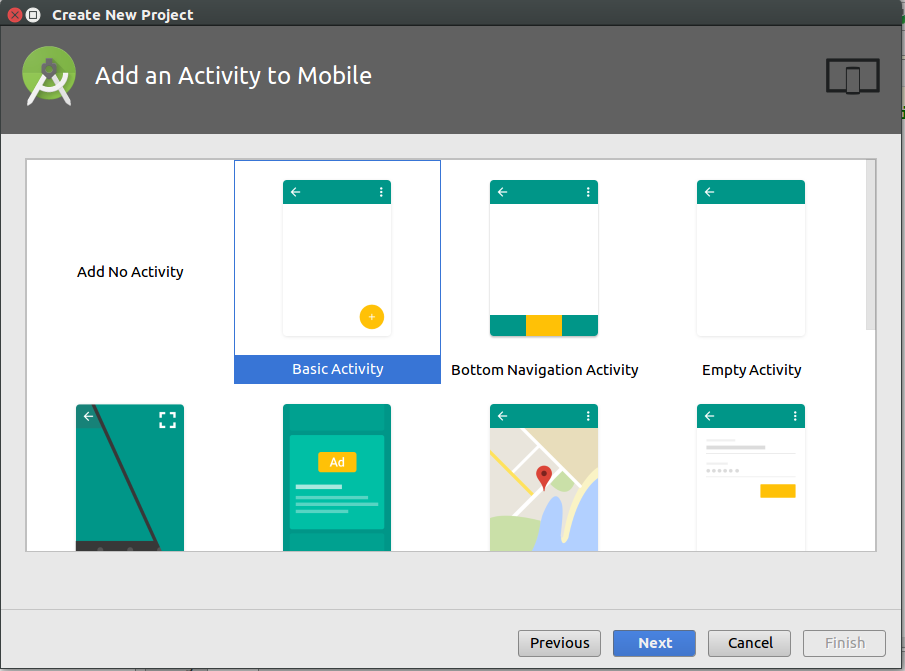
  1.  On the next screen, you will be prompted to Add an Activity to the project. You can also skip this step and add an activity later, but for now, just click on a Basic Activity and click on Next. If you have also chosen Wear or any other option, you will be prompted to add activity for those components as well:
  1. Next, you will be prompted to Configure the Activity you added. Basically, what you have to do is to provide Activity Name, Layout Name, and Title. After this, click on Finish, because you are done with creating your first project in Kotlin.
  2. Run project on your device: You need to follow these steps:
    1. Connect your device to your development machine with a USB cable.
    2. Enable USB debugging on your device by going to Settings | Developer options.
On Android 4.2 and newer, Developer options are hidden by default. To make it available, go to Settings | About phone and tap on Build number seven times. Return to the previous screen to find Developer options.

Now in your Android Studio, click on the app module in the Project window and then select Run (or click on Run in the toolbar).

In the Select Deployment Target window, select your device, and click on OK. After a while, you will see the application running on your mobile or an emulator.

There's more...

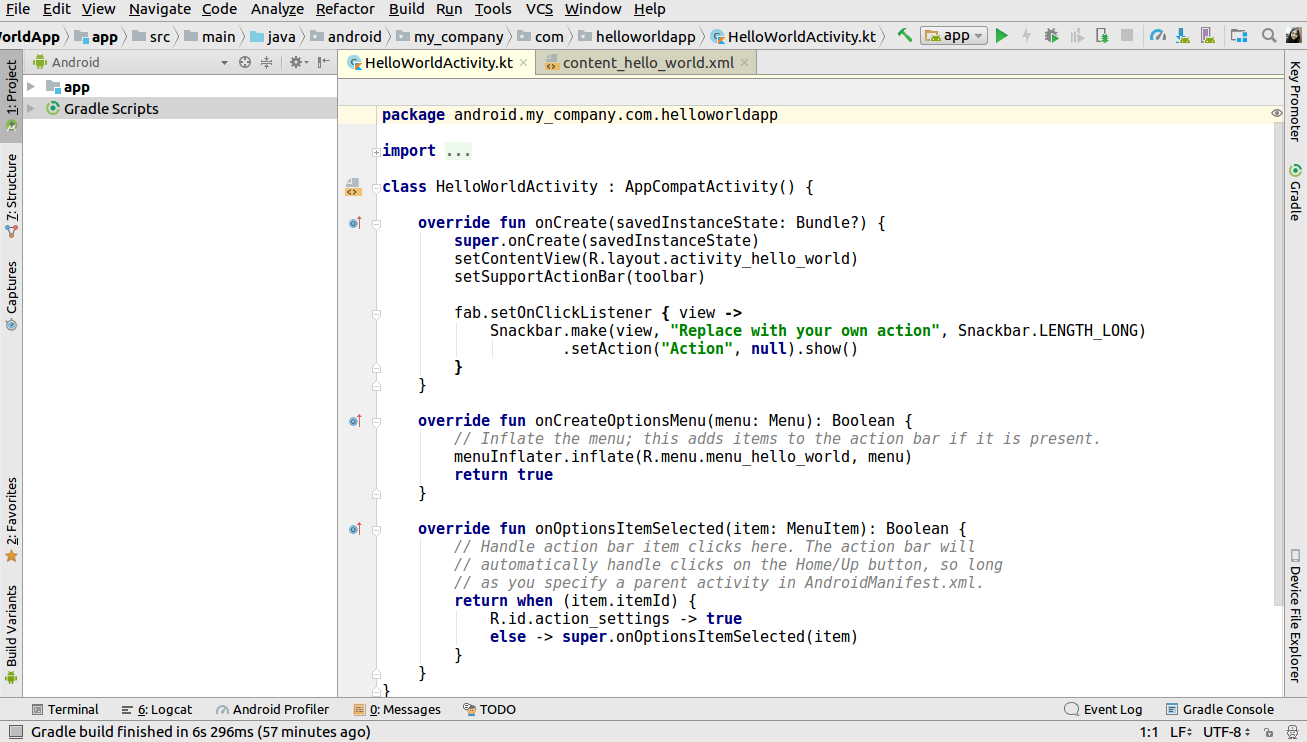
After clicking on the Finish button in the Create New Project window, Android Studio will configure things and create your project. If you added an activity as mentioned in Step 4, you will be greeted with the boilerplate code of the activity. It looks something like this:

Visually different images
CONTINUE READING
83
Tech Concepts
36
Programming languages
73
Tech Tools
Icon Unlimited access to the largest independent learning library in tech of over 8,000 expert-authored tech books and videos.
Icon Innovative learning tools, including AI book assistants, code context explainers, and text-to-speech.
Icon 50+ new titles added per month and exclusive early access to books as they are being written.
Kotlin Programming Cookbook
notes
bookmark Notes and Bookmarks search Search in title playlist Add to playlist font-size Font size

Change the font size

margin-width Margin width

Change margin width

day-mode Day/Sepia/Night Modes

Change background colour

Close icon Search
Country selected

Close icon Your notes and bookmarks

Confirmation

Modal Close icon
claim successful

Buy this book with your credits?

Modal Close icon
Are you sure you want to buy this book with one of your credits?
Close
YES, BUY

Submit Your Feedback

Modal Close icon
Modal Close icon
Modal Close icon