Sign In Start Free Trial
Account

Add to playlist

Create a Playlist

Modal Close icon
You need to login to use this feature.
  • Book Overview & Buying Qt5 Python GUI Programming Cookbook
  • Table Of Contents Toc
Qt5 Python GUI Programming Cookbook

Qt5 Python GUI Programming Cookbook

By : Harwani
2.4 (9)
close
close
Qt5 Python GUI Programming Cookbook

Qt5 Python GUI Programming Cookbook

2.4 (9)
By: Harwani

Overview of this book

PyQt is one of the best cross-platform interface toolkits currently available; it's stable, mature, and completely native. If you want control over all aspects of UI elements, PyQt is what you need. This book will guide you through every concept necessary to create fully functional GUI applications using PyQt, with only a few lines of code. As you expand your GUI using more widgets, you will cover networks, databases, and graphical libraries that greatly enhance its functionality. Next, the book guides you in using Qt Designer to design user interfaces and implementing and testing dialogs, events, the clipboard, and drag and drop functionality to customize your GUI. You will learn a variety of topics, such as look and feel customization, GUI animation, graphics rendering, implementing Google Maps, and more. Lastly, the book takes you through how Qt5 can help you to create cross-platform apps that are compatible with Android and iOS. You will be able to develop functional and appealing software using PyQt through interesting and fun recipes that will expand your knowledge of GUIs
Table of Contents (15 chapters)
close
close

Introduction

We will be learning to create GUI applications using the Qt toolkit. The Qt toolkit, known simply as Qt, is a cross-platform application and UI framework developed by Trolltech, which is used for developing GUI applications. It runs on several platforms, including Windows, macOS X, Linux, and other UNIX platforms. It is also referred to as a widget toolkit because it provides widgets such as buttons, labels, textboxes, push buttons, and list boxes, which are required for designing a GUI. It includes a cross-platform collection of classes, integrated development tools, and a cross-platform IDE. To create real-time applications, we will be making use of Python bindings for the Qt toolkit called, PyQt5.

PyQt

PyQt is a set of Python bindings for the cross-platform application framework that combines all the advantages of Qt and Python. With PyQt, you can include Qt libraries in Python code, enabling you to write GUI applications in Python. In other words, PyQt allows you to access all the facilities provided by Qt through Python code. Since PyQt depends on the Qt libraries to run, when you install PyQt, the required version of Qt is also installed automatically on your machine.

A GUI application may consist of a main window with several dialogs or just a single dialog. A small GUI application usually consists of at least one dialog. A dialog application contains buttons. It doesn't contain a menu bar, toolbar, status bar, or central widget, whereas a main window application normally has all of those.

Dialogs are of the following two types:

  • Modal: This dialog is one that blocks the user from interacting with other parts of the application. The dialog is the only part of the application that the user can interact with. Until the dialog is closed, no other part of the application can be accessed.
  • Modeless: This dialog is the opposite of a modal dialog. When a modeless dialog is active, the user is free to interact with the dialog and with the rest of the application.

Ways of creating GUI applications

There are the following two ways to write a GUI application:

  • From scratch, using a simple text editor
  • With Qt Designer, a visual design tool with which you can create a user interface quickly using drag and drop

You will be using Qt Designer to develop GUI applications in PyQt, as it is a quick and easy way to design user interfaces without writing a single line of code. So, launch Qt Designer by double-clicking on its icon on desktop.

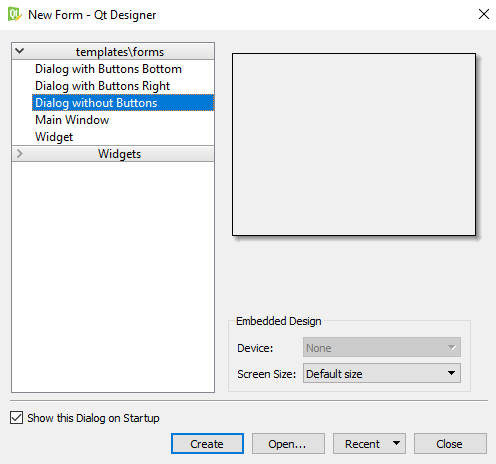
On opening, Qt Designer asks you to select a template for your new application, as shown in the following screenshot:

Qt Designer provides a number of templates that are suitable for different kinds of applications. You can choose any of these templates and then click the Create button.

Qt Designer provides the following predefined templates for a new application:

  • Dialog with Buttons Bottom: This template creates a form with the OK and Cancel buttons in the bottom-right corner.
  • Dialog with Buttons Right: This template creates a form with the OK and Cancel buttons in the top-right corner.
  • Dialog without Buttons: This template creates an empty form on which you can place widgets. The superclass for dialogs is QDialog.
  • Main Window: This template provides a main application window with a menu bar and a toolbar that can be removed if not required.
  • Widget: This template creates a form whose superclass is QWidget rather than QDialog.

Every GUI application has a top-level widget and the rest of the widgets are called its children. The top-level widget can be QDialog, QWidget, or QMainWindow, depending on the template you require. If you want to create an application based on the dialog template, then the top-level widget or the first class that you inherit will be QDialog. Similarly, to create an application based on the Main Window template, the top-level widget will be QMainWindow, and to create the application based on the Widget template, you need to inherit the QWidget class. As mentioned previously, the rest of the widgets that are used for the user interface are called child widgets of the classes.

Qt Designer displays a menu bar and toolbar at the top. It shows a Widget box on the left that contains a variety of widgets used to develop applications, grouped in sections. All you have to do is drag and drop the widgets you want from the form. You can arrange widgets in layouts, set their appearance, provide initial attributes, and connect their signals to slots.

CONTINUE READING
83
Tech Concepts
36
Programming languages
73
Tech Tools
Icon Unlimited access to the largest independent learning library in tech of over 8,000 expert-authored tech books and videos.
Icon Innovative learning tools, including AI book assistants, code context explainers, and text-to-speech.
Icon 50+ new titles added per month and exclusive early access to books as they are being written.
Qt5 Python GUI Programming Cookbook
notes
bookmark Notes and Bookmarks search Search in title playlist Add to playlist download Download options font-size Font size

Change the font size

margin-width Margin width

Change margin width

day-mode Day/Sepia/Night Modes

Change background colour

Close icon Search
Country selected

Close icon Your notes and bookmarks

Confirmation

Modal Close icon
claim successful

Buy this book with your credits?

Modal Close icon
Are you sure you want to buy this book with one of your credits?
Close
YES, BUY

Submit Your Feedback

Modal Close icon
Modal Close icon
Modal Close icon