Sign In Start Free Trial
Account

Add to playlist

Create a Playlist

Modal Close icon
You need to login to use this feature.
  • Book Overview & Buying .NET Standard 2.0 Cookbook
  • Table Of Contents Toc
  • Feedback & Rating feedback
.NET Standard 2.0 Cookbook

.NET Standard 2.0 Cookbook

By : Ismail
1 (1)
close
close
.NET Standard 2.0 Cookbook

.NET Standard 2.0 Cookbook

1 (1)
By: Ismail

Overview of this book

The .NET Standard is a standard that represents a set of APIs that all .NET platforms have to implement, making it easy for developers to access and use one common library for their development needs. This book begins with a quick refresher, helping you understand the mechanics of the new standard and offering insight into how it works. You’ll explore the core library concepts, such as working with collections, configurations, I/O, security, and multithreading. You’ll explore the iOS and Android libraries of Xamarin and we’ll guide you through creating a .NET Standard 2.0 library, which you’ll use with both Android and iOS applications. In the final chapters, you’ll learn the various debugging and diagnostics tools to deliver quality libraries and create a NuGet package of the .NET Standard 2.0 library. By the end of this book, you’ll be able to expand your current workflow to various .NET flavors and have the essential skills to create a .NET Standard 2.0 library from scratch to package and deliver it to the world.
Table of Contents (13 chapters)
close
close

Creating a .NET Core console application to use the library


In this recipe, we will be building a .NET Core console application. This application will use the library we built in the previous recipe.

Getting ready

Make sure you have completed the previous recipe and it builds correctly. Let's get started on the application to use the library.

How to do it...

  1. Open Visual Studio 2017.
  2. Now, open the solution from the previous recipe. Click File | Open | Open Project/Solution, or press Ctrl + Shift + O, and select the Chapter6.Threads solution. 
  3. Press Ctrl + Shift + B for a quick build to check that everything is fine. 
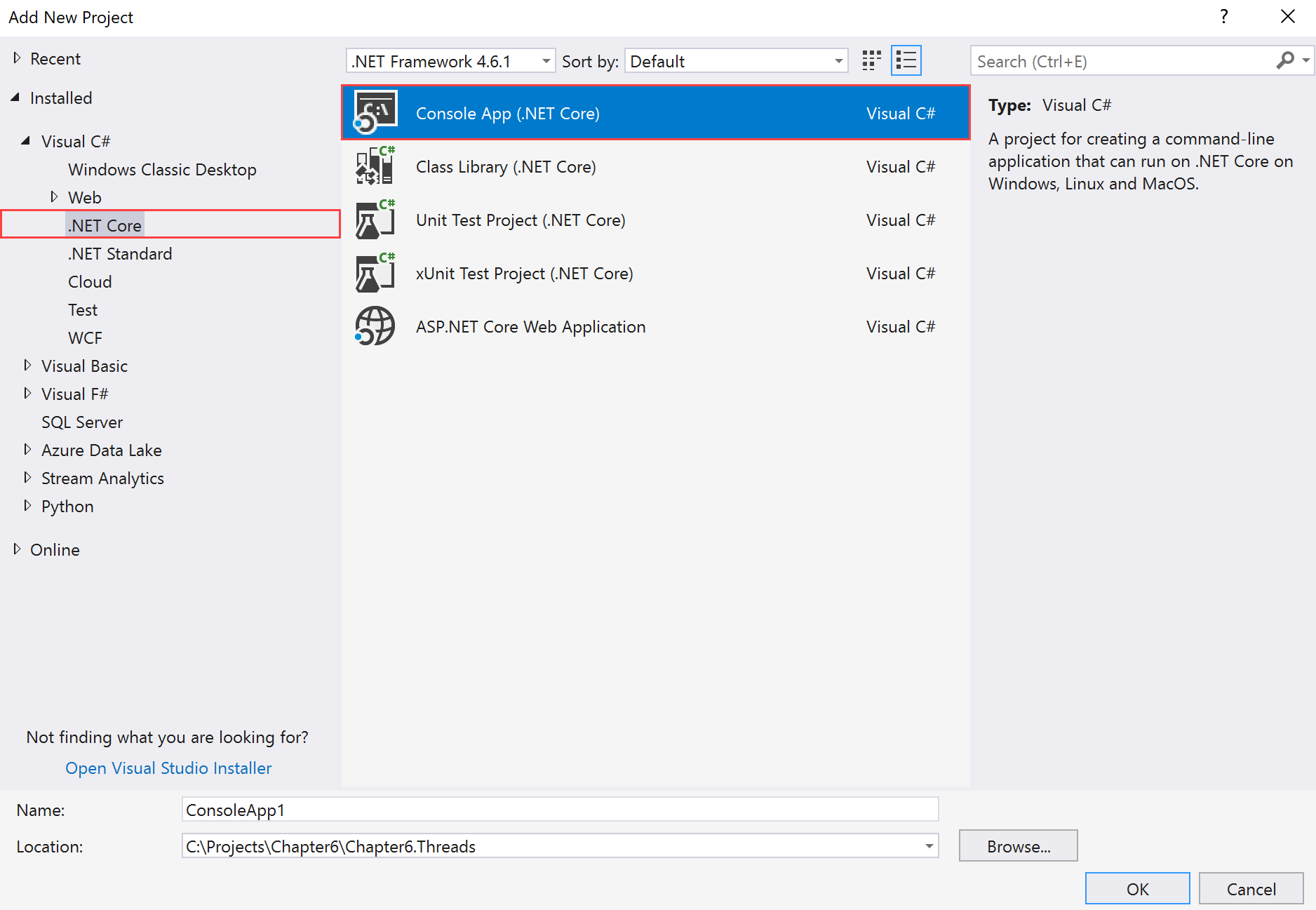
  4. Click on the Chapter6.Threads solution label. Click File | Add | New Project.
  5. In the Add New Project template dialog box, expand the Visual C# node in the left-hand pane. 
  6. Select .NET Core and select Console App (.NET Core) in the right-hand pane:
  1. Now, in the Name: textbox, type Chapter6.Threads.ThreadsCore as the name of the project. The rest of the fields should be left as they are:...
Visually different images
CONTINUE READING
83
Tech Concepts
36
Programming languages
73
Tech Tools
Icon Unlimited access to the largest independent learning library in tech of over 8,000 expert-authored tech books and videos.
Icon Innovative learning tools, including AI book assistants, code context explainers, and text-to-speech.
Icon 50+ new titles added per month and exclusive early access to books as they are being written.
.NET Standard 2.0 Cookbook
notes
bookmark Notes and Bookmarks search Search in title playlist Add to playlist font-size Font size

Change the font size

margin-width Margin width

Change margin width

day-mode Day/Sepia/Night Modes

Change background colour

Close icon Search
Country selected

Close icon Your notes and bookmarks

Confirmation

Modal Close icon
claim successful

Buy this book with your credits?

Modal Close icon
Are you sure you want to buy this book with one of your credits?
Close
YES, BUY

Submit Your Feedback

Modal Close icon
Modal Close icon
Modal Close icon