




Let's go back to ASP.NET now. For those of you that are still working with Web Forms, what is this MVC thing anyway, and where did it come from?
Let's face it: it was pretty easy to do terrible things in Web Forms, such as add lots of sensitive code in the page (which wouldn't be compiled until the page was accessed by the browser), adding complex business logic to a page class, having several megabytes of code in View State going back and forth on every request, and so on. There was no mechanism at all, other than the developer's discretion, to do things the right way. Plus, it was terrible to unit test it, because it relied on browser submission (POST) and JavaScript to have things working properly, such as binding actions to event handlers and submitted values to controls. There had to be a different solution, and in fact, there was.
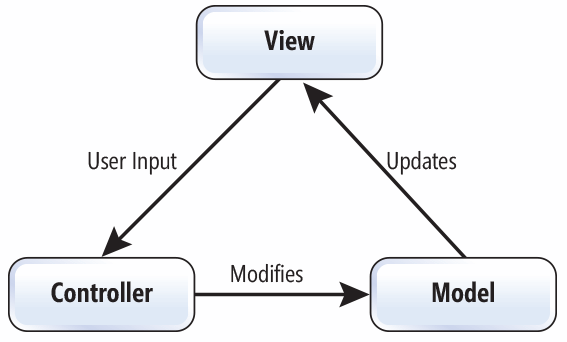
The model-view-controller (MVC) design pattern was defined in the late 1970s and early 1980s of the past century (scary, isn't it?). It was conceived as a way to properly separate things that shouldn't conceptually be together, such as the code to render a user interface (UI) and the code that contains the business logic and data access that will feed and control that UI. In the MVC paradigm (and its offspring), we have controllers that expose public actions. Inside each action, the controller applies any business logic it needs to and then decides which view it should render, passing it enough information (the model) so that it can do its job. A controller knows nothing about UI elements—it just takes the data and execution context it needs to operate inside the action and goes from there. Likewise, a view will not know anything about databases, web services, connection strings, SQL, and the like—it just renders data, possibly making simple decisions about the way to do it. As for the model, it's basically anything you want that contains the information required by the view, including lists of records, static user information, and more. This strict separation makes things much easier to manage, test, and implement. Of course, the MVC pattern is not specific to the web—it can be used whenever this separation of concerns is useful, such as when we have a UI and some code to control it.
The following diagram presents the relationship between views, controllers, and models:
MVC is normally associated with object-oriented programming (OOP), but there are implementations in a myriad of languages, including JavaScript and PHP. The .NET MVC implementation has the following basic characteristics:
- Controller classes are either Plain Old CLR Objects (POCOs) or inherit from a base class, Controller. Inheriting from Controller is not required (unlike in previous versions), but it does make things slightly easier. Controller classes are instantiated by the ASP.NET Core DI framework, which means they can have the services they depend upon passed into them.
- Actions are public methods in a controller; they can take parameters, both simple types as well as complex ones (POCOs). MVC uses what is called model binding to translate information sent from the browser (the query string, headers, cookies, forms, DI, and other locations) into method parameters. The choice of which method to invoke from which controller from the request URLs and submitted parameters is achieved by a mix of a routing table, convention, and helper attributes.
- The model is sent from the controller to the view in the return of an action method, and it can be basically anything (or nothing). Of course, action methods for API calls do not return views, but can return a model together with an HTTP status code. There are other ways to pass data to the view, such as the view bag, which is essentially an untyped dictionary of data (a big bag); the difference between the two is that the model is normally typed. A model is automatically validated and bound to the action method parameters.
- Views consist of domain-specific language (DSL) files that are interpreted by a view engine and turned into something that the browser can interpret, such as HTML. ASP.NET Core features an extensible view engine framework, but includes a single implementation, Razor. Razor offers a simple syntax that allows developers to mix HTML and C# to get hold of the model passed in and make decisions as to what to do with it. Views can be constrained by layouts (Web Forms developers can think of layouts as master pages) and they can include other partial views (similar to web user controls in Web Forms). A view for the Razor view engine has the .cshtml extension, and cannot be accessed directly—only as the result of an action invocation. Views can be precompiled so that syntax errors are detected sooner.
- Filters are used to intercept, modify, or fully replace the request; built-in filters enable you to, for example, prevent access to unauthenticated users or redirect to an error page in the event of an exception occurring.
Now, there are other patterns similar in purpose to MVC, such as model-view-presenter (MVP) or model-view-ViewModel (MVVM). We will only focus on Microsoft's implementation of MVC and its specifics. In particular, the version of MVC that ships with ASP.NET Core is version 6, because it builds on version 5, which was previously available for the .NET full framework, but both add and drop a couple of features. Because it now sits on the new .NET Core framework, it is fully based on OWIN, so there's no more Global.asax.cs file. More on this later on.
The way in which MVC is implemented in ASP.NET focuses on the following:
- URLs: They are now more meaningful and Search Engine Optimization (SEO) friendly.
- HTTP verbs: Verbs now exactly state what the operation is supposed to do—for example, GET is used for idempotent operations, POST for new contents, PUT for full content updates, PATCH for partial content updates, and DELETE for removals, among others.
- HTTP status codes: These are used for returning operation result codes, which is more important in the case of Web APIs.
For example, issuing a GET request to http://somehost/Product/120 is likely to return a view for a product with an ID of 120, and a DELETE request for the same URL will probably delete this product and return either an HTTP status code or a nice view informing us of the fact.
URLs and their binding to controllers and actions are configurable through routes, and it is likely that this URL will be handled by a controller called ProductController and an action method that is configured to handle GET or DELETE requests. Views cannot be extracted from the URL because they are determined inside the action method.
We will cover Microsoft's implementation of MVC in depth in the following chapters. Of course, being a .NET Core feature, all of its components are available as NuGet packages. Some of the ones you will likely find are as follows:
| Package |
Purpose |
| Microsoft.AspNetCore.Antiforgery |
Antiforgery APIs |
| Microsoft.AspNetCore.Authentication |
Authentication base classes |
| Microsoft.AspNetCore.Authentication.Cookies |
Authentication through cookies |
| Microsoft.AspNetCore.Authentication.JwtBearer |
JWT authentication |
| Microsoft.AspNetCore.Authorization |
Authorization APIs |
| Microsoft.AspNetCore.Diagnostics |
Diagnostics APIs |
| Microsoft.AspNetCore.Hosting |
Hosting base classes |
| Microsoft.AspNetCore.Identity |
Identity authentication |
| Microsoft.AspNetCore.Identity.EntityFrameworkCore |
Identity with Entity Framework Core as the store |
| Microsoft.AspNetCore.Localization.Routing |
Localization through routing |
| Microsoft.AspNetCore.Mvc |
The core MVC features |
| Microsoft.AspNetCore.Mvc.Cors |
Support for Cross-Origin Request Scripting (CORS) |
| Microsoft.AspNetCore.Mvc.DataAnnotations |
Validation through data annotations |
| Microsoft.AspNetCore.Mvc.Localization |
Localization-based APIs |
| Microsoft.AspNetCore.Mvc.TagHelpers |
Tag helpers functionality |
| Microsoft.AspNetCore.Mvc.Versioning |
Web API versioning |
| Microsoft.AspNetCore.ResponseCaching |
Response caching |
| Microsoft.AspNetCore.Routing |
Routing |
| Microsoft.AspNetCore.Server.IISIntegration |
IIS integration |
| Microsoft.AspNetCore.Server.Kestrel |
Kestrel server |
|
Microsoft.AspNetCore.Server.WebListener (Microsoft.AspNetCore.Server.HttpSysin ASP.NET Core 2) |
WebListener server (now called HTTP.sys). See https://docs.microsoft.com/en-us/aspnet/core/fundamentals/servers/httpsys. |
| Microsoft.AspNetCore.Session |
Session functionality |
| Microsoft.AspNetCore.StaticFiles |
Ability to serve static files |
You may or may not need all these packages, but you should make yourself familiar with them.
Next, let's see how context execution works.


