Sign In Start Free Trial
Account

Add to playlist

Create a Playlist

Modal Close icon
You need to login to use this feature.
  • Book Overview & Buying  Learning Geospatial Analysis with Python
  • Table Of Contents Toc
 Learning Geospatial Analysis with Python

Learning Geospatial Analysis with Python - Fourth Edition

By : Joel Lawhead
5 (7)
close
close
 Learning Geospatial Analysis with Python

Learning Geospatial Analysis with Python

5 (7)
By: Joel Lawhead

Overview of this book

Geospatial analysis is used in almost every domain you can think of, including defense, farming, and even medicine. In this special 10th anniversary edition, you'll embark on an exhilarating geospatial analysis adventure using Python. This fourth edition starts with the fundamental concepts, enhancing your expertise in geospatial analysis processes with the help of illustrations, basic formulas, and pseudocode for real-world applications. As you progress, you’ll explore the vast and intricate geospatial technology ecosystem, featuring thousands of software libraries and packages, each offering unique capabilities and insights. This book also explores practical Python GIS geospatial applications, remote sensing data, elevation data, and the dynamic world of geospatial modeling. It emphasizes the predictive and decision-making potential of geospatial technology, allowing you to visualize complex natural world concepts, such as environmental conservation, urban planning, and disaster management to make informed choices. You’ll also learn how to leverage Python to process real-time data and create valuable information products. By the end of this book, you'll have acquired the knowledge and techniques needed to build a complete geospatial application that can generate a report and can be further customized for different purposes.
Table of Contents (18 chapters)
close
close
1
Part 1:The History and the Present of the Industry
5
Part 2:Geospatial Analysis Concepts
11
Part 3:Practical Geospatial Processing Techniques

Point cloud data

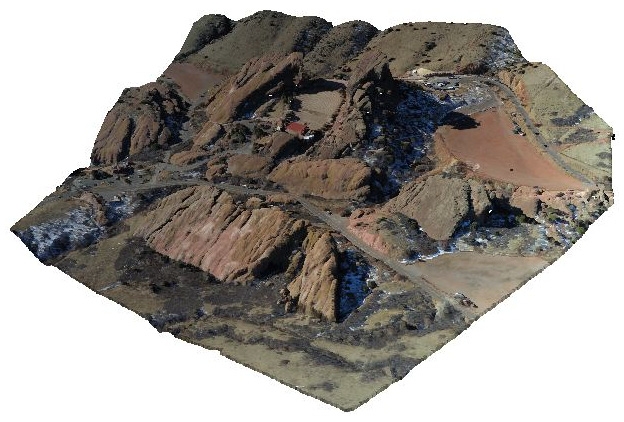
Remote sensing data can measure the Earth in two dimensions. But we can also use remote sensing to measure the Earth and things on it in three dimensions using point cloud data. Point cloud data are collections of discrete points with horizontal coordinates represented by X and Y values and a vertical coordinate represented by a Z value. These points are collected in a variety of ways, including lasers (as in the case of lidar data), sound (which is commonly used for mapping the seafloor but can also be used on land), stereoscopic imagery, radio waves (such as radar), or “structure-in-motion” data, where a single geo-located camera is used to collect overlapping images to estimate the 3D structure of a scene. Point cloud data can be mapped relative to any origin and is not necessarily dependent on GPS like other types of geospatial data. This feature allows it to be used to map indoor spaces, as well as outdoor spaces. Point cloud data can also be colorized for visualization using color photography or video for creating immersive 3D models, as shown in the following colorized point cloud of Red Rocks, Colorado, USA:

Figure 1.9 – A colorized lidar point cloud of Red Rocks, Colorado, USA, which creates a photorealistic 3D model

Figure 1.9 – A colorized lidar point cloud of Red Rocks, Colorado, USA, which creates a photorealistic 3D model

Point cloud data is the most common way to create elevation data that can be turned into a gridded format. This is called a Digital Elevation Model (DEM). A DEM is a three-dimensional representation of a planet’s terrain. In the context of this book, this planet is the Earth. The history of digital elevation models is far less complicated than remotely-sensed imagery but no less significant. Before computers, representations of elevation data were limited to topographic maps created through traditional land surveys. The technology existed to create three-dimensional models from stereoscopic images or physical models from materials such as clay or wood, but these approaches were not widely used for geography.

The concept of digital elevation models came about in 1986 when the French space agency, Centre National d’études Spatiales (CNES) or National Center for the Study of Space, launched its SPOT-1 satellite, which included a stereoscopic radar. This system created the first usable DEM. Several other US and European satellites followed this model with similar missions.

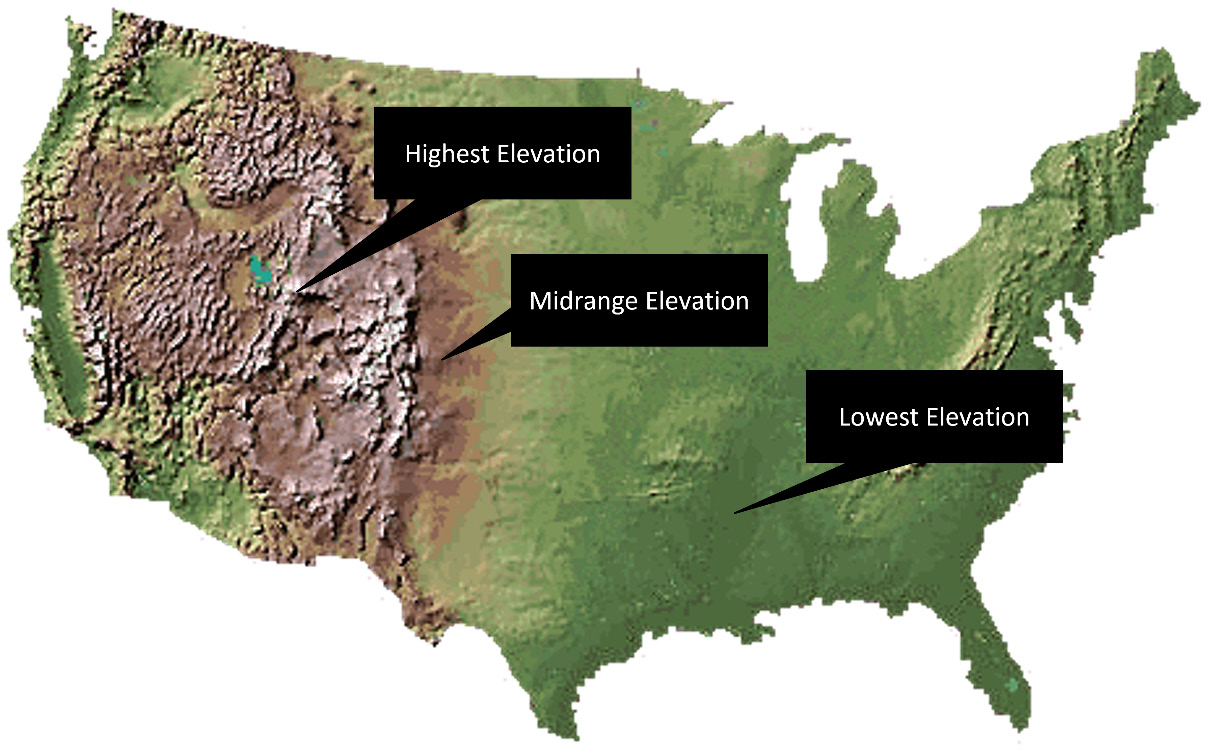
In February 2000, the space shuttle Endeavour conducted the Shuttle Radar Topography Mission (SRTM), which collected elevation data of over 80% of the Earth’s surface using a special radar antenna configuration that allowed a single pass. This model was surpassed in 2009 by the joint US and Japanese mission, which used the Advanced Spaceborne Thermal Emission and Reflection Radiometer (ASTER) sensor aboard NASA’s Terra satellite. This system captured 99% of the Earth’s surface but has proven to have minor data issues. Since the Space Shuttle’s orbit did not cross the Earth’s poles, it did not capture the entire surface. SRTM remains the gold standard. The following figure from the USGS (https://www.usgs.gov/media/images/national-elevation-dataset) shows a colorized DEM known as a hill shade. Greener areas are at lower elevations, while yellow and brown areas are at mid-range to high elevations:

Figure 1.10 – An example of a DEM using colors and hill shade shadows to create a natural-looking representation of elevation

Figure 1.10 – An example of a DEM using colors and hill shade shadows to create a natural-looking representation of elevation

Recently, more ambitious attempts at a worldwide elevation dataset are underway in the form of the TerraSAR-X and TanDEM-X satellites, which were launched by Germany in 2007 and 2010, respectively. These two radar elevation satellites worked together to produce a global DEM called WorldDEM, which was released on April 15, 2014. This dataset has a relative accuracy of 2 meters and an absolute accuracy of 4 meters.

CONTINUE READING
83
Tech Concepts
36
Programming languages
73
Tech Tools
Icon Unlimited access to the largest independent learning library in tech of over 8,000 expert-authored tech books and videos.
Icon Innovative learning tools, including AI book assistants, code context explainers, and text-to-speech.
Icon 50+ new titles added per month and exclusive early access to books as they are being written.
 Learning Geospatial Analysis with Python
notes
bookmark Notes and Bookmarks search Search in title playlist Add to playlist download Download options font-size Font size

Change the font size

margin-width Margin width

Change margin width

day-mode Day/Sepia/Night Modes

Change background colour

Close icon Search
Country selected

Close icon Your notes and bookmarks

Confirmation

Modal Close icon
claim successful

Buy this book with your credits?

Modal Close icon
Are you sure you want to buy this book with one of your credits?
Close
YES, BUY

Submit Your Feedback

Modal Close icon
Modal Close icon
Modal Close icon