Sign In Start Free Trial
Account

Add to playlist

Create a Playlist

Modal Close icon
You need to login to use this feature.
  • Book Overview & Buying Hands-On Edge Analytics with Azure IoT
  • Table Of Contents Toc
Hands-On Edge Analytics with Azure IoT

Hands-On Edge Analytics with Azure IoT

By : Colin Dow
4.7 (3)
close
close
Hands-On Edge Analytics with Azure IoT

Hands-On Edge Analytics with Azure IoT

4.7 (3)
By: Colin Dow

Overview of this book

Edge analytics has gained attention as the IoT model for connected devices rises in popularity. This guide will give you insights into edge analytics as a data analysis model, and help you understand why it’s gaining momentum. You'll begin with the key concepts and components used in an edge analytics app. Moving ahead, you'll delve into communication protocols to understand how sensors send their data to computers or microcontrollers. Next, the book will demonstrate how to design modern edge analytics apps that take advantage of the processing power of modern single-board computers and microcontrollers. Later, you'll explore Microsoft Azure IoT Edge, MicroPython, and the OpenCV visual recognition library. As you progress, you'll cover techniques for processing AI functionalities from the server side to the sensory side of IoT. You'll even get hands-on with designing a smart doorbell system using the technologies you’ve learned. To remove vulnerabilities in the overall edge analytics architecture, you'll discover ways to overcome security and privacy challenges. Finally, you'll use tools to audit and perform real-time monitoring of incoming data and generate alerts for the infrastructure. By the end of this book, you'll have learned how to use edge analytics programming techniques and be able to implement automated analytical computations.
Table of Contents (15 chapters)
close
close
1
Section 1: Getting Started with Edge Analytics
5
Section 2: Understanding Edge Analytics Technologies
11
Section 3: The Road Ahead

What is edge analytics?

In order to build on the statement that edge analytics is like the personal computer revolution, but for IoT devices, let's take a technological step back and look at the way application computing used to be done. We'll start by taking a customary look at early computers.

Early computers

Operators of early digital computers accessed the computer through paper punch cards, paper tape readout, blinking lights, and teletype machines adapted for computer use. By the mid-1960s, CRT (known as cathode ray tube) displays were used as displays in place of paper, allowing for better flexibility. CRT displays were the technology of television sets at the time. By the mid-1970s, dumb terminals using CRT screens and typewriter keyboards were the standards in interacting with a computer.

In 1943, Thomas Watson, the president of IBM, famously predicted that there was a world market for a possible five computers. In hindsight, this prediction was incredibly wrong. Watson could not have possibly envisioned the technological advancements in computing since the time of his prediction. It is estimated that there are over 2 billion personal computers in use today.

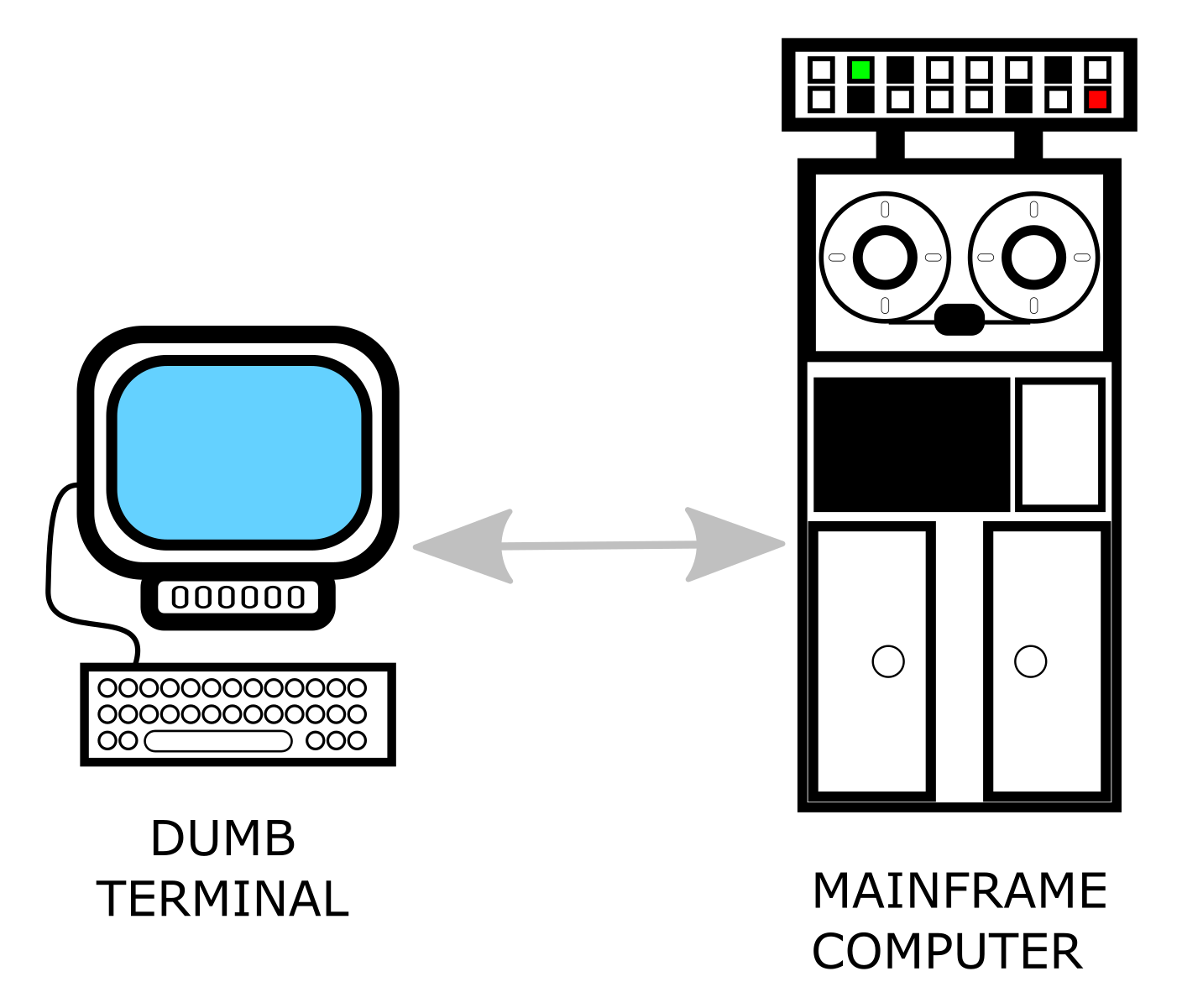
The following diagram shows a mid-1970s computer (called a mainframe) and a dumb terminal. A system such as this would be used by operators for applications such as booking hotel rooms and checking inventory levels:

In this arrangement, the dumb terminal was used only for displaying and entering data. The processing was done by the mainframe computer. Access to the mainframe was controlled by system administrators. The dumb terminal and mainframe would dominate the 1970s; however, a growing interest in bringing computing power to hobbyists and would-be programmers was starting to brew. This period of time would prove to be the dawning of the personal computer era.

The rise of the personal computer

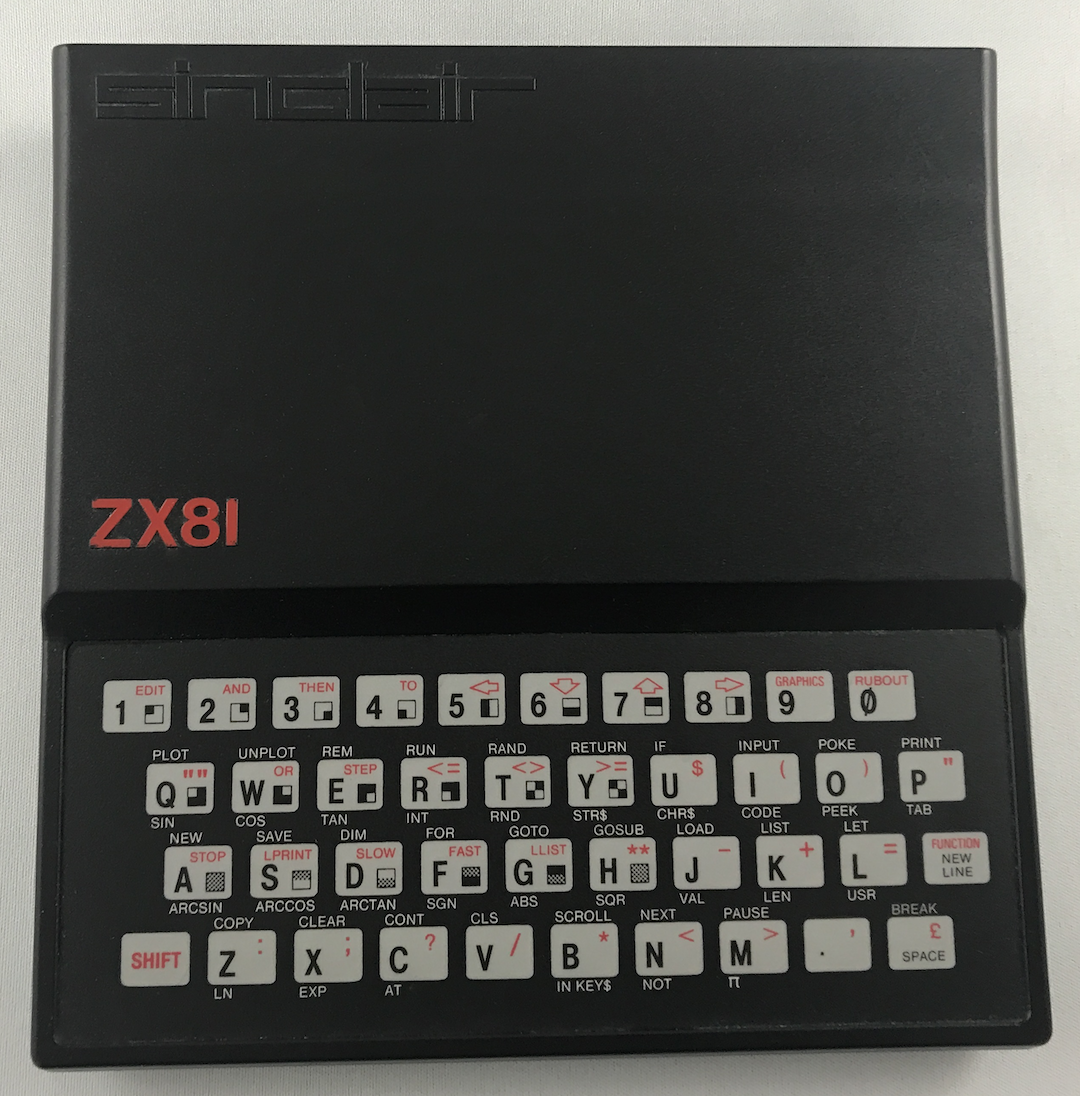
By the mid-1970s, personal computers were starting to make their way into the market place in a meaningful way. The term personal computer was used when the Altair 8800 was introduced in December 1974. The first Apple computer was released 2 years later. By the mid-1980s, there were many personal computers for technologists and hobbyists to choose from, including the PC from IBM, the Commodore 64, and the Atari Amiga. The following image shows the Sinclair ZX81 computer from 1982. Despite its limited 1 KB memory, this very ZX81 would start yours truly on the path to becoming a computer nerd:

Users of early personal computers were free from depending on system administrators for mainframe access. The personal computer spawned a new generation of programmers who now had more control over their devices than ever before. Advancements in microelectronics created increasingly better personal computers and the prices continued to fall. Early applications for personal computers included word processing, spreadsheet programs, and—of course—games.

Peer-to-peer networks

It wasn't long before personal computers were connected together in networks, where their collective power could be utilized. Computations performed by powerful mainframes could now be spread across many personal computers in a method known as distributed computing.

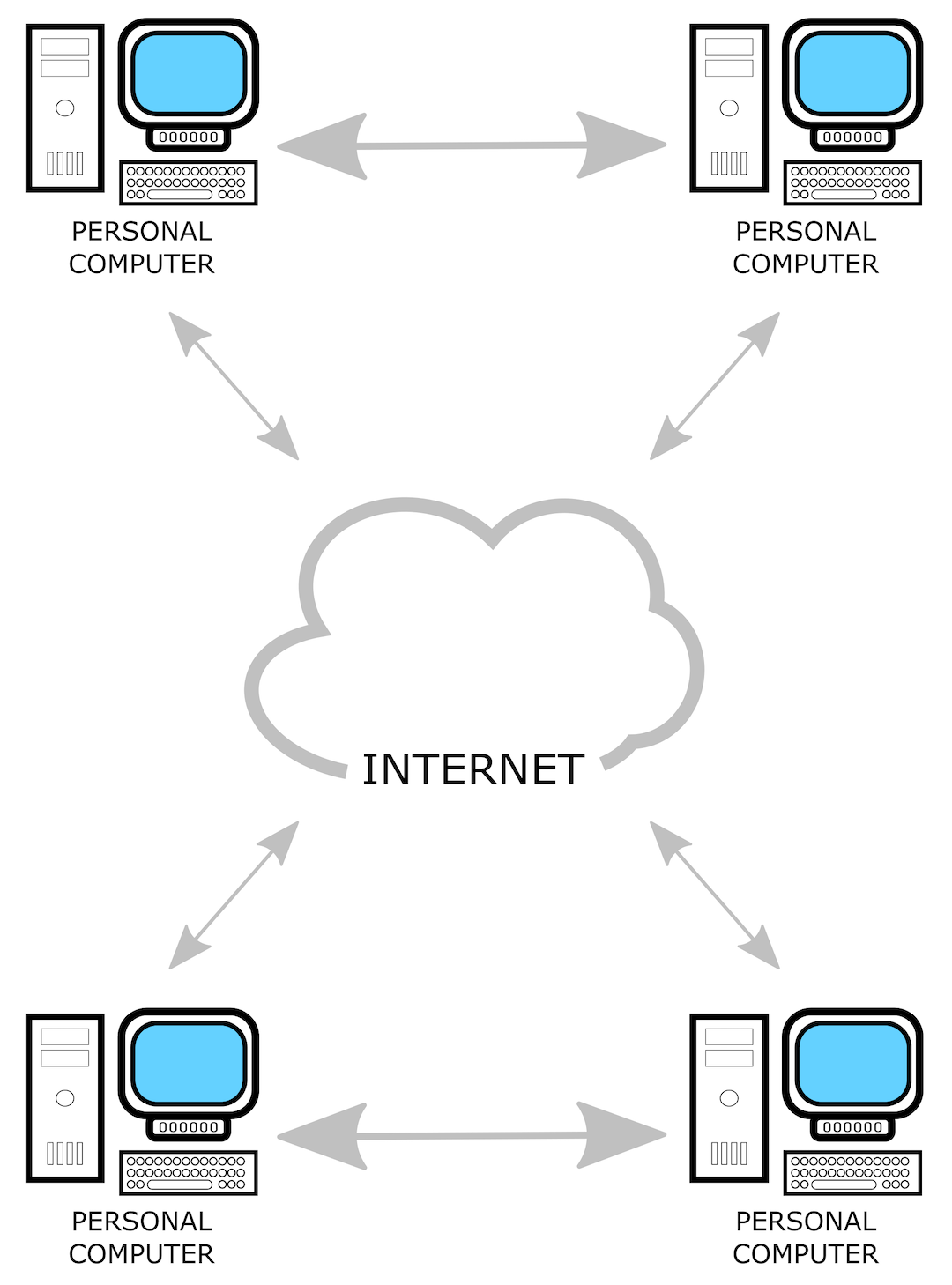
With the arrival of the internet on April 30, 1993, personal computers were able to connect to other personal computers anywhere in the world. Early peer-to-peer (P2P) networks allowed users to share files with each other over the entire world. The following diagram shows such a network:

SETI@home is a distributed computing project designed to analyze radio signals in order to look for signs of extraterrestrial intelligence. SETI@home depends on volunteers who donate their internet-connected computer's downtime to the distributed network. With this architecture, SETI@home is the largest supercomputer in the world.

P2P networks became notorious for digital piracy. P2P applications such as Napster allowed users to share songs over the internet with others, bypassing copyright laws. Despite this, P2P networks continued to flourish. Blockchain, the technology behind Bitcoin, operates on a P2P network of computers that each hold an identical copy of a ledger of transactions.

Cloud computing

As applications became more resource-intensive, more and more computing power was needed. Server rooms with powerful PCs popped up in businesses all over the world, with staff hired to maintain these servers. It soon became obvious that it was far more cost-effective to shift server resources outside of the company to the internet, or what is commonly referred to as the cloud. Thus, cloud computing became a reality.

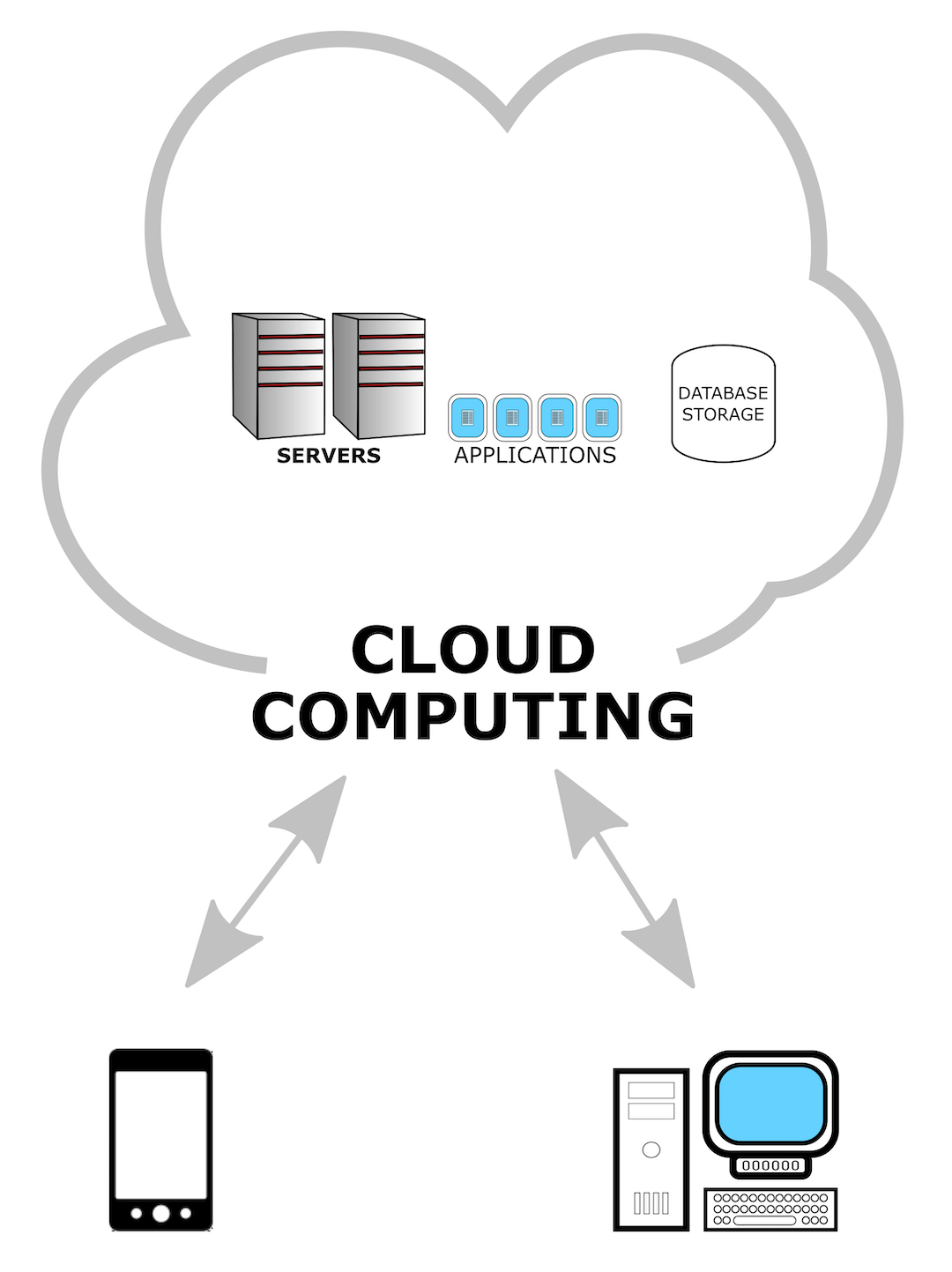
So, what exactly is cloud computing? Why should an organization use cloud computing? The following high-level diagram shows what cloud computing looks like:

As you can see, the servers, applications, and database storage exist in the cloud. These resources are accessed by the client's device (in this case, cell phone or PC) through the internet. Companies that push their resources to the cloud do not have to carry the expense or worry of running a server room. They pay only for the resources they use, thus they reduce their expenses.

One of the first cloud services offered was the Amazon Elastic Compute Cloud (or EC2). EC2 is central to Amazon's cloud service offering, Amazon Web Services (AWS), and was released to the public in 2006. Other cloud service providers include the Google Cloud Platform (GCP) and Microsoft Azure.

Edge computing

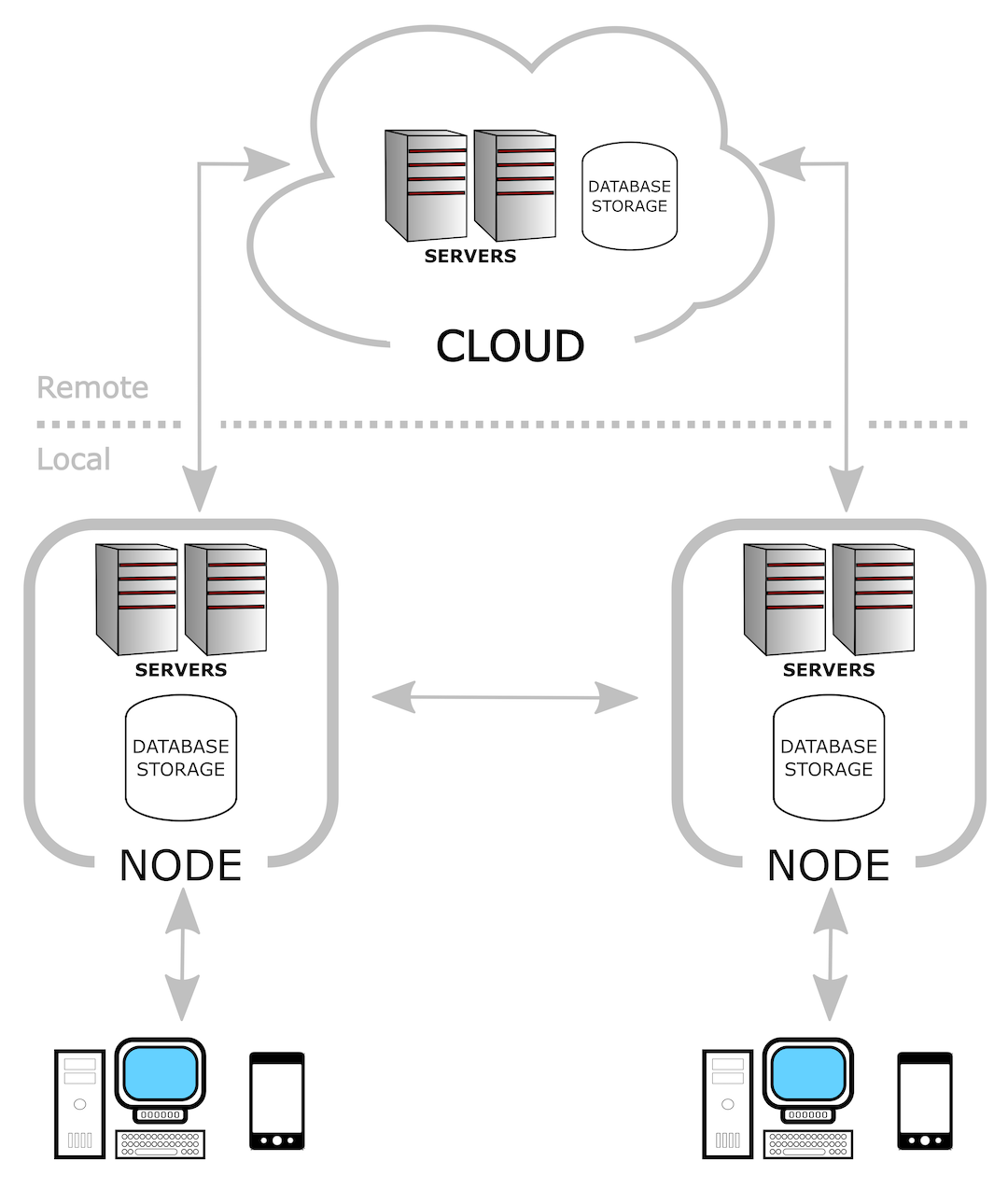
Edge computing is a form of distributed computing whereby resources are copied from a remote location to a local one. See the following diagram:

As you can see, there is a central cloud network of servers and database storage, and nodes of servers and databases connected to the central cloud. The cloud-based network exists in a remote location. This could be on the other side of the world, for example. The nodes are located locally, perhaps in the same physical building as the computers that will access them.

Edge computing will be used in the upcoming 5G cellular data standard, as locally distributed nodes will provide access to the network with lightning speeds. With the rapid rise in the number of IoT devices connected, 5G will allow for sensors to transmit data with a small amount of latency.

Despite improvements to network technology, having nodes close to the location where they are needed is a methodology worth the extra cost due to the following three factors:

  • Privacy
  • Latency
  • Reliability

We will go into more detail on these three factors in the upcoming section Edge analytics.

Now that we have an understanding of the various options for computing resources, let's take a look at IoT applications.

Early IoT applications

Early IoT applications were much like the old mainframe and dumb terminal computing architecture. In these applications, remote sensors send basic data to a computer through an internet- (cloud-) connected microcontroller.

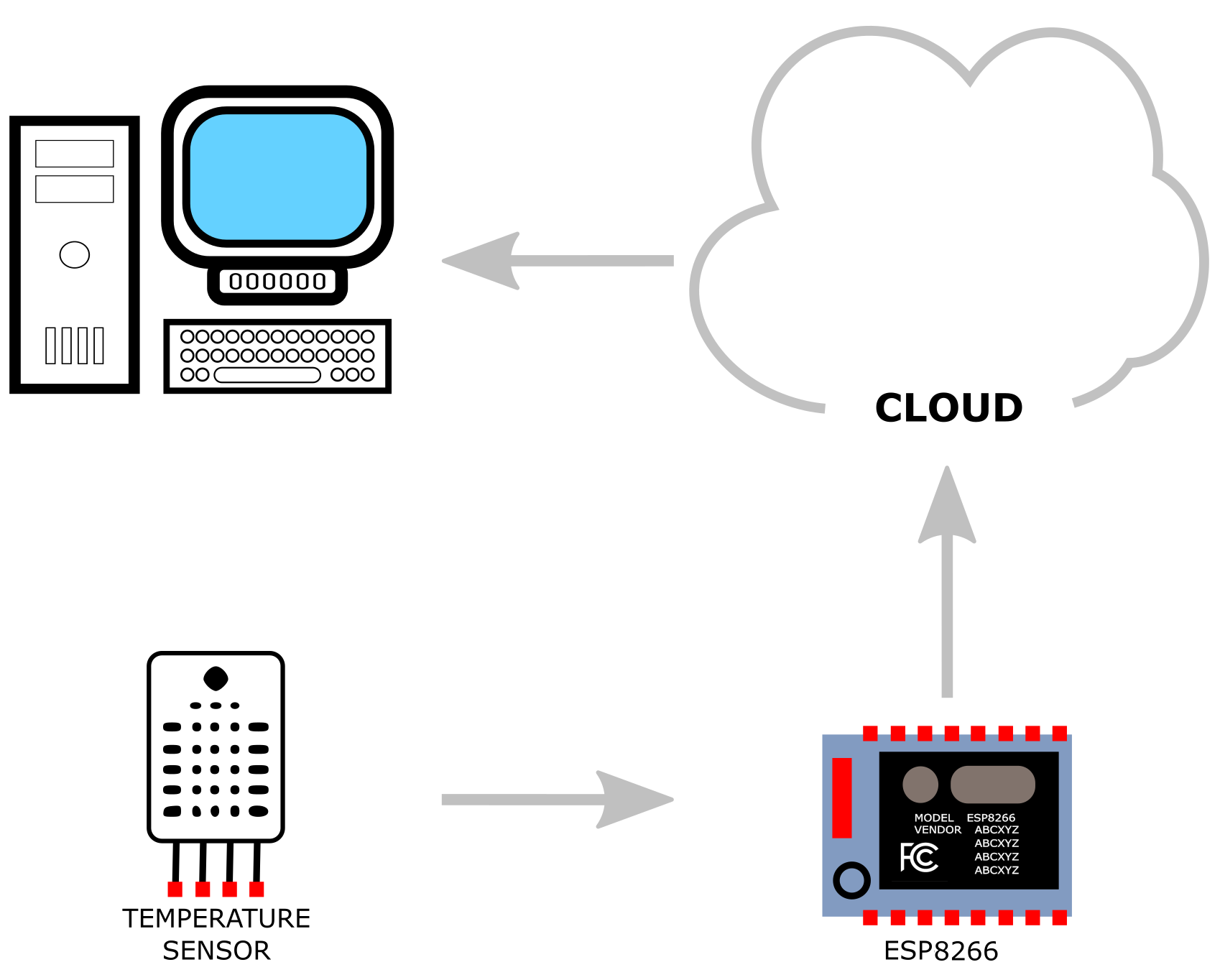
The following diagram shows an IoT application using a temperature sensor and an ESP8266 internet-connected microcontroller:

As you can see, the thing in the IoT application does nothing more than read the temperature. The ESP8266 microcontroller passes the sensory data along to a web service using the internet (cloud). The processing of sensory data is done by a computer or a series of computers on the other side of the cloud.

Edge analytics

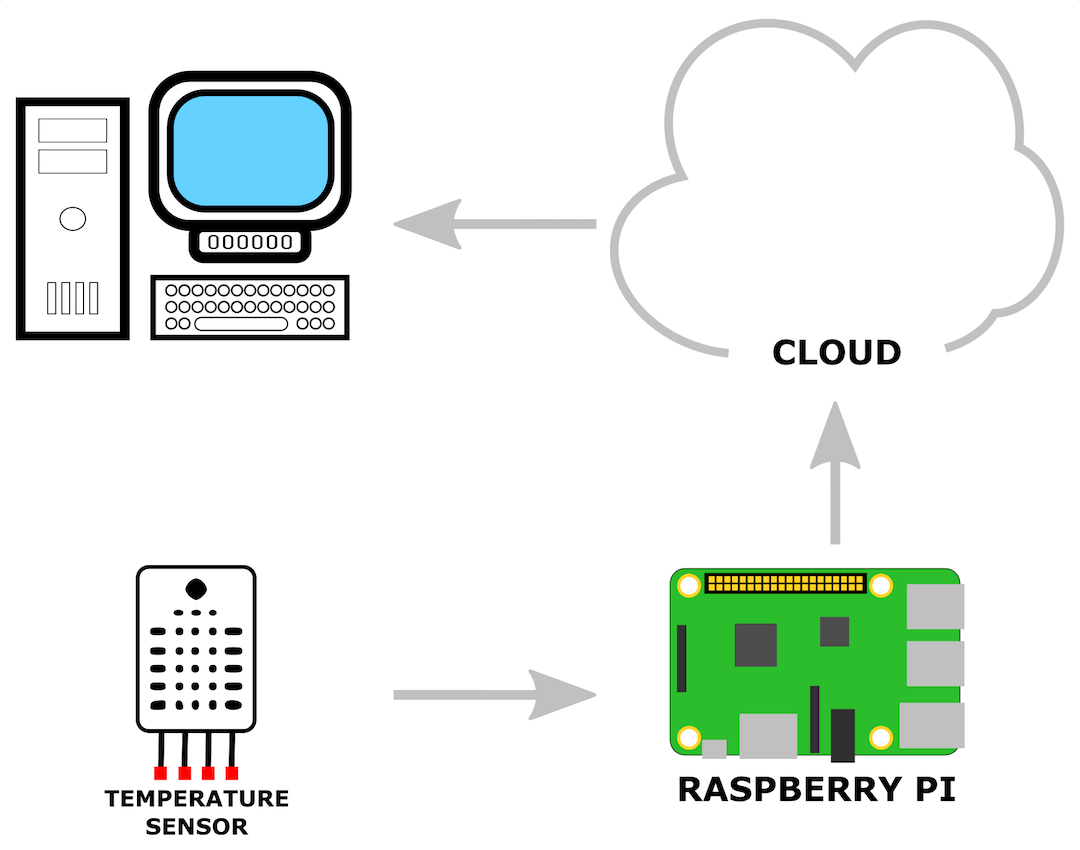
Edge analytics removes some of the processing burden from the internet-connected computer. Instead of just sending sensory information, as is the case in the early IoT solutions, an edge analytics architecture processes the data at the source (the edge), thereby limiting the amount of data sent back. Edge analytics takes its name from edge computing. An edge analytics application benefits from resources close to where they are needed, just as other edge computing applications do. The following diagram shows a basic edge analytics application:

As you can see in the diagram, a Raspberry Pi is used in place of a microcontroller to communicate with the temperature sensor. Being a single-board computer, the Raspberry Pi is far more powerful than a microcontroller such as the ESP8266. Although the preceding diagram only shows one sensor connected to the Raspberry Pi, it could show many more. The Raspberry Pi contains an entire operating system and built-in programming environments that make it relatively easy to access sensory information and process it.

At the time of writing this book, the Raspberry Pi 4 Model B was a few months old. The Raspberry Pi 4 Model B features dual 4K monitor support, a faster processor, up to 4 GB of random-access memory (RAM), and two Universal Serial Bus (USB) 3 ports. This new release has taken the Raspberry Pi from an embedded computer for maker projects into the domain of desktop computing.

While our analogy of edge analytics being similar to the personal computer revolution may not be perfect, it is possible to see the correlation between the two concepts. The history of computing seems to always go back and forth between central processing control and distributed processing or edge processing. Edge analytics for IoT falls into the latter category.

CONTINUE READING
83
Tech Concepts
36
Programming languages
73
Tech Tools
Icon Unlimited access to the largest independent learning library in tech of over 8,000 expert-authored tech books and videos.
Icon Innovative learning tools, including AI book assistants, code context explainers, and text-to-speech.
Icon 50+ new titles added per month and exclusive early access to books as they are being written.
Hands-On Edge Analytics with Azure IoT
notes
bookmark Notes and Bookmarks search Search in title playlist Add to playlist download Download options font-size Font size

Change the font size

margin-width Margin width

Change margin width

day-mode Day/Sepia/Night Modes

Change background colour

Close icon Search
Country selected

Close icon Your notes and bookmarks

Confirmation

Modal Close icon
claim successful

Buy this book with your credits?

Modal Close icon
Are you sure you want to buy this book with one of your credits?
Close
YES, BUY

Submit Your Feedback

Modal Close icon
Modal Close icon
Modal Close icon