Sign In Start Free Trial
Account

Add to playlist

Create a Playlist

Modal Close icon
You need to login to use this feature.
  • Book Overview & Buying Hands-On Edge Analytics with Azure IoT
  • Table Of Contents Toc
Hands-On Edge Analytics with Azure IoT

Hands-On Edge Analytics with Azure IoT

By : Colin Dow
4.7 (3)
close
close
Hands-On Edge Analytics with Azure IoT

Hands-On Edge Analytics with Azure IoT

4.7 (3)
By: Colin Dow

Overview of this book

Edge analytics has gained attention as the IoT model for connected devices rises in popularity. This guide will give you insights into edge analytics as a data analysis model, and help you understand why it’s gaining momentum. You'll begin with the key concepts and components used in an edge analytics app. Moving ahead, you'll delve into communication protocols to understand how sensors send their data to computers or microcontrollers. Next, the book will demonstrate how to design modern edge analytics apps that take advantage of the processing power of modern single-board computers and microcontrollers. Later, you'll explore Microsoft Azure IoT Edge, MicroPython, and the OpenCV visual recognition library. As you progress, you'll cover techniques for processing AI functionalities from the server side to the sensory side of IoT. You'll even get hands-on with designing a smart doorbell system using the technologies you’ve learned. To remove vulnerabilities in the overall edge analytics architecture, you'll discover ways to overcome security and privacy challenges. Finally, you'll use tools to audit and perform real-time monitoring of incoming data and generate alerts for the infrastructure. By the end of this book, you'll have learned how to use edge analytics programming techniques and be able to implement automated analytical computations.
Table of Contents (15 chapters)
close
close
1
Section 1: Getting Started with Edge Analytics
5
Section 2: Understanding Edge Analytics Technologies
11
Section 3: The Road Ahead

Edge analytics architectures

As with any application we design, when the time comes to design an edge analytics application, it is good to explore the options available. We will start off this section looking at a basic edge analytics architecture—one that does not involve using a vendor-specific solution. We will then turn our attention to the Microsoft Azure IoT platform and Microsoft Azure IoT Edge.

Basic edge analytics architecture

By basic edge analytics architecture, I am referring to an environment where the platform is made up of just the core physical components—a system where a standard operating system with custom code is used in place of a platform such as Microsoft Azure IoT. Let's face it—there are times when a simple solution is required and the costs of a vendor-specific platform cannot be justified.

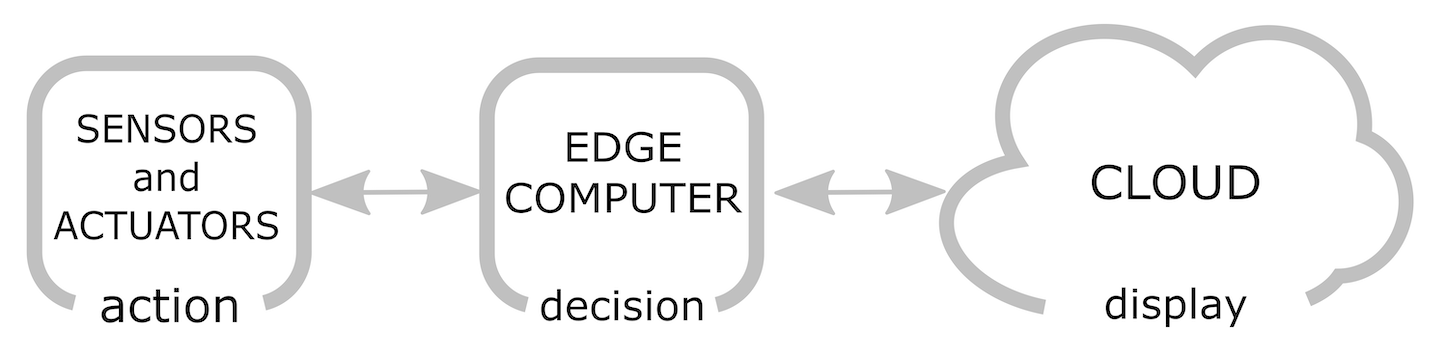
A basic edge analytics application consists of three major components. They are as follows:

  • Sensors and actuators
  • Edge computers
  • Cloud-based dashboards

We can see how these components are connected together in the following diagram:

As we can see in the preceding diagram, our sensors and actuators are responsible for the action in our edge analytics application. These actions could be such things as taking the temperature using a DHT11 sensor or opening up a door, as is the case for actuators.

The decisions made in our edge analytics happen with the edge computer. The edge computer could be as simple as a microcontroller or as powerful as a quad-core desktop computer. What makes the computer an edge computer is its close proximity to the sensor and actuators.

The cloud used in our edge analytics application is responsible for dashboards and messaging to our devices. We may also use the cloud to create a control interface that may override decisions made by the edge computer.

We will be looking at the physical components used in this architecture in Chapter 2, How Does IoT Edge Analytics Work?

Azure IoT Edge-based edge analytics architecture

For more advanced edge analytics applications, such as those requiring a vendor-specific machine learning algorithm, then a platform such as Microsoft Azure IoT Edge is desired. What exactly is Microsoft Azure IoT Edge, and why would we use it? Before we can answer these questions, let's take a look at Microsoft Azure IoT.

Understanding Microsoft Azure IoT

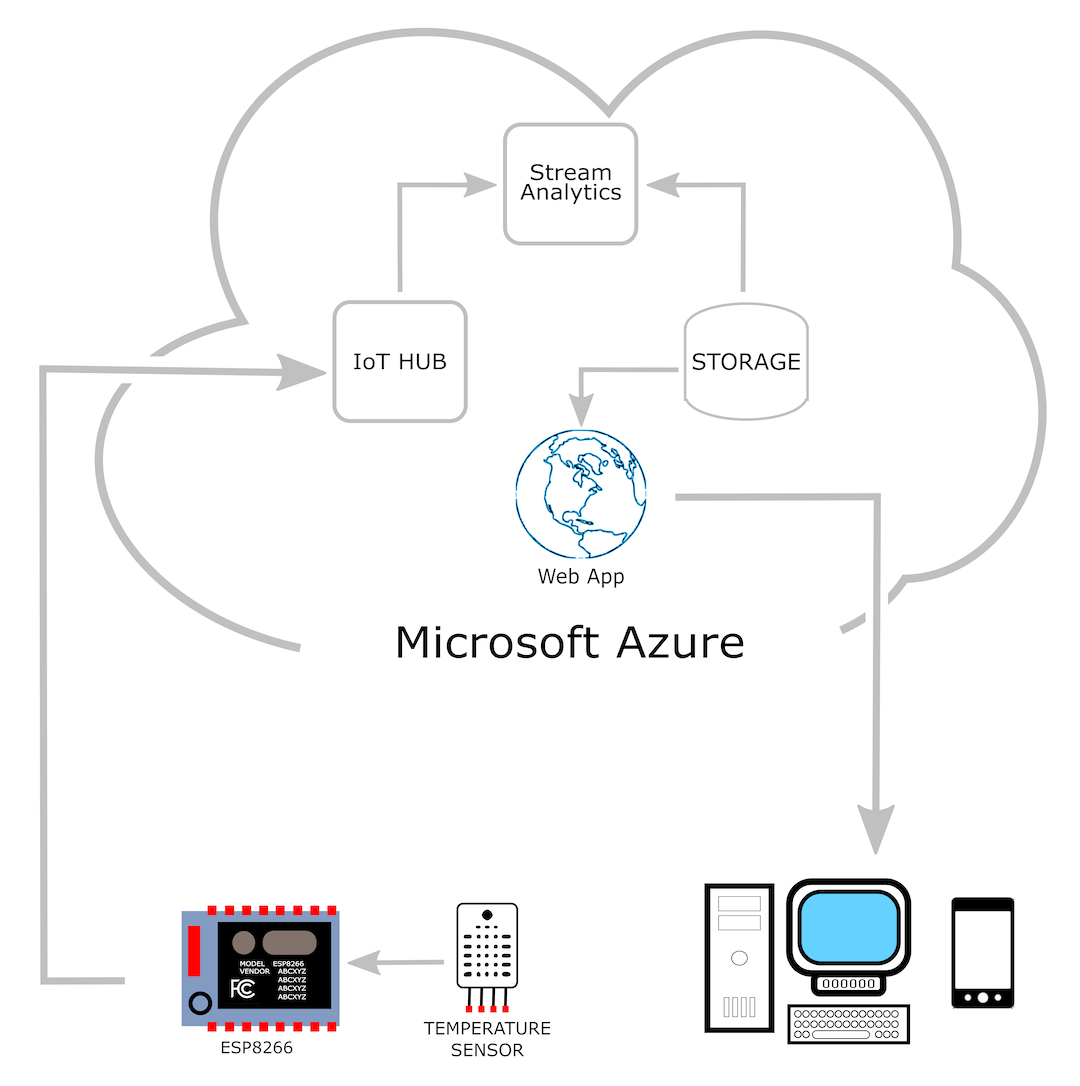
Microsoft Azure IoT is a collection of Microsoft Azure cloud services used to build IoT applications. Microsoft Azure IoT applications are built using physical sensors and the Azure web portal. Access to the web portal is controlled through an Azure account. The following diagram shows a typical IoT application using Microsoft Azure IoT:

The IoT application shown in the preceding diagram is similar to the ones we've designed earlier in this chapter. It features a temperature sensor hooked up to an ESP8266 microcontroller. Data from the ESP8266 microcontroller is sent to the Azure cloud service. Using the Azure portal, we would configure the IoT Hub, Stream Analytics, Storage, and Web App components.

Using the Microsoft Azure IoT platform instead of building our own platform, we are able to utilize pre-written code, as well as have an infrastructure already set up. We do not need to buy and set up our own servers or configure a hosted web server. This saves us time as well as money, as we only pay for what we need. We will cover these concepts in more detail in Chapter 4, Working with Microsoft Azure IoT Hub.

Now that we have an understanding of Microsoft Azure IoT, let's take a look at Azure IoT Edge.

Understanding Microsoft Azure IoT Edge

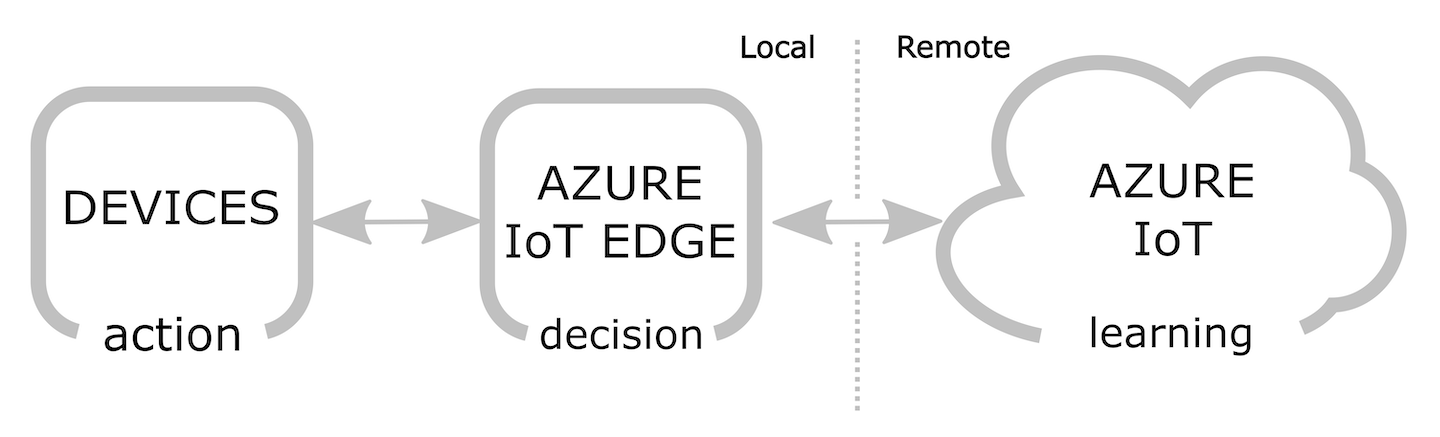
So, what exactly is Microsoft Azure IoT Edge? How does it differ from the other edge analytics applications we have discussed up till now? We can understand Azure IoT Edge a little bit better if we view Azure IoT Hub as if it were a typical remote server, and the installation of Azure IoT Edge on a physical edge device as if it were an edge computing platform. More precisely, though, Azure IoT Edge is a form of distributed computing whereby Azure modules are copied to the physical edge device, as illustrated in the following diagram:

In the preceding diagram, we can see that Azure IoT is remote-based and the Azure IoT Edge installation is a locally based node. The devices (which are similar to the sensors and actuators mentioned in the previous section) are locally based as well and take advantage of having a node version of Azure IoT in the form of Azure IoT Edge. So, in other words, Azure IoT Edge brings the advantages of edge computing to Azure-based IoT applications. We will revisit and go into more detail about this diagram in Chapter 2, How Does IoT Edge Analytics work?.

CONTINUE READING
83
Tech Concepts
36
Programming languages
73
Tech Tools
Icon Unlimited access to the largest independent learning library in tech of over 8,000 expert-authored tech books and videos.
Icon Innovative learning tools, including AI book assistants, code context explainers, and text-to-speech.
Icon 50+ new titles added per month and exclusive early access to books as they are being written.
Hands-On Edge Analytics with Azure IoT
notes
bookmark Notes and Bookmarks search Search in title playlist Add to playlist download Download options font-size Font size

Change the font size

margin-width Margin width

Change margin width

day-mode Day/Sepia/Night Modes

Change background colour

Close icon Search
Country selected

Close icon Your notes and bookmarks

Confirmation

Modal Close icon
claim successful

Buy this book with your credits?

Modal Close icon
Are you sure you want to buy this book with one of your credits?
Close
YES, BUY

Submit Your Feedback

Modal Close icon
Modal Close icon
Modal Close icon