Sign In Start Free Trial
Account

Add to playlist

Create a Playlist

Modal Close icon
You need to login to use this feature.
  • Book Overview & Buying OSWorkflow: A guide for Java developers and architects to integrating open-source Business Process Management
  • Table Of Contents Toc
OSWorkflow: A guide for Java developers and architects to integrating open-source Business Process Management

OSWorkflow: A guide for Java developers and architects to integrating open-source Business Process Management

By : DIEGO ADRIAN NAYA LAZO
4.6 (5)
close
close
OSWorkflow: A guide for Java developers and architects to integrating open-source Business Process Management

OSWorkflow: A guide for Java developers and architects to integrating open-source Business Process Management

4.6 (5)
By: DIEGO ADRIAN NAYA LAZO

Overview of this book

OSWorkflow is an open-source workflow engine written entirely in Java with a flexible approach and a technical user-base target. It is released under the Apache License. You can create simple or complex workflows, depending on your needs. You can focus your work on the business logic and rules. No more Petri Net or finite state machine coding! You can integrate OSWorkflow into your application with a minimum of fuss. OSWorkflow provides all of the workflow constructs that you might encounter in real-life processes, such as steps, conditions, loops, splits, joins, roles, etc.This book explains in detail all the various aspects of OSWorkflow, without assuming any prior knowledge of Business Process Management. Real-life examples are used to clarify concepts.
Table of Contents (13 chapters)
close
close
OSWorkflow
Credits
About the Author
About the Reviewers
Introduction

Navigating the Sample User Interface


OSWorkflow includes a sample workflow definition based in a document-publishing system. Be free to try it out; log into the web application and execute actions. The screenshots that follow will show you how to instantiate a new document publishing workflow, revise the history and traceability data, and search for workflows in the workflow database.

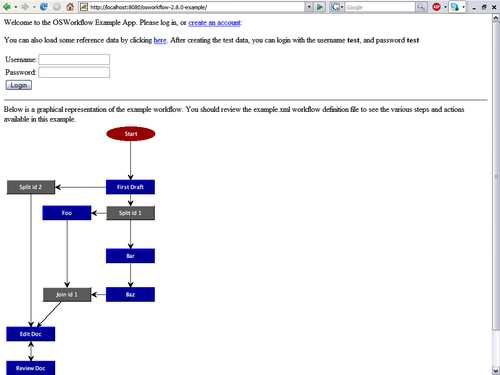
The welcome screen that appears immediately after you enter the application address into the browser is as follows:

It shows a login screen with two hyperlinks—one for loading test users and the other for creating a new account.

Click the reference data hyperlink to load the test user's data. After loading the data, you can log in using "test" as username and password. Clicking the Login button will display the following screen:

Once you are logged in, you will see the following three buttons:

  • Home: This sends you back to the previous screen.

  • New Workflow: This instantiates a new document-publishing workflow...

CONTINUE READING
83
Tech Concepts
36
Programming languages
73
Tech Tools
Icon Unlimited access to the largest independent learning library in tech of over 8,000 expert-authored tech books and videos.
Icon Innovative learning tools, including AI book assistants, code context explainers, and text-to-speech.
Icon 50+ new titles added per month and exclusive early access to books as they are being written.
OSWorkflow: A guide for Java developers and architects to integrating open-source Business Process Management
notes
bookmark Notes and Bookmarks search Search in title playlist Add to playlist font-size Font size

Change the font size

margin-width Margin width

Change margin width

day-mode Day/Sepia/Night Modes

Change background colour

Close icon Search
Country selected

Close icon Your notes and bookmarks

Confirmation

Modal Close icon
claim successful

Buy this book with your credits?

Modal Close icon
Are you sure you want to buy this book with one of your credits?
Close
YES, BUY

Submit Your Feedback

Modal Close icon
Modal Close icon
Modal Close icon