Sign In Start Free Trial
Account

Add to playlist

Create a Playlist

Modal Close icon
You need to login to use this feature.
  • Book Overview & Buying Object-Oriented Programming in ColdFusion
  • Table Of Contents Toc
Object-Oriented Programming in ColdFusion

Object-Oriented Programming in ColdFusion

By : Matthew Gifford
4.5 (11)
close
close
Object-Oriented Programming in ColdFusion

Object-Oriented Programming in ColdFusion

4.5 (11)
By: Matthew Gifford

Overview of this book

Are you tired of procedural programming or is your extensive code base starting to become un-manageable? Breathe some new life into your code and improve your development skills with the basic concepts of object-oriented programming. Utilize objects, modular components, and design patterns to expand your skills and improve your ColdFusion applications. Packed with example code, and written in a friendly, easy-to-read style, this book is just what you need if you are serious about ColdFusion.This book is a fast-paced tutorial to important ColdFusion object-oriented programming topics. It will give you clear, concise, and practical guidance to take you from the basics of ColdFusion to the skills that will make you a ColdFusion developer to be reckoned with. Don't be put off by jargon or complex diagrams; read and see how you can benefit from this book and extend your development skills in the process.Using the practical examples within this guide, you will learn how to structure your applications and code, applying the fundamental basics of object-oriented programming to develop modular, reusable components that will scale easily with your application. You will learn the basic fundamental practices of object-oriented programming, from object creation and re-use, to Bean objects, service layers, Data Access objects, and sample design patterns to gain a better understanding of OOP using examples that can be altered and applied in your application. Complete with detailed code samples and snippets, and written in a friendly easy-to-follow style, you will be able to break free from writing purely procedural code and enhance your applications by building structured applications utilizing basic design patterns and object-oriented principles.
Table of Contents (14 chapters)
close
close
Object-Oriented Programming in ColdFusion
Credits
Foreword
About the Author
Acknowledgement
About the Reviewer
Preface

Arguments in action

Let's look at another simple use case for creating reusable components and functions, which will also highlight some benefits of passing arguments into your methods.

Merging your functions into one

Create a new CFC called contacts.cfc, and add your cfcomponent tags to define the component.

Add the following method in the contacts.cfc file. This new function runs a SELECT query on the Project Tracker application database to retrieve a recordset of all contacts:

<cffunction name="getContacts">
<cfset var rstContacts = "" />
<cfquery name="rstContacts" datasource="projectTracker">
SELECT firstName,lastName FROM Owners
</cfquery>
<cfreturn rstContacts />
</cffunction>

Listing 1.28

We now have a function returning our query data. We also want to have a query to pull out a specific record based on the record ID of a particular person.

We can create a second function to handle this as well:

<cffunction name="getContact">
<cfargument name="ID" type="numeric" />
<cfset var rstContact = "" />
<cfquery name="rstContact" datasource="projectTracker">
SELECT firstName,lastName FROM Owners WHERE ID = <cfqueryparam cfsqltype="cf_sql_integer" value="#arguments.ID#" />
</cfquery>
<cfreturn rstContact />
</cffunction>

Listing 1.29

These two methods within the contacts.cfc file interact with our database and return query data. However, the two queries pull out exactly the same information from the database. The only difference between the queries is that getContact() returns records for a specific user, based upon the ID value. We can easily streamline our CFC by combining these two methods into one, which will remove unnecessary code from our files and theoretically turn one function into two.

Using cfargument to combine your methods

In this example, we will combine the two SELECT queries into one method, using the cfargument tag.

<cffunction name="getContact">
<cfargument name="ID" type="numeric" default="0" />
<cfset var rstContact = "" />
<cfquery name="rstContact" datasource="projectTracker">
SELECT firstName,lastName FROM Owners
<cfif arguments.ID GT 0>
WHERE ID = <cfqueryparam cfsqltype="cf_sql_integer" value="#arguments.ID#" />
</cfif>
</cfquery>
<cfreturn rstContact />
</cffunction>

Listing 1.30

The cfargument tag has a default attribute, which allows you to provide a default value for an argument if you do not pass one into the method. As the customer ID parameter type is set to "numeric", we have set the default value of the argument to "0". This value will now always be available within our method and will stay at the default value until a parameter is passed in to the function.

By providing a default value, we are now able to wrap a cfif tag block around the WHERE clause of the query. If the value of arguments.ID (the value of the parameter within the arguments scope) is greater than 0, that is, if we have passed a numeric value into the method ourselves, then include the WHERE clause when running the SQL within the cfquery tags.

By doing this, we have merged the two methods within the contacts.cfc into one, optimizing our code and allowing it to perform more than one function.

Let's run this query. Create a new page template called query.cfm, and paste in the following code to create the object and run the method without sending in any parameters:

<!--- instantiate the object --->
<cfset objContacts = createObject('component', 'contacts') />
<!--- dump the results --->
<cfdump var="#objContacts.getContact()#" />

Listing 1.31

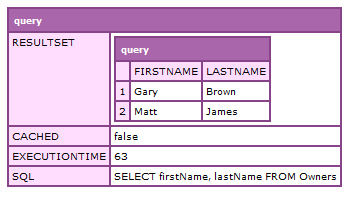
If no ID value is sent through as a parameter, meaning the default value is 0, the method will return the full recordset of all content from the Owners database table:

Using cfargument to combine your methods

Amend the code by adding in a numeric value to pass through as the ID argument:

<!--- dump the results --->
<cfdump var="#objContacts.getContact(2)#" />

Listing 1.32

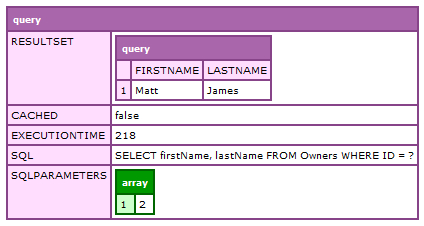
If we provide an ID within the argument, the method will only return the row for the contact that has the matching ID value:

Using cfargument to combine your methods

The dumped object now shows us the parameter sent through in the arguments scope and the SQL query that now includes the WHERE clause.

The simple solution of using an argument with a default value and a cfif statement to control the flow has streamlined and reduced the amount of extraneous code within your application.

CONTINUE READING
83
Tech Concepts
36
Programming languages
73
Tech Tools
Icon Unlimited access to the largest independent learning library in tech of over 8,000 expert-authored tech books and videos.
Icon Innovative learning tools, including AI book assistants, code context explainers, and text-to-speech.
Icon 50+ new titles added per month and exclusive early access to books as they are being written.
Object-Oriented Programming in ColdFusion
notes
bookmark Notes and Bookmarks search Search in title playlist Add to playlist font-size Font size

Change the font size

margin-width Margin width

Change margin width

day-mode Day/Sepia/Night Modes

Change background colour

Close icon Search
Country selected

Close icon Your notes and bookmarks

Confirmation

Modal Close icon
claim successful

Buy this book with your credits?

Modal Close icon
Are you sure you want to buy this book with one of your credits?
Close
YES, BUY

Submit Your Feedback

Modal Close icon
Modal Close icon
Modal Close icon