Sign In Start Free Trial
Account

Add to playlist

Create a Playlist

Modal Close icon
You need to login to use this feature.
  • Book Overview & Buying Sage Beginner's Guide
  • Table Of Contents Toc
Sage Beginner's Guide

Sage Beginner's Guide

By : Craig Finch
3.9 (11)
close
close
Sage Beginner's Guide

Sage Beginner's Guide

3.9 (11)
By: Craig Finch

Overview of this book

Table of Contents (17 chapters)
close
close
Sage Beginner's Guide
Credits
About the Author
About the Reviewers
www.PacktPub.com
Preface
1
Index

More advanced graphics


Sage has sophisticated plotting capabilities. By combining the power of the Python programming language with Sage's graphics functions, we can construct detailed illustrations. To demonstrate a few of Sage's advanced plotting features, we will solve a simple system of equations algebraically:

var('x')
f(x) = x^2
g(x) = x^3 - 2 * x^2 + 2

solutions=solve(f == g, x, solution_dict=True)

for s in solutions:
    show(s)

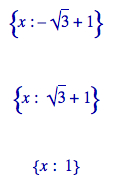
The result is as follows:

We used the keyword argument solution_dict=True to tell the solve function to return the solutions in the form of a Python list of Python dictionaries. We then used a for loop to iterate over the list and display the three solution dictionaries. We'll go into more detail about lists and dictionaries in Chapter 4. Let's illustrate our answers with a detailed plot:

p1 = plot(f, (x, -1, 3), color='blue', axes_labels=['x', 'y'])
p2 = plot(g, (x, -1, 3), color='red')

labels = []
lines = []
markers = []
for s in solutions:
    x_value = s[x].n(digits=3)
    y_value = f(x_value).n(digits=3)
    labels.append(text('y=' + str(y_value), (x_value+0.5, 
        y_value+0.5), color='black'))
    lines.append(line([(x_value, 0), (x_value, y_value)], 
        color='black', linestyle='--'))
    markers.append(point((x_value,y_value), color='black', size=30))

show(p1+p2+sum(labels) + sum(lines) + sum(markers))

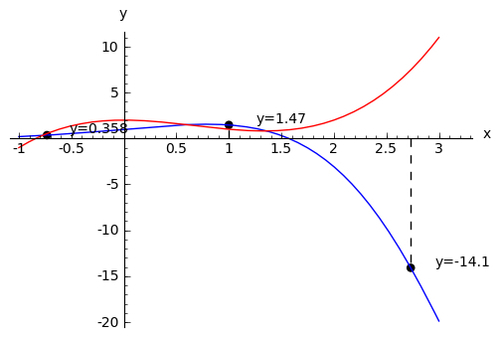
The plot looks like this:

We created a plot of each function in a different colour, and labelled the axes. We then used another for loop to iterate through the list of solutions and annotate each one. Plotting will be covered in detail in Chapter 6.

Visualising a three-dimensional surface

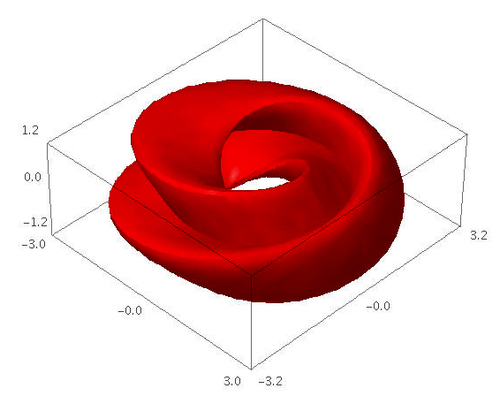
Sage does not restrict you to making plots in two dimensions. To demonstrate the 3D capabilities of Sage, we will create a parametric plot of a mathematical surface known as the "figure 8" immersion of the Klein bottle. You will need to have Java enabled in your web browser to see the 3D plot.

var('u,v')
r = 2.0
f_x = (r + cos(u / 2) * sin(v) - sin(u / 2) 
    * sin(2 * v)) * cos(u)
f_y = (r + cos(u / 2) * sin(v) - sin(u / 2)
    * sin(2 * v)) * sin(u)
f_z = sin(u / 2) * sin(v) + cos(u / 2) * sin(2 * v)
parametric_plot3d([f_x, f_y, f_z], (u, 0, 2 * pi), 
    (v, 0, 2 * pi), color="red")

In the Sage notebook interface, the 3D plot is fully interactive. Clicking and dragging with the mouse over the image changes the viewpoint. The scroll wheel zooms in and out, and right-clicking on the image brings up a menu with further options.

Typesetting mathematical expressions

Sage can be used in conjunction with the LaTeX typesetting system to create publication-quality typeset mathematical expressions. In fact, all of the mathematical expressions in this chapter were typeset using Sage and exported as graphics. Chapter 10 explains how to use LaTeX and Sage together.

CONTINUE READING
83
Tech Concepts
36
Programming languages
73
Tech Tools
Icon Unlimited access to the largest independent learning library in tech of over 8,000 expert-authored tech books and videos.
Icon Innovative learning tools, including AI book assistants, code context explainers, and text-to-speech.
Icon 50+ new titles added per month and exclusive early access to books as they are being written.
Sage Beginner's Guide
notes
bookmark Notes and Bookmarks search Search in title playlist Add to playlist font-size Font size

Change the font size

margin-width Margin width

Change margin width

day-mode Day/Sepia/Night Modes

Change background colour

Close icon Search
Country selected

Close icon Your notes and bookmarks

Confirmation

Modal Close icon
claim successful

Buy this book with your credits?

Modal Close icon
Are you sure you want to buy this book with one of your credits?
Close
YES, BUY

Submit Your Feedback

Modal Close icon
Modal Close icon
Modal Close icon