Sign In Start Free Trial
Account

Add to playlist

Create a Playlist

Modal Close icon
You need to login to use this feature.
  • Book Overview & Buying Mastering LOB Development for Silverlight 5: A Case Study in Action
  • Table Of Contents Toc
Mastering LOB Development for Silverlight 5: A Case Study in Action

Mastering LOB Development for Silverlight 5: A Case Study in Action

By : Braulio Diez, Jose Fernando Almoguera, Pablo NAVARRO CASTILLO, Sebastian Stehle, Rocio Serrano, Reyes Garcia Rosado
4.4 (7)
close
close
Mastering LOB Development for Silverlight 5: A Case Study in Action

Mastering LOB Development for Silverlight 5: A Case Study in Action

4.4 (7)
By: Braulio Diez, Jose Fernando Almoguera, Pablo NAVARRO CASTILLO, Sebastian Stehle, Rocio Serrano, Reyes Garcia Rosado

Overview of this book

Microsoft Silverlight is fully established as a powerful tool for creating and delivering Rich Internet Applications and media experiences on the Web. This book will help you dive straight into utilizing Silverlight 5, which now more than ever is a top choice in the Enterprise for building Business Applications. "Mastering LOB Development for Silverlight 5: A Case Study in Action" focuses on the development of a complete Silverlight 5 LOB application, helping you to take advantage of the powerful features available along with expert advice. Fully focused on LOB development, this expert guide takes you from the beginning of designing and implementing a Silverlight 5 LOB application, all the way through to completion. Accompanied by a gradually built upon case study, you will learn about data access via RIA and Web services, architecture with MEF and MVVM applied to LOB development, testing and error control, and much more.With "Mastering LOB Development for Silverlight 5: A Case Study in Action" in hand, you will be fully equipped to expertly develop your own Silverlight Line of Business application, without dwelling on the basics of Enterprise Silverlight development.
Table of Contents (13 chapters)
close
close
12
Index

Creating a Domain Service and consuming it from a Silverlight application


Let us get into practice so as to understand all that we have learnt in the previous sections. We will create a new project from scratch, based upon the Silverlight Application template. Why not use a template which is more oriented to RIA Services, such as Business Application? The goal is to clarify all the necessary steps to create an RIA Services project.

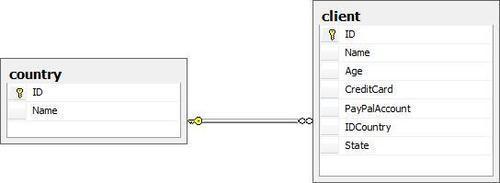
Let us begin from the Database First approach, using a simple database. The following image shows a simple database:

As a summary, these will be the steps to follow: First, the project will be created. Second, the Entity Framework model will be added. Later, the Domain Service will be added, and, to finish, this will be bound to our Silverlight project.

Let us begin by creating the project and adding the Entity Framework model:

  1. First, click on Create new project. Then, choose Silverlight application. Name the project SimpleDB and point out that an associated web project...

CONTINUE READING
83
Tech Concepts
36
Programming languages
73
Tech Tools
Icon Unlimited access to the largest independent learning library in tech of over 8,000 expert-authored tech books and videos.
Icon Innovative learning tools, including AI book assistants, code context explainers, and text-to-speech.
Icon 50+ new titles added per month and exclusive early access to books as they are being written.
Mastering LOB Development for Silverlight 5: A Case Study in Action
notes
bookmark Notes and Bookmarks search Search in title playlist Add to playlist font-size Font size

Change the font size

margin-width Margin width

Change margin width

day-mode Day/Sepia/Night Modes

Change background colour

Close icon Search
Country selected

Close icon Your notes and bookmarks

Confirmation

Modal Close icon
claim successful

Buy this book with your credits?

Modal Close icon
Are you sure you want to buy this book with one of your credits?
Close
YES, BUY

Submit Your Feedback

Modal Close icon
Modal Close icon
Modal Close icon