-
Book Overview & Buying
-
Table Of Contents
Oracle APEX Best Practices
By :
We have set up the APEX environment, now let's focus on the database. For means of consistency and maintainability, it's a good practice to use standards and guidelines. In this section, we will describe some standards and guidelines for data modeling, database objects, and PL/SQL usage.
When the requirements are clear, we can create a data model. A data model provides the structure, definition, and format of the data.
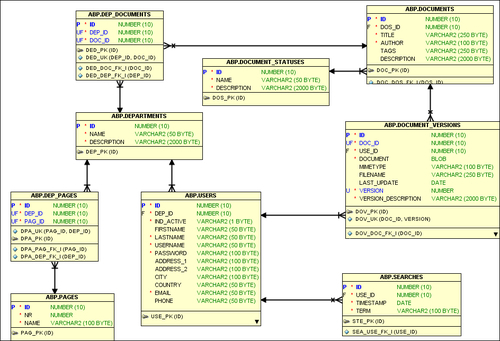
We will translate the requirements into tables, columns, and relations. It will be the single point of truth of our system. Because our whole system is built upon this model, it's very important to spend sufficient time on it. A data model is also a great means to communicate with your customers and among developers about the system and design of the database. When a database is well designed, it can be easily maintained for future development.There are a number of Computer Aided Software Engineering (CASE) tools that you can use to create a data model. Besides data modeling, some of these CASE tools can also be used to maintain all the PL/SQL packages, functions, procedures, and trigger code that we use in our applications. Oracle itself provides Oracle Designer and Data Modeler from SQL Developer. The following diagram shows Data Modeler. One of the advantages of using such a tool is the ability to generate and reverse engineer the database creation scripts in an intuitive graphical manner.

SQL Developer Data Modeler
Relations between the tables are always in a one-to-many relationship; for example, a user can perform one or more searches. We can use colors to differentiate between tables that have a lot of mutations and tables that don't have any. Those tables can be candidates for creating lists of values (discussed later in this chapter).
A great example of standards and guidelines is Oracle's well-documented CDM RuleFrame. Database modeling standards and guidelines can be as follows:
id. This is useful when we want to write reusable generic code.id.CREATE OR REPLACE TRIGGER doc_bir BEFORE INSERT ON documents FOR EACH ROW BEGIN :new_id := NVL(:new_id,all_seq.NEXTVAL); END; /
sys_guid(). On the Internet, a lot of information about the pros and cons for both approaches is available. Define all the id columns as the RAW(16) columns and use sys_guid() as a default value for the id column. For example:CREATE TABLE t ( id RAW(16) DEFAULT sys_guid() PRIMARY KEY , column_a VARCHAR2(10) , column_b VARCHAR2(10) … ) /
The first thing we have to do is create the database schema, which will hold the database objects. We can use the SQL Workshop of APEX for creating the database objects, but its use is very limited compared to the specialized CASE tools.
The following objects can be created in the application schema:
Beside the tools for creating a model, we need some tools during the further development process, tools for accessing the database easily, and tools for web development. Without going into detail, we will just name a few tools that you can use.
Examples of database tools are:
Tools for web development, HTML, CSS, and JavaScript are as follows:
Miscellaneous tools:
Refer to Chapter 5, Debugging and Troubleshooting for the details on other tools.
We use the following guidelines regarding PL/SQL:
This approach has the following advantages:
Change the font size
Change margin width
Change background colour