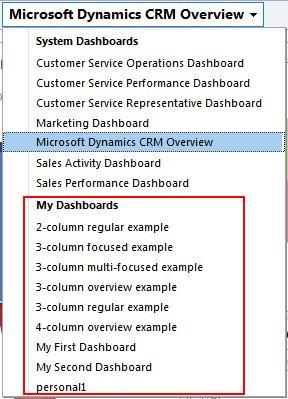


When viewing the list of available dashboards, the user dashboards are listed separately from the system dashboards. This is done to help the user quickly identify the set of dashboards that they have either created or have been granted access to through the sharing and assigning technique.
Carry out the following steps in order to complete this recipe:
Select the Dashboards link from the Workplace area and click on the drop-down list of available dashboards, as shown in the following screenshot:

The collection of user dashboards will be listed under the My Dashboards section in this list. Select one of the user dashboards that you created in the earlier chapters, as shown in the following screenshot: