Sign In Start Free Trial
Account

Add to playlist

Create a Playlist

Modal Close icon
You need to login to use this feature.
  • Book Overview & Buying Multithreading in C# 5.0 Cookbook
  • Table Of Contents Toc
Multithreading in C# 5.0 Cookbook

Multithreading in C# 5.0 Cookbook

By : Evgenii Agafonov
4.6 (5)
close
close
Multithreading in C# 5.0 Cookbook

Multithreading in C# 5.0 Cookbook

4.6 (5)
By: Evgenii Agafonov

Overview of this book

In an age when computer processors are being developed to contain more and more cores, multithreading is a key factor for creating scalable, effective, and responsive applications. If you fail to do it correctly, it can lead to puzzling problems that take a huge amount of time to resolve. Therefore, having a solid understanding of multithreading is a must for the modern application developer. Multithreading in C# 5.0 Cookbook is an easy-to-understand guide to the most puzzling programming problems. This book will guide you through practical examples dedicated to various aspects of multithreading in C# on Windows and will give you a good basis of practical knowledge which you can then use to program your own scalable and reliable multithreaded applications. This book guides you through asynchronous and parallel programming from basic examples to practical, real-world solutions to complex problems. You will start from the very beginning, learning what a thread is, and then proceed to learn new concepts based on the information you get from the previous examples. After describing the basics of threading, you will be able to grasp more advanced concepts like Task Parallel Library and C# asynchronous functions. Then, we move towards parallel programming, starting with basic data structures and gradually progressing to the more advanced patterns. The book concludes with a discussion of the specifics of Windows 8 application programming, giving you a complete understanding of how Windows 8 applications are different and how to program asynchronous applications for Windows 8.
Table of Contents (13 chapters)
close
close
12
Index

Creating a thread in C#

Throughout the following recipes, we will use Visual Studio 2012 as the main tool to write multithreaded programs in C#. This recipe will show you how to create a new C# program and use threads in it.

Note

There are free Visual Studio 2012 Express editions, which can be downloaded from the Microsoft website. We will need Visual Studio 2012 Express for Windows Desktop for most of the examples and Visual Studio 2012 Express for Windows 8 for Windows 8-specific recipes.

Getting ready

To work through this recipe, you will need Visual Studio 2012. There are no other prerequisites. The source code for this recipe can be found at BookSamples\Chapter1\Recipe1.

Tip

Downloading the example code

You can download the example code files for all Packt books you have purchased through your account at http://www.packtpub.com. If you purchased this book elsewhere, you can visit http://www.packtpub.com/support and register to have the files e-mailed directly to you.

How to do it...

To understand how to create a new C# program and use threads in it, perform the following steps:

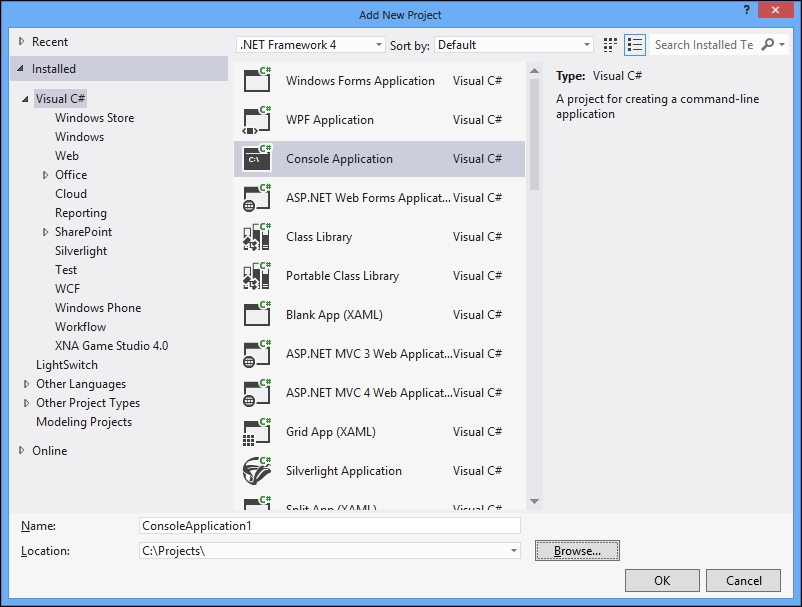
  1. Start Visual Studio 2012. Create a new C# Console Application project.
  2. Make sure that the project uses .NET Framework 4.0 or higher version.
    How to do it...
  3. In the Program.cs file add the following using directives:
    using System;
    using System.Threading;
  4. Add the following code snippet below the Main method:
    static void PrintNumbers()
    {
      Console.WriteLine("Starting...");
      for (int i = 1; i < 10; i++)
      {
        Console.WriteLine(i);
      }
    }
  5. Add the following code snippet inside the Main method:
    Thread t = new Thread(PrintNumbers);
    t.Start();
    PrintNumbers();
  6. Run the program. The output will be something like:
    How to do it...

How it works...

In steps 1 and 2 we created a simple console application in C# using .Net Framework version 4.0. Then in step 3 we included the namespace System.Threading, which contains all the types needed for the program.

Note

An instance of a program is being executed can be referred to as a process. A process consists of one or more threads. This means that when we run a program, we always have one main thread that executes the program code.

In step 4 we defined the method PrintNumbers, which will be used in both the main and newly created threads. Then in step 5, we created a thread that runs PrintNumbers. When we construct a thread, an instance of the ThreadStart or ParameterizedThreadStart delegate is passed to the constructor. The C# compiler is creating this object behind the scenes when we just type the name of the method we want to run in a different thread. Then we start a thread and run PrintNumbers in the usual manner on the main thread.

As a result, there will be two ranges of numbers from 1 to 10 randomly crossing each other. This illustrates that the PrintNumbers method runs simultaneously on the main thread and on the other thread.

CONTINUE READING
83
Tech Concepts
36
Programming languages
73
Tech Tools
Icon Unlimited access to the largest independent learning library in tech of over 8,000 expert-authored tech books and videos.
Icon Innovative learning tools, including AI book assistants, code context explainers, and text-to-speech.
Icon 50+ new titles added per month and exclusive early access to books as they are being written.
Multithreading in C# 5.0 Cookbook
notes
bookmark Notes and Bookmarks search Search in title playlist Add to playlist font-size Font size

Change the font size

margin-width Margin width

Change margin width

day-mode Day/Sepia/Night Modes

Change background colour

Close icon Search
Country selected

Close icon Your notes and bookmarks

Confirmation

Modal Close icon
claim successful

Buy this book with your credits?

Modal Close icon
Are you sure you want to buy this book with one of your credits?
Close
YES, BUY

Submit Your Feedback

Modal Close icon
Modal Close icon
Modal Close icon