Sign In Start Free Trial
Account

Add to playlist

Create a Playlist

Modal Close icon
You need to login to use this feature.
  • Book Overview & Buying Burp Suite Cookbook
  • Table Of Contents Toc
Burp Suite Cookbook

Burp Suite Cookbook - Second Edition

By : Dr. Sunny Wear
5 (6)
close
close
Burp Suite Cookbook

Burp Suite Cookbook

5 (6)
By: Dr. Sunny Wear

Overview of this book

With its many features, easy-to-use interface, and flexibility, Burp Suite is the top choice for professionals looking to strengthen web application and API security. This book offers solutions to challenges related to identifying, testing, and exploiting vulnerabilities in web applications and APIs. It provides guidance on identifying security weaknesses in diverse environments by using different test cases. Once you’ve learned how to configure Burp Suite, the book will demonstrate the effective utilization of its tools, such as Live tasks, Scanner, Intruder, Repeater, and Decoder, enabling you to evaluate the security vulnerability of target applications. Additionally, you’ll explore various Burp extensions and the latest features of Burp Suite, including DOM Invader. By the end of this book, you’ll have acquired the skills needed to confidently use Burp Suite to conduct comprehensive security assessments of web applications and APIs.
Table of Contents (14 chapters)
close
close

Creating a custom scan script

Burp Suite provides predefined tasks for crawling and auditing. Previously, we looked at the live crawl and audit tasks and how they work. However, if you want to create a custom scanning script, Burp Suite provides the mechanism for you to do so.

Getting ready

Using the OWASP Mutillidae II application found within the OWASP BWA VM as our target, we will create a scanning script with custom configurations and run this script against Mutillidae.

How to do it...

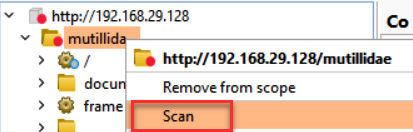
  1. Right-click the target application and select Scan from the menu:
Figure 3.141 – How to configure a scan for the target application

Figure 3.141 – How to configure a scan for the target application

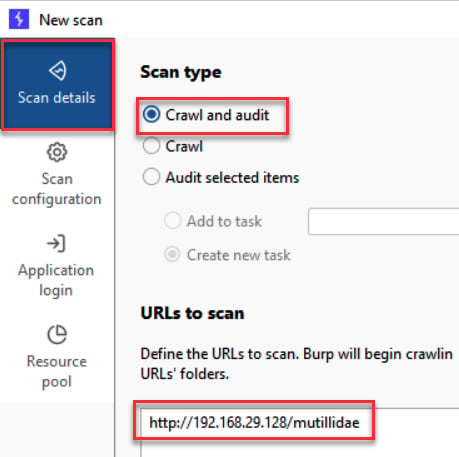
  1. In the New scan pop-out window, make sure the Crawl and audit radio button is selected and your target application is shown in the URLs to scan text area. Move down to the Scan configuration box:
Figure 3.142 – Select or use the default setting of Crawl and audit

Figure 3.142 – Select or use the default setting of Crawl and audit

Note...

CONTINUE READING
83
Tech Concepts
36
Programming languages
73
Tech Tools
Icon Unlimited access to the largest independent learning library in tech of over 8,000 expert-authored tech books and videos.
Icon Innovative learning tools, including AI book assistants, code context explainers, and text-to-speech.
Icon 50+ new titles added per month and exclusive early access to books as they are being written.
Burp Suite Cookbook
notes
bookmark Notes and Bookmarks search Search in title playlist Add to playlist font-size Font size

Change the font size

margin-width Margin width

Change margin width

day-mode Day/Sepia/Night Modes

Change background colour

Close icon Search
Country selected

Close icon Your notes and bookmarks

Confirmation

Modal Close icon
claim successful

Buy this book with your credits?

Modal Close icon
Are you sure you want to buy this book with one of your credits?
Close
YES, BUY

Submit Your Feedback

Modal Close icon
Modal Close icon
Modal Close icon