Sign In Start Free Trial
Account

Add to playlist

Create a Playlist

Modal Close icon
You need to login to use this feature.
  • Book Overview & Buying Magento Extensions Development
  • Table Of Contents Toc
Magento Extensions Development

Magento Extensions Development

By : Bouchet
close
close
Magento Extensions Development

Magento Extensions Development

By: Bouchet

Overview of this book

Magento has been revealed as the best and the most popular open source e-commerce platform in the world, with about 250k+ online stores. Magento 2 is the most recent version of this awesome toolset: every new and modern development techniques are used to offer a real modular approach and powerful architecture. The book will support you in the writing of innovative and complex extensions. Starting from the beginning, we will cover how to set up a development environment that allows you to be really efficient in your functionality writing, including GIT registering and many other development tools. We then move on to provide a large overview of the best practices to scale your module in a high-load environment. After these foundations, you will see how to use test driven-development (TDD) and unit tests to handle your code. We then build a complex extension together, step by step, and internationally-ready. Next, you will find out how to protect the users’ data. Finally, we will take a look a publishing the extension on the new Magento Connect marketplace and how to protect your intellectual property. After you read this book, you will know everything you need to know to become an invaluable extension editor, whether it is for your customers’ needs or for your own requirements.
Table of Contents (11 chapters)
close
close
10
Index

Managing our work with Git source control

Once the project has begun, it may be a good thing to take care of code revision and eventually collaboration with other developers.

Git is a distributed revision control system developed by Linus Torvalds in 2005, initially for Linux kernel development. It has begun to replace the Subversion (SVN) system in a lot of companies, thanks to its full-fledged repository and independence from network access and a distant server.

As soon as you start to work with other people and developers, the repository must be always available on the Internet. You have two choices to do this: the first is to create a Git repository on your own server (a private server in your organization, or a rented dedicated server), and the second is to use a service that provides a repository for you. In this recipe, we will register our code on Bitbucket.

Note

GitHub and Sourceforge provide the same services, but Bitbucket offers more free services and is fully integrated with other Atlassian services such as Hipchat or Jira. It is up to you to make your choice according to your needs and environments.

Bitbucket registration

Perform the following steps for Bitbucket registration:

  1. Sign up to Bitbucket (https://bitbucket.org) by following the instructions on the website:
    Bitbucket registration
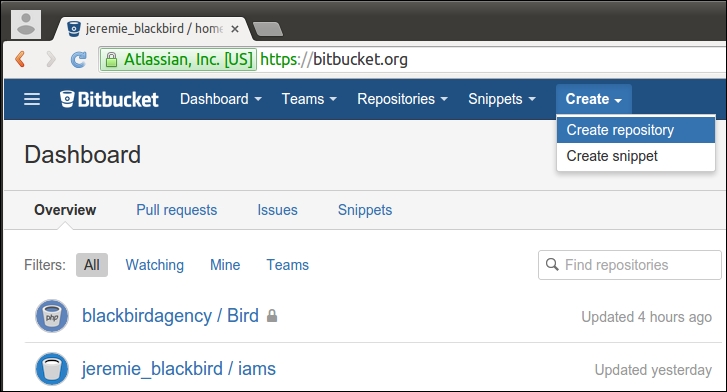
  2. In the upper-right corner of any page, click on Create, and then click Create repository:
    Bitbucket registration
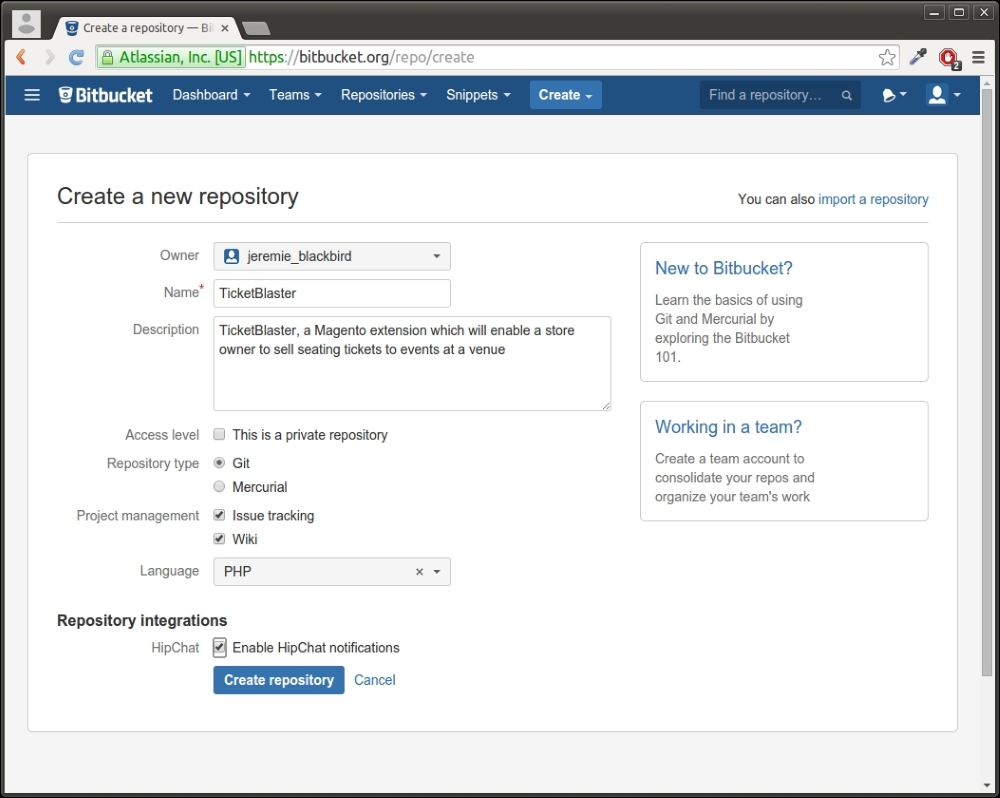
  3. Enter your repository name and choose whether your repository will be public or private.

    Tip

    Check This is a private repository if you want to hide your repository from the general public, so that only selected people can see it.

    Bitbucket registration
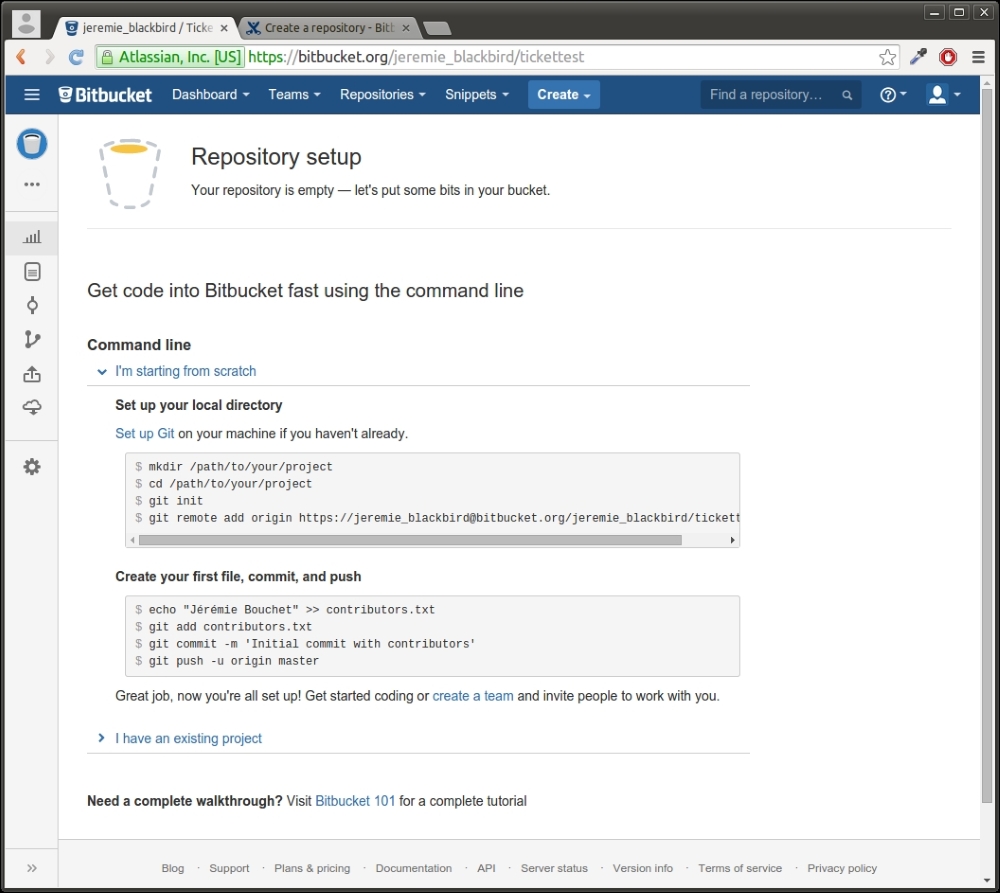
  4. That's it for Bitbucket. Keep this window open for future instructions.
    Bitbucket registration
  5. Go to your terminal and install Git on your computer by running the following command line:
    sudo apt-get install git
    

Committing our work

In the following step, we will commit our code to a new repository, and then we will push the repository to Bitbucket:

  1. Initialize an empty repository by going to your Magento source folder and running the following command:
    git init
    
  2. Check that your repository has been created and is empty:
    git status
    
  3. Create a .gitignore file in the root of the repository and add the following content to it:
    #Git ignore for extensions writing
    /app/code/Magento/*
    /dev/tests/
    /lib/
    [...]
    

    Note

    The source code can be found in the by-chapter branch of the Git repository, in the Chapter1 folder.

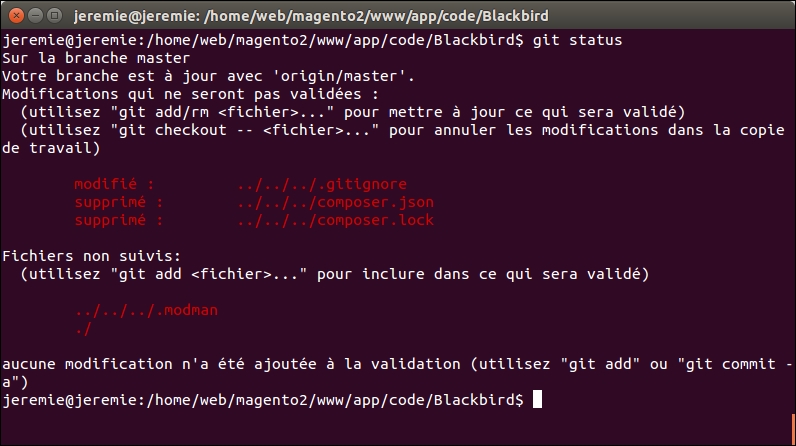
  4. Verify that the .gitignore file is taken into account by running git status again:
    git status
    
    Committing our work
  5. You can see that only .gitignore is taken into account by Git.

    Note

    What happened? In fact, in a Magento project, especially with Magento CE, the source files are always available online and are the same for all. That's why you can presume that each of your collaborators first, and every client next, will run Magento. This is your code, it is unique and important, and that's why your code is the only thing to keep in your repository. Note for later: if you need to add another folder in your repository, just remove the corresponding ignore line.

  6. Run the following commands to add and commit the .gitignore file:
    git add .gitignore
    git commit .gitignore -m "Ignoring all resources files"
    
  7. Now your repository needs to be filled with the files of our project. Repeat the operation for all the files the extension needs with the command git add <folder | filename>:
    git -f add app/code/Blackbird/
    

    Note

    Note the -f option, to force Git to add the file even if it is stored in an ignored folder. If you don't use this option, Git will inform you that it can't add the file.

  8. Commit your additions:
    git commit -m "Adding the first extension files"
  9. Link your repository to the Bitbucket repository:
    git remote add originhttps://[email protected]/blackbirdagency/ticket-blaster.git
    

    Tip

    This line is to modify your repository configuration.

  10. Finally, send the files and commit comments to Bitbucket by pushing the repository:
    git push -u origin master
    

    You will find your files by clicking on your repository name on https://bitbucket.org/, proving that the files have been sent and are available for other users.

    Note

    Take note not to send useless files.

    When you are creating an extension, the people who install your code will already have a Magento instance. It is very important to share only the extension files and not Magento and customizable files, which are already modified or installed by your client.

    That's why we have chosen to ignore almost all files by default, and to force a git add with the -f option when the file we need to share is placed in an ignored folder.

Discovering other Git servers!

There are others Git storage services online, such as https://github.com/ or https://sourceforge.net/, which offer different storage spaces and different public/private repo policies.

You can create your own private Git server too, which can be dedicated to your company or organization.

CONTINUE READING
83
Tech Concepts
36
Programming languages
73
Tech Tools
Icon Unlimited access to the largest independent learning library in tech of over 8,000 expert-authored tech books and videos.
Icon Innovative learning tools, including AI book assistants, code context explainers, and text-to-speech.
Icon 50+ new titles added per month and exclusive early access to books as they are being written.
Magento Extensions Development
notes
bookmark Notes and Bookmarks search Search in title playlist Add to playlist download Download options font-size Font size

Change the font size

margin-width Margin width

Change margin width

day-mode Day/Sepia/Night Modes

Change background colour

Close icon Search
Country selected

Close icon Your notes and bookmarks

Confirmation

Modal Close icon
claim successful

Buy this book with your credits?

Modal Close icon
Are you sure you want to buy this book with one of your credits?
Close
YES, BUY

Submit Your Feedback

Modal Close icon
Modal Close icon
Modal Close icon