-
Book Overview & Buying
-
Table Of Contents
Building a Web Application with PHP and MariaDB: A Reference Guide
By :
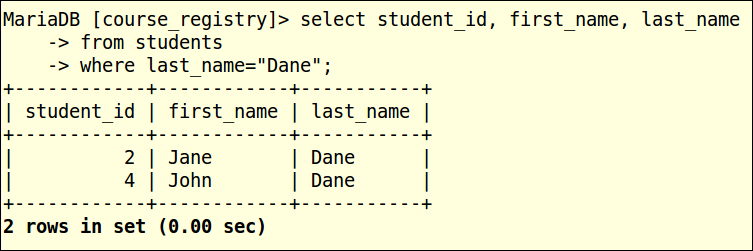
Until now, we have dealt with data retrieval where all the data in the students table is being retrieved, but seldom do we need all that data. We have used the LIMIT and OFFSET clauses that have allowed us to limit the amount of data were retrieved. Now let us use MariaDB's filtering mechanism to retrieve the data by supplying search criteria. To perform a search in a SQL statement, we will use the WHERE clause. The WHERE clause can be used with the SELECT statement, or it can be even used with the UPDATE and DELETE statements, which will be discussed in the next section:

In the preceding example, we are selecting the students' records whose last_name is Dane.

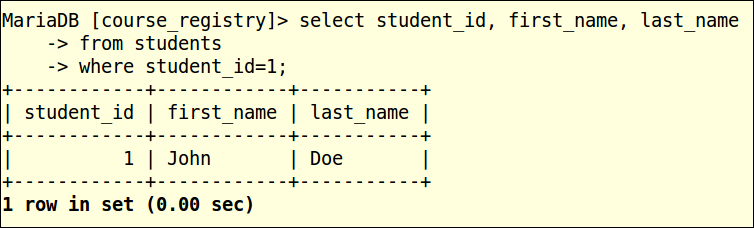
In the preceding example, we are selecting the students' records whose student_id is 1.

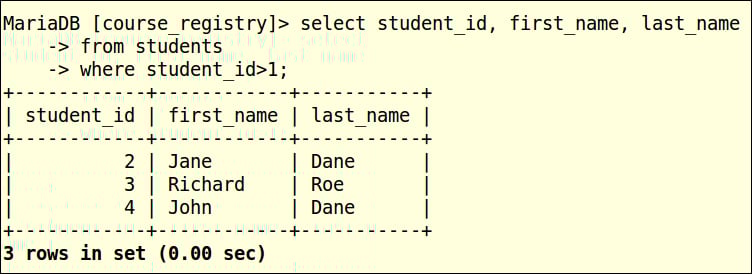
In the preceding example, we are selecting the students' records whose student_id is greater than 1.

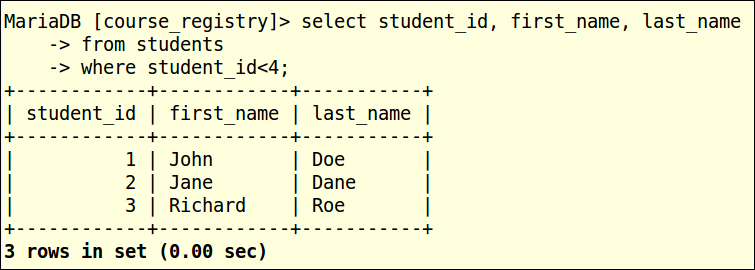
In the preceding example, we are selecting the students' records whose student_id is less than 4.

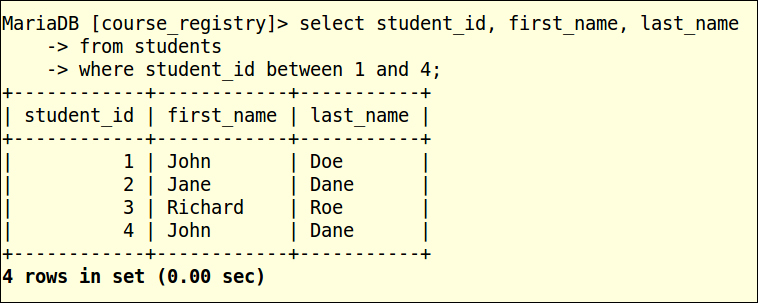
In the preceding example, we are selecting the students' records whose student_id is between 1 and 4, the between clause is inclusive, so the records with student_id 1 and 4 are also retrieved. The following table lists the common operators that can be used for data filtering:
|
Operator |
Explanation |
Comment |
|---|---|---|
|
|
Filters and returns data where the criterion has an exact match. | |
|
|
Filters and returns data where the criterion doesn't have an exact match. | |
|
|
Filters and returns data where the criterion doesn't have an exact match. |
This is same as above, based on preference, either notations can be used for inequality. |
|
|
Filters and returns data where the data is greater than the value in the criterion. | |
|
|
Filters and returns data where the data is greater than or equal to the value in the criterion. | |
|
|
Filters and returns data where the data is lesser than the value in the criterion. | |
|
|
Filters and returns data where the data is lesser than or equal to the criterion. | |
|
|
Filters and returns the rows where the specified column has no data. | |
|
|
Filters and returns the rows where the specified column has some data. | |
|
|
Filters and returns data where the data is part of the specified range. |
This uses the keywords |
Data can also be filtered by utilizing multiple search criteria by using the AND and OR operators, by employing multiple column search criteria, by using wildcard filtering, by using the IN operator, and so on. As this chapter will only deal with basic filtering, we will not be covering these advanced filtering concepts. The basic filtering in this chapter can be used as a foundation to delve deeper into understanding the advanced concepts of filtering.
Change the font size
Change margin width
Change background colour