-
Book Overview & Buying
-
Table Of Contents
Test Driven Python Development
By :
Over the course of this book, we are going to be using TDD to build a simple stock alert application. The application will listen to stock updates from a source. The source can be anything—a server on the Internet, or a file on the hard drive, or something else. We will be able to define rules, and when the rule is matched, the application sends us an email or text message.
For example, we could define a rule as "If AAPL crosses the $550 level then send me an email". Once defined, the application will monitor updates and send an e-mail when the rule is matched.
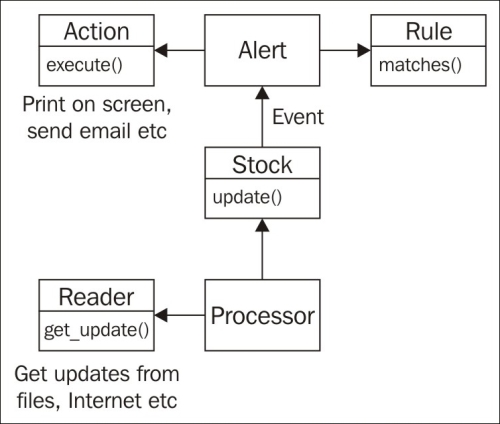
Enough talk. Let's get started with our application. What is a good place to start? From examining the application description mentioned earlier, it looks like we will need the following modules:
Based on these requirements, we will be using the following design:

Each term is discussed as follows:
Among all these classes, the way to manage stock information seems to be the simplest, so let's start there. What we are going to do is to create a Stock class. This class will hold information about the current stock. It will store the current price and possibly some recent price history. We can then use this class when we want to match rules later on.
To get started, create a directory called src. This directory is going to hold all our source code. In the rest of this book, we will refer to this directory as the project root. Inside the src directory, create a subdirectory called stock_alerter. This is the directory in which we are going to implement our stock alert module.
Okay, let's get started with implementing the class.
NO! Wait! Remember the TDD process that was described earlier? The first step is to write a test, before we code the implementation. By writing the test first, we now have the opportunity to think about what we want this class to do.
So what exactly do we want this class to do? Let's start with something simple:
Stock class should be instantiated with the ticker symbolNoneOf course, there are many more things we will want this class to do, but we'll think about them later. Rather than coming up with a very comprehensive list of functionality, we're going to focus on tiny bits of functionality, one at a time. For now, the preceding expectation is good enough.
To convert the preceding expectation into code, create a file called stock.py in the project root, and put the following code in it:
import unittest
class StockTest(unittest.TestCase):
def test_price_of_a_new_stock_class_should_be_None(self):
stock = Stock("GOOG")
self.assertIsNone(stock.price)
if __name__ == "__main__":
unittest.main()What does this code do?
unittest. This is the library that has the test framework that we are going to use. Luckily for us, it is bundled into the Python standard library by default and is always available, so we don't need to install anything, we can just import the module directly.StockTest. This class will hold all the test cases for the Stock class. This is just a convenient way of grouping related tests together. There is no rule that every class should have a corresponding test class. Sometimes, if we have a lot of tests for a class, then we may want to create separate test classes for each individual behavior, or group the tests some other way. However, in most cases, creating one test class for an actual class is the best way to go about it.StockTest class inherits from the TestCase class in the unittest module. All tests need to inherit from this class in order to be identified as a test class.unittest framework will pick up any method that starts with test. The method has a name that describes what the test is checking for. This is just so that when we come back after a few months, we still remember what the test does.Stock object and then checks if the price is None. assertIsNone is a method provided by the TestCase class that we are inheriting from. It checks that its parameter is None. If the parameter is not None, it raises an AssertionError and fails the test. Otherwise, execution continues to the next line. Since that is the last line of the method, the test completes and is marked as a pass.__name__ variable will have the value __main__, and the code will execute the unittest.main() function. This function will scan the current file for all tests and execute them. The reason we need to wrap this function call inside the conditional is because this part does not get executed if the module is imported into another file.Congratulations! You have your first failing test. Normally, a failing test would be a cause for worry, but in this case, a failing test means that we're done with the first step of the process and can move on to the next step.
Now that we've written our test, it is time to run it. To run the test, just execute the file. Assuming that the current directory is the src directory, the following is the command to execute the file:
python.exe stock_alerter\stock.py
python3 stock_alerter/stock.py
If the python executable is not on your path, then you will have to give the full path to the executable here. In some Linux distributions, the file may be called python34 or python3.4 instead of python3.
When we run the file, the output looks like the following:
E ===================================================================== ERROR: test_price_of_a_new_stock_class_should_be_None (__main__.StockTest) --------------------------------------------------------------------- Traceback (most recent call last): File "stock_alerter\stock.py", line 6, in test_price_of_a_new_stock_class_should_be_None stock = Stock("GOOG") NameError: name 'Stock' is not defined --------------------------------------------------------------------- Ran 1 test in 0.001s FAILED (errors=1)
As expected, the test fails, because we haven't created the Stock class yet.
Let's look at that output in a little more detail:
E on the first line signifies that the test gave an error. If a test passed, then you would have a dot on that line. A failed test would be marked with F. Since we have only a single test, there is only one character there. When we have multiple tests, then the status of each test will be displayed on that line, one character per test.ERROR) followed by the name of the test and which class it belongs to. This is followed by a traceback, so we know where the failure occurred.There are two reasons why a test might not pass: It might have failed or it might have caused an error. There is a small difference between these two. A failure indicates that we expected some outcome (usually via an assert), but got something else. For example, in our test, we are asserting that stock.price is None. Suppose stock.price has some other value apart from None, then the test will fail.
An error indicates that something unexpected happened, usually an unexpected exception was raised. In our previous example, we got an error because the Stock class has not yet been defined.
In both the cases, the test does not pass, but for different reasons, and these are reported separately as test failures and test errors.
Now that we have a failing test, let's make it pass. Add the following code to the stock.py file, after the import unittest line:
class Stock:
def __init__(self, symbol):
self.symbol = symbol
self.price = NoneWhat we have done here is to implement just enough code to pass the test. We've created the Stock class so the test shouldn't complain about it being missing, and we've initialized the price attribute to None.
What about the rest of the implementation for this class? This can wait. Our main focus right now is to pass the current expectation for this class. As we write more tests, we will end up implementing more of the class as well.
Run the file again, and this time the output should be like the following:
. --------------------------------------------------------------------- Ran 1 test in 0.000s OK
We've got a dot in the first line, which signifies that the test is passing. The OK message at the end tells us that all tests have passed.
The final step is to refactor the code. With so little code, there is really nothing much to clean up. So, we can skip the refactoring step and start with the next test.
Change the font size
Change margin width
Change background colour