Sign In Start Free Trial
Account

Add to playlist

Create a Playlist

Modal Close icon
You need to login to use this feature.
  • Book Overview & Buying Spring Integration Essentials
  • Table Of Contents Toc
Spring Integration Essentials

Spring Integration Essentials

By : CHANDAN K PANDEY
2.7 (3)
close
close
Spring Integration Essentials

Spring Integration Essentials

2.7 (3)
By: CHANDAN K PANDEY

Overview of this book

This book is intended for developers who are either already involved with enterprise integration or planning to venture into the domain. Basic knowledge of Java and Spring is expected. For newer users, this book can be used to understand an integration scenario, what the challenges are, and how Spring Integration can be used to solve it. Prior experience of Spring Integration is not expected as this book will walk you through all the code examples.
Table of Contents (12 chapters)
close
close
11
Index

Creating your first project

The following steps will help you in creating your first project:

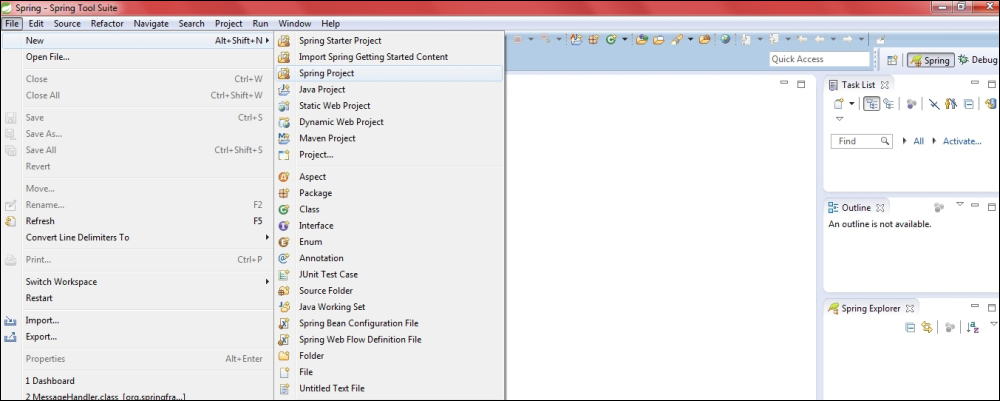
  1. Create a Spring Integration project by navigating to File | Spring Project, as shown in the following screenshot:
    Creating your first project
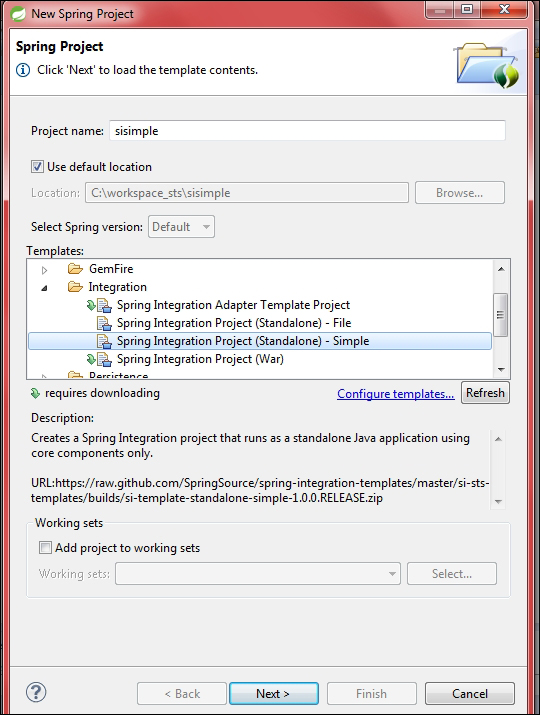
  2. Under the templates section, select Spring Integration Project - Simple. Provide a project name, for example, sisimple, as shown in the following screenshot:
    Creating your first project
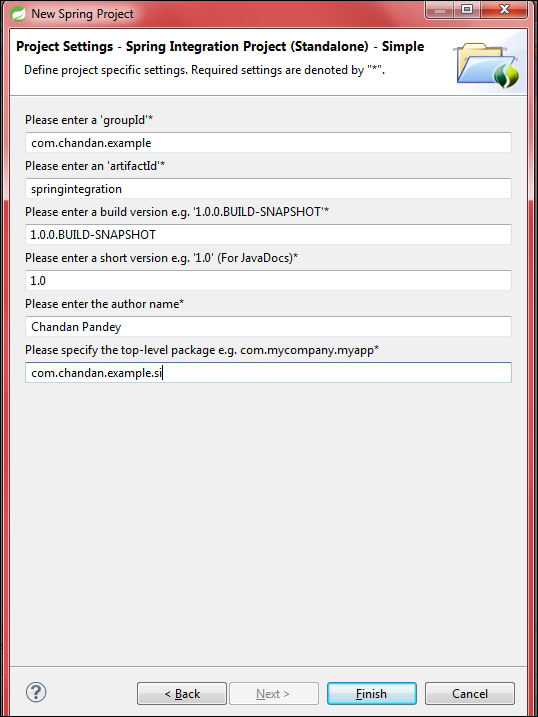
  3. Fill in the information required to create a Maven-based project, as shown in this screenshot:
    Creating your first project
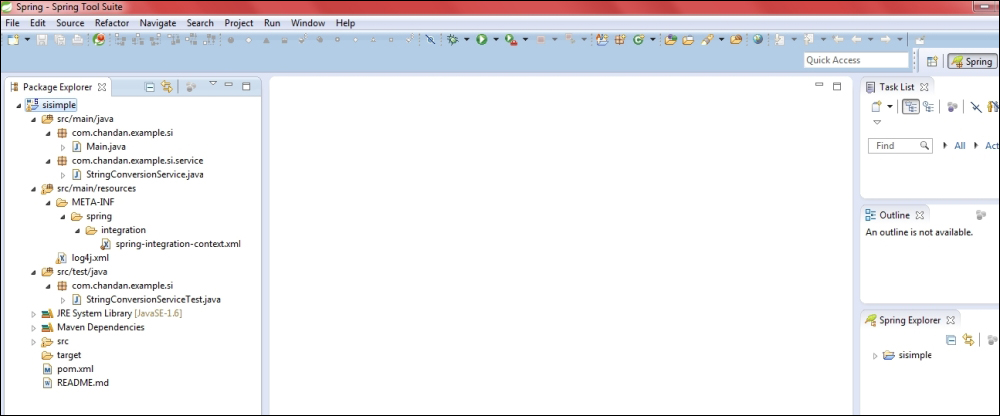
  4. Click on Finish; this will create a project with the name that was provided by us (sisimple), as shown in this screenshot:
    Creating your first project

This project is as simple as it can be. Let's take a quick look at the generated Java classes in the following points:

  • Main.java: This file is located at the path: /sisimple/src/main/java/com/chandan/example/si/. It has the main method and will be used to run this sample. Right-click on this file from the package explorer and click on Run As | Java Application—this will start the program. This class has the code to bootstrap Spring Integration configuration files and load components defined in it. Additionally, it converts user input to upper case.
  • StringConversionService.java: This file is located at the path: /sisimple/src/main/java/com/chandan/example/si/service/. This is the service interface that is used to convert user input to upper case.
  • spring-integration-context.xml: This file is located at the path: /sisimple/src/main/resources/META-INF/spring/integration/. It is the Spring Integration configuration file. It contains the XML-based declaration of Spring Integration components.
  • log4j.xml: This file is located at the path: /sisimple/src/main/resources/. It is the Log4j configuration file. It can be edited to control the log level, appenders, and other logging-related aspects.
  • StringConversionServiceTest.java: This file is located at the path: /sisimple/src/test/java/com/chandan/example/si/. This is the test file for StringConversionService. This will be used to run tests against the service classes.
  • pom.xml: This is the file used for rmaven dependency management, located in /sisimple/. It has entries for all the dependencies used by the project.

It will be a bit heavy and premature to explain each of the components in these classes and configuration files without having built up some theoretical concepts—we will discuss each of the elements in detail, as we move ahead in the chapters.

CONTINUE READING
83
Tech Concepts
36
Programming languages
73
Tech Tools
Icon Unlimited access to the largest independent learning library in tech of over 8,000 expert-authored tech books and videos.
Icon Innovative learning tools, including AI book assistants, code context explainers, and text-to-speech.
Icon 50+ new titles added per month and exclusive early access to books as they are being written.
Spring Integration Essentials
notes
bookmark Notes and Bookmarks search Search in title playlist Add to playlist font-size Font size

Change the font size

margin-width Margin width

Change margin width

day-mode Day/Sepia/Night Modes

Change background colour

Close icon Search
Country selected

Close icon Your notes and bookmarks

Confirmation

Modal Close icon
claim successful

Buy this book with your credits?

Modal Close icon
Are you sure you want to buy this book with one of your credits?
Close
YES, BUY

Submit Your Feedback

Modal Close icon
Modal Close icon
Modal Close icon