Sign In Start Free Trial
Account

Add to playlist

Create a Playlist

Modal Close icon
You need to login to use this feature.
  • Book Overview & Buying Learning PHP 7
  • Table Of Contents Toc
  • Feedback & Rating feedback
Learning PHP 7

Learning PHP 7

By : L Zapata (GBP)
3.4 (10)
close
close
Learning PHP 7

Learning PHP 7

3.4 (10)
By: L Zapata (GBP)

Overview of this book

PHP is a great language for building web applications. It is essentially a server-side scripting language that is also used for general purpose programming. PHP 7 is the latest version with a host of new features, and it provides major backwards-compatibility breaks. This book begins with the fundamentals of PHP programming by covering the basic concepts such as variables, functions, class, and objects. You will set up PHP server on your machine and learn to read and write procedural PHP code. After getting an understanding of OOP as a paradigm, you will execute MySQL queries on your database. Moving on, you will find out how to use MVC to create applications from scratch and add tests. Then, you will build REST APIs and perform behavioral tests on your applications. By the end of the book, you will have the skills required to read and write files, debug, test, and work with MySQL.
Table of Contents (12 chapters)
close
close
11
Index

Setting up the environment on Windows

Even though it is not very professional to pick sides based on personal opinions, it is well known among developers how hard it can be to use Windows as a developer machine. They prove to be extremely tricky when it comes to installing all the software since the installation mode is always very different from OS X and Linux systems, and quite often, there are dependency or configuration problems. In addition, the command line has different interpreters than Unix systems, which makes things a bit more confusing. This is why most developers would recommend you use a virtual machine with Linux if you only have a Windows machine at your disposal.

However, to be fair, PHP 7 is the exception to the rule. It is surprisingly simple to install it, so if you are really comfortable with your Windows and would prefer not to use Vagrant, here you have a short explanation on how to set up your environment.

Installing PHP

In order to install PHP 7, you will first download the installer from the official website. For this, go to http://windows.php.net/download. The options should be similar to the following screenshot:

Installing PHP

Choose x86 Thread Safe for Windows 32-bit or x64 Thread Safe for the 64-bit one. Once downloaded, uncompress it in C:\php7. Yes, that is it!

Installing MySQL

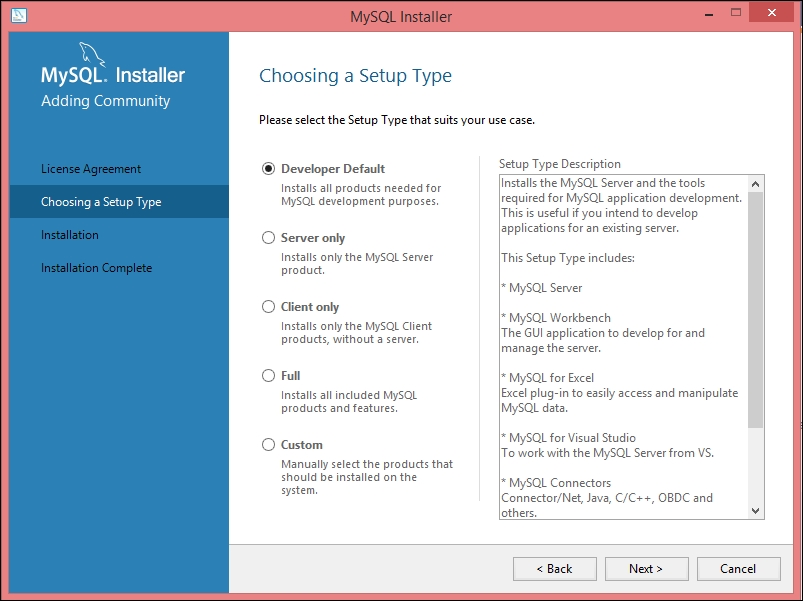
Installing MySQL is a little more complex. Download the installer from http://dev.mysql.com/downloads/installer/ and execute it. After accepting the license agreement, you will get a window similar to the following one:

Installing MySQL

For the purposes of the book—and actually for any development environment—you should go for the first option: Developer Default. Keep going forward, leaving all the default options, until you get a window similar to this:

Installing MySQL

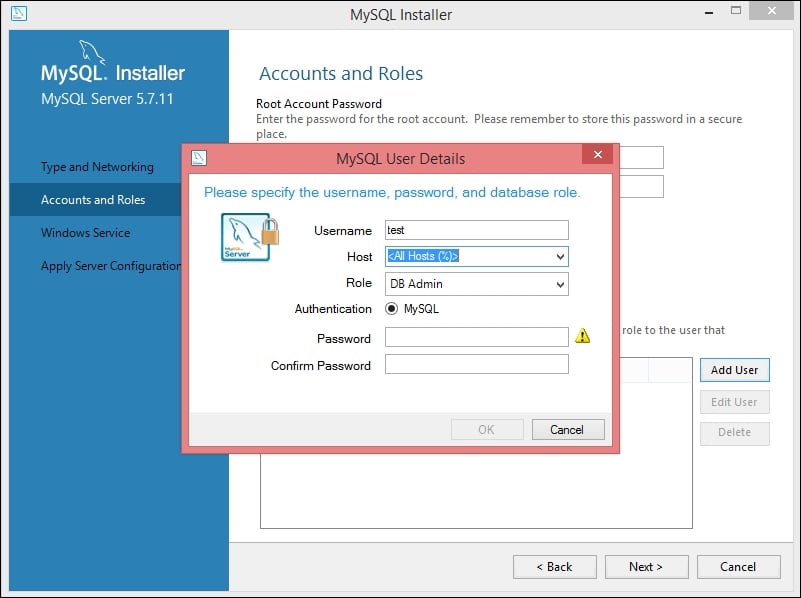
Depending on your preferences, you can either just set a password for the root user, which is enough as it is only a development machine, or you can add an extra user by clicking on Add User. Make sure to set the correct name, password, and permissions. A user named test with administration permissions should look similar to the following screenshot:

Installing MySQL

For the rest of the installation process, you can select all the default options.

Installing Nginx

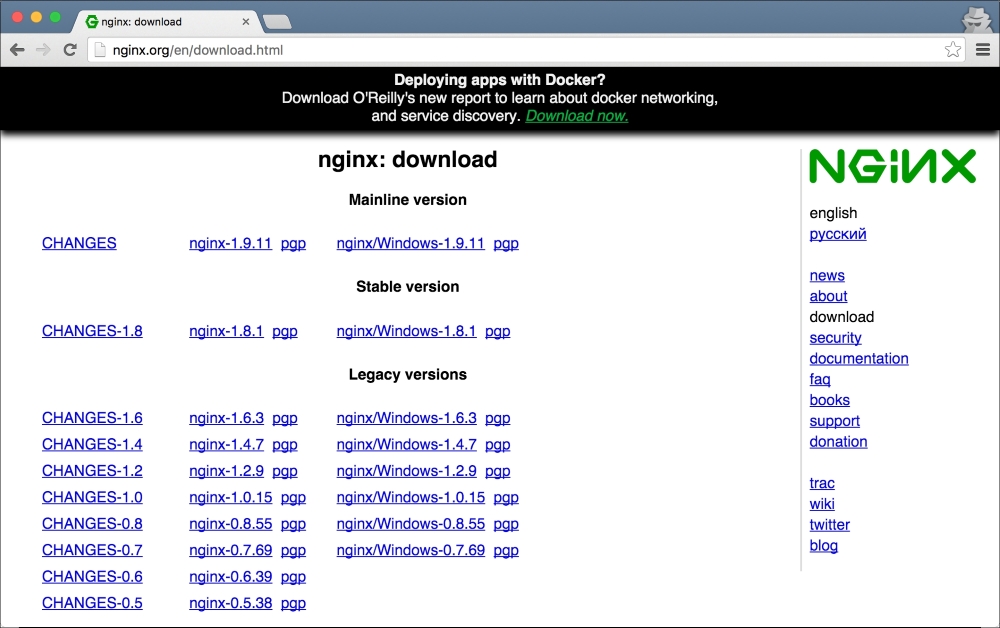
The installation for Nginx is almost identical to the PHP 7 one. First, download the ZIP file from http://nginx.org/en/download.html. At the time of writing, the versions available are as follows:

Installing Nginx

You can safely download the mainline version 1.9.10 or a later one if it is stable. Once the file is downloaded, uncompress it in C:\nginx and run the following commands to start the web server:

$ cd nginx
$ start nginx

Installing Composer

To finish with the setup, we need to install Composer. To go for the automatic installation, just download the installer from https://getcomposer.org/Composer-Setup.exe. Once downloaded, execute it in order to install Composer on your system and to update your PATH environment variable.

Visually different images
CONTINUE READING
83
Tech Concepts
36
Programming languages
73
Tech Tools
Icon Unlimited access to the largest independent learning library in tech of over 8,000 expert-authored tech books and videos.
Icon Innovative learning tools, including AI book assistants, code context explainers, and text-to-speech.
Icon 50+ new titles added per month and exclusive early access to books as they are being written.
Learning PHP 7
notes
bookmark Notes and Bookmarks search Search in title playlist Add to playlist download Download options font-size Font size

Change the font size

margin-width Margin width

Change margin width

day-mode Day/Sepia/Night Modes

Change background colour

Close icon Search
Country selected

Close icon Your notes and bookmarks

Confirmation

Modal Close icon
claim successful

Buy this book with your credits?

Modal Close icon
Are you sure you want to buy this book with one of your credits?
Close
YES, BUY

Submit Your Feedback

Modal Close icon
Modal Close icon
Modal Close icon