Sign In Start Free Trial
Account

Add to playlist

Create a Playlist

Modal Close icon
You need to login to use this feature.
  • Book Overview & Buying Modular Programming with PHP 7
  • Table Of Contents Toc
Modular Programming with PHP 7

Modular Programming with PHP 7

By : Branko Ajzele
5 (1)
close
close
Modular Programming with PHP 7

Modular Programming with PHP 7

5 (1)
By: Branko Ajzele

Overview of this book

Modular design techniques help you build readable, manageable, reusable, and more efficient codes. PHP 7, which is a popular open source scripting language, is used to build modular functions for your software. With this book, you will gain a deep insight into the modular programming paradigm and how to achieve modularity in your PHP code. We start with a brief introduction to the new features of PHP 7, some of which open a door to new concepts used in modular development. With design patterns being at the heart of all modular PHP code, you will learn about the GoF design patterns and how to apply them. You will see how to write code that is easy to maintain and extend over time with the help of the SOLID design principles. Throughout the rest of the book, you will build different working modules of a modern web shop application using the Symfony framework, which will give you a deep understanding of modular application development using PHP 7.
Table of Contents (14 chapters)
close
close
Lock Free Chapter
1
1. Ecosystem Overview
13
Index

Implementation


We start off by creating a new module called Foggyline\CatalogBundle. We do so with the help of the console, by running the command as follows:

php bin/console generate:bundle --namespace=Foggyline/CatalogBundle

The command triggers an interactive process that asks us several questions along the way, as shown in the following screenshot:

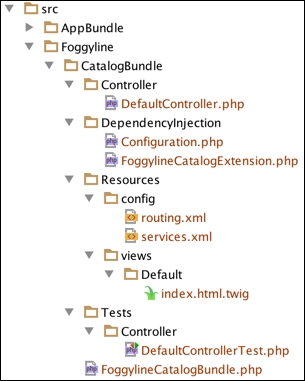
Once done, the following structure is generated for us:

If we now take a look at the app/AppKernel.php file, we would see the following line under the registerBundles method:

new Foggyline\CatalogBundle\FoggylineCatalogBundle()

Similarly, the app/config/routing.yml has the following route definition added to it:

foggyline_catalog:
  resource: "@FoggylineCatalogBundle/Resources/config/routing.xml"
  prefix: /

Here we need to change prefix: / into prefix: /catalog/, so we don't collide with core module routes. Leaving it as prefix: / would simply overrun our core AppBundle and output Hello World! from the src/Foggyline/CatalogBundle/Resources/views...

CONTINUE READING
83
Tech Concepts
36
Programming languages
73
Tech Tools
Icon Unlimited access to the largest independent learning library in tech of over 8,000 expert-authored tech books and videos.
Icon Innovative learning tools, including AI book assistants, code context explainers, and text-to-speech.
Icon 50+ new titles added per month and exclusive early access to books as they are being written.
Modular Programming with PHP 7
notes
bookmark Notes and Bookmarks search Search in title playlist Add to playlist download Download options font-size Font size

Change the font size

margin-width Margin width

Change margin width

day-mode Day/Sepia/Night Modes

Change background colour

Close icon Search
Country selected

Close icon Your notes and bookmarks

Confirmation

Modal Close icon
claim successful

Buy this book with your credits?

Modal Close icon
Are you sure you want to buy this book with one of your credits?
Close
YES, BUY

Submit Your Feedback

Modal Close icon
Modal Close icon
Modal Close icon