Sign In Start Free Trial
Account

Add to playlist

Create a Playlist

Modal Close icon
You need to login to use this feature.
  • Book Overview & Buying Moodle Theme Development
  • Table Of Contents Toc
Moodle Theme Development

Moodle Theme Development

By : Silvina Paola Hillar
1 (1)
close
close
Moodle Theme Development

Moodle Theme Development

1 (1)
By: Silvina Paola Hillar

Overview of this book

Theming is one of the main features of Moodle, and it can be used to customize your online courses and make them look exactly how you want them to,according to your target audience. If you have been looking for a book that will help you develop Moodle themes that you are proud of, and that your students will enjoy, then this is the book for you. We start off by introducing Moodle 3 and explaining what it is, how it works, and what tools you might need to create a stunning Moodle theme. We then show you how to choose and change the pre-installed Moodle themes in detailed steps, and explain what Moodle themes are and how they work. Next, we show you how to change an existing theme and test the changes that you have made. You can not only plan the customization of theme, but also tailor it using advanced Moodle theming processes; this book is your one-stop guide to creating your own personalized Moodle 3 theme.
Table of Contents (12 chapters)
close
close

Using HTML tags to define colors


HTML is found on all those pages that we find on the Internet. What we see on the screen has HTML code behind it. It also includes font colors, therefore we can change the color of text using HTML tags.

HTML tags are a bit complex. But we do not need to master the HTML standard in order to change colors. We can change colors using HTML code in a simple way. We can use a dynamic HTML color-code chart or an HTML code picker, such as the ones offered by the HTML Color Codes website: http://html-color-codes.info/ .

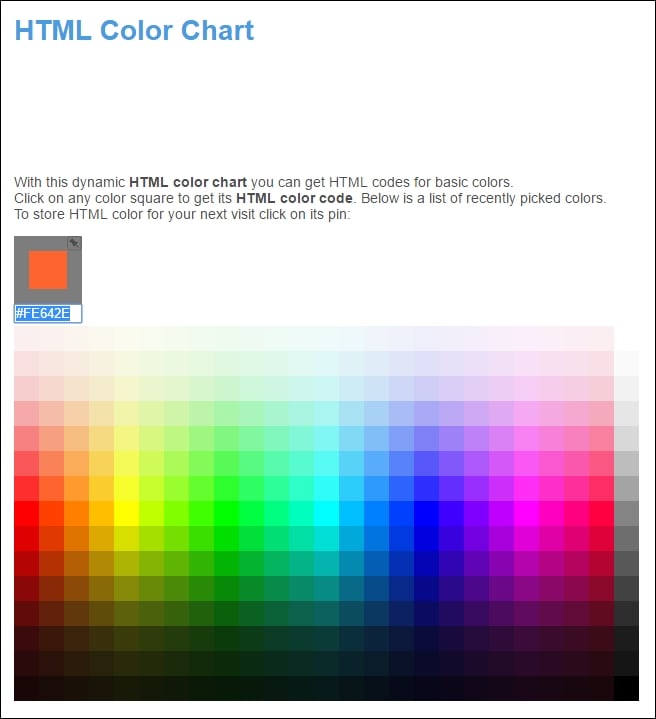
We can click on one of the color boxes in the chart and the site will display the selected color code, as shown in the following screenshot:

In this case, the selected color code is #FE642E. HTML codes define a color using a symbol (#) and a group of three two-digit hexadecimal numbers. Thus, we will see the # followed by six letters (A-F) or numbers (0-9). The three two-digit hexadecimal numbers represent the intensity of the red, green, and blue...

CONTINUE READING
83
Tech Concepts
36
Programming languages
73
Tech Tools
Icon Unlimited access to the largest independent learning library in tech of over 8,000 expert-authored tech books and videos.
Icon Innovative learning tools, including AI book assistants, code context explainers, and text-to-speech.
Icon 50+ new titles added per month and exclusive early access to books as they are being written.
Moodle Theme Development
notes
bookmark Notes and Bookmarks search Search in title playlist Add to playlist font-size Font size

Change the font size

margin-width Margin width

Change margin width

day-mode Day/Sepia/Night Modes

Change background colour

Close icon Search
Country selected

Close icon Your notes and bookmarks

Confirmation

Modal Close icon
claim successful

Buy this book with your credits?

Modal Close icon
Are you sure you want to buy this book with one of your credits?
Close
YES, BUY

Submit Your Feedback

Modal Close icon
Modal Close icon
Modal Close icon