Sign In Start Free Trial
Account

Add to playlist

Create a Playlist

Modal Close icon
You need to login to use this feature.
  • Book Overview & Buying Server-Side Enterprise Development with Angular
  • Table Of Contents Toc
Server-Side Enterprise Development with Angular

Server-Side Enterprise Development with Angular

By : Borggreve
close
close
Server-Side Enterprise Development with Angular

Server-Side Enterprise Development with Angular

By: Borggreve

Overview of this book

With the help of Server-Side Enterprise Development with Angular, equip yourself with the skills required to create modern, progressive web applications that load quickly and efficiently. This fast-paced book is a great way to learn how to build an effective UX by using the new features of Angular 7 beta, without wasting efforts in searching for referrals. To start off, you'll install Angular CLI and set up a working environment, followed by learning to distinguish between the container and presentational components. You'll explore advanced concepts such as making requests to a REST API from an Angular application, creating a web server using Node.js and Express, and adding dynamic metadata. You'll also understand how to implement and configure a service worker using Angular PWA and deploy the server-side rendered app to the cloud. By the end of this book, you'll have developed skills to serve your users views that load instantly, while reaping all the SEO benefits of improved page indexing.
Table of Contents (5 chapters)
close
close

Creating a New Application

Now that we have installed and configured Angular CLI, we will start by generating a new application.

Running the ng new command will do the following:

  1. Create a folder called angular-social.
  2. Create a new application inside this folder.
  3. Add a routing module (because of the --routing flag).
  4. Run npm install inside this folder to install the dependencies.
  5. Run git init to initialize a new Git repository.

The following is the folder structure of an Angular CLI app:

  • src: This folder contains the source files for the application.
  • src/app/: This folder contains the application files.
  • src/assets/: This folder contains the static assets we can use in the application (such as images).
  • src/environments/: This folder contains the definition of the default environments of the application.
  • e2e: This folder contains the end-to-end tests for the application.

Exercise 2: Creating a New Application

In this exercise, we will create a new application. Follow these steps to complete this exercise:

  1. Open the terminal and navigate to the workspace directory where you want to work on the application:
    cd dev
  2. Inside the workspace directory, invoke the ng command, as follows:
    ng new angular-social
  3. Answer Y to the question about generating a routing module.
  4. For the stylesheet format, we will select CSS.

    The application will be generated using these options in the angular-social directory, as shown in the following screenshot:
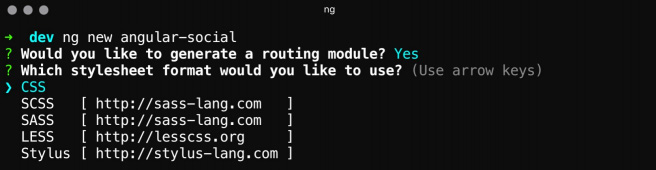
Figure 1.2: Creating a new application

Exercise 3: Starting the Development Server

In this exercise, we will start the development server. Follow these steps to complete this exercise:

  1. Open the terminal and enter the working directory:
    cd angular-social
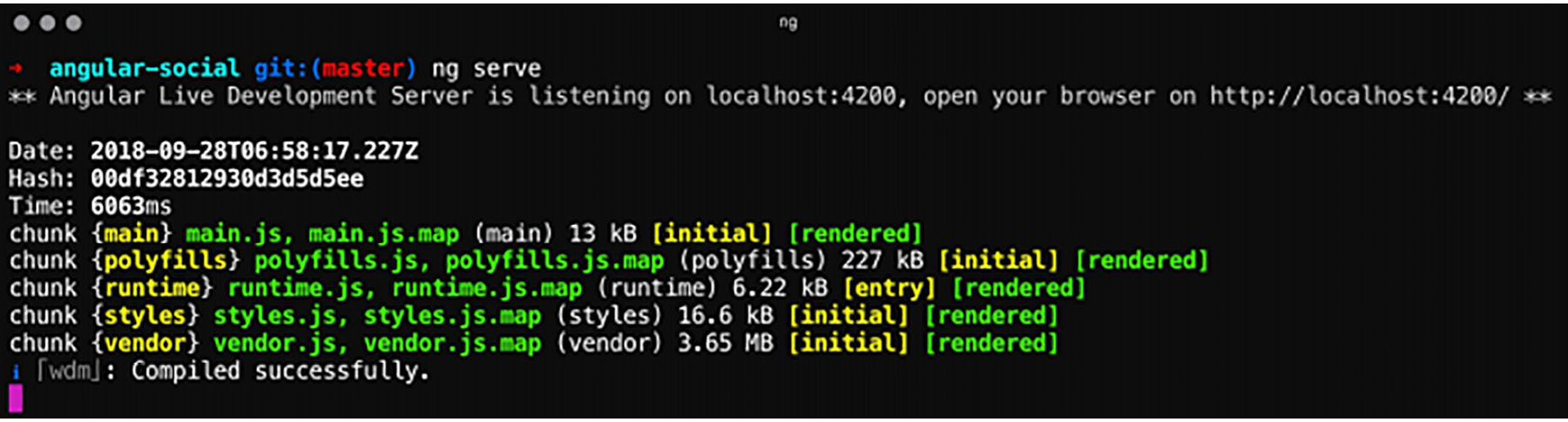
  2. Use ng serve to start the development server:
    cd angular-social
    ng serve
Figure 1.3: Serving the application

Exercise 4: Browsing to the Application

In this exercise, we will navigate to the default page of our application. Follow these steps to complete this exercise:

  1. Open your browser and navigate to http://localhost:4200/.
  2. You should be greeted with a default page that says Welcome to angular-social!:
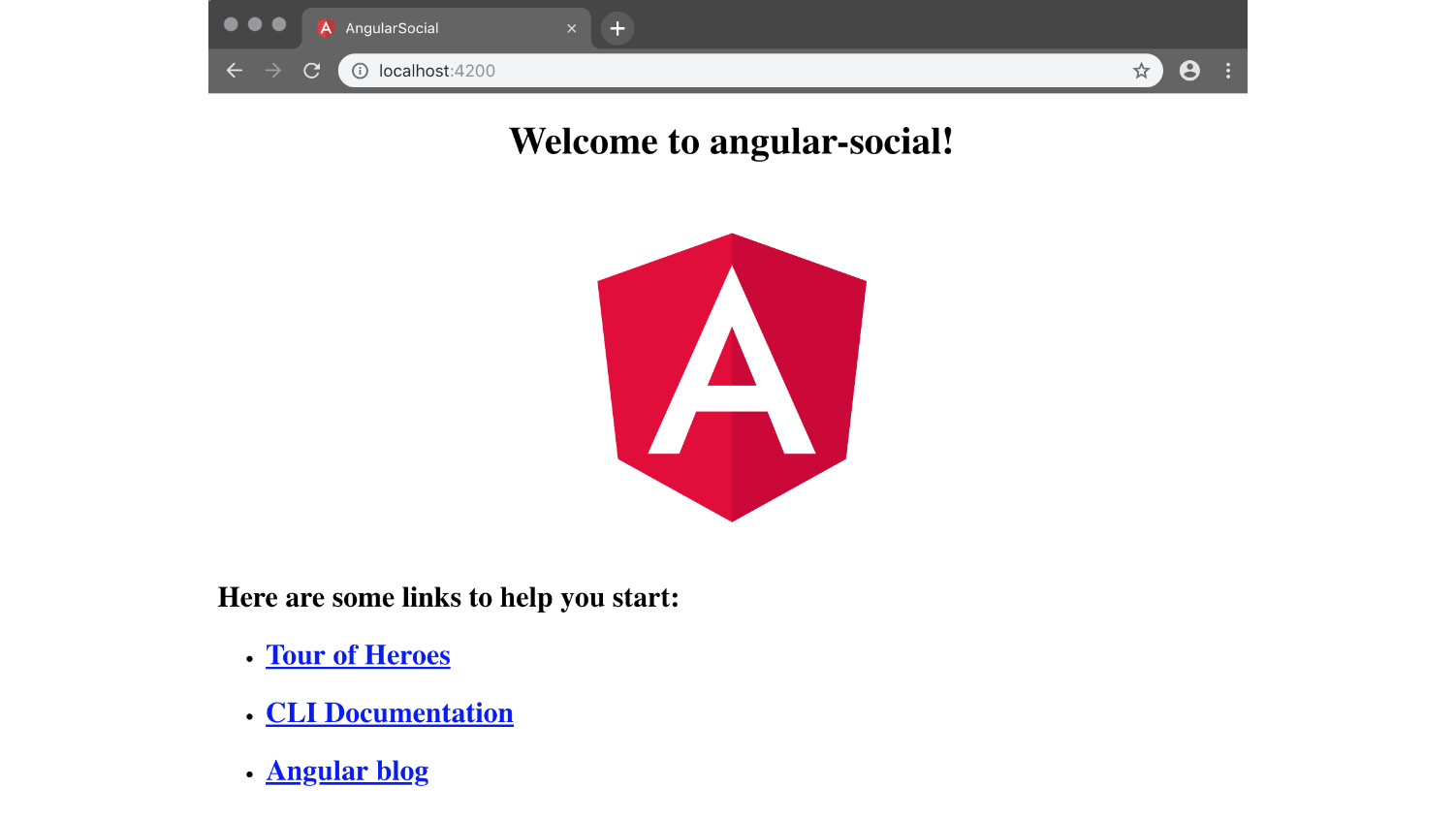
Figure 1.4: Browsing to the application
CONTINUE READING
83
Tech Concepts
36
Programming languages
73
Tech Tools
Icon Unlimited access to the largest independent learning library in tech of over 8,000 expert-authored tech books and videos.
Icon Innovative learning tools, including AI book assistants, code context explainers, and text-to-speech.
Icon 50+ new titles added per month and exclusive early access to books as they are being written.
Server-Side Enterprise Development with Angular
notes
bookmark Notes and Bookmarks search Search in title playlist Add to playlist font-size Font size

Change the font size

margin-width Margin width

Change margin width

day-mode Day/Sepia/Night Modes

Change background colour

Close icon Search
Country selected

Close icon Your notes and bookmarks

Confirmation

Modal Close icon
claim successful

Buy this book with your credits?

Modal Close icon
Are you sure you want to buy this book with one of your credits?
Close
YES, BUY

Submit Your Feedback

Modal Close icon
Modal Close icon
Modal Close icon