Sign In Start Free Trial
Account

Add to playlist

Create a Playlist

Modal Close icon
You need to login to use this feature.
  • Book Overview & Buying ASP.NET Core 5 and Angular
  • Table Of Contents Toc
ASP.NET Core 5 and Angular

ASP.NET Core 5 and Angular - Fourth Edition

By : Valerio De Sanctis
4.9 (17)
close
close
ASP.NET Core 5 and Angular

ASP.NET Core 5 and Angular

4.9 (17)
By: Valerio De Sanctis

Overview of this book

Learning full-stack development calls for knowledge of both front-end and back-end web development. ASP.NET Core 5 and Angular, Fourth Edition will enhance your ability to create, debug, and deploy efficient web applications using ASP.NET Core and Angular. This revised edition includes coverage of the Angular routing module, expanded discussion on the Angular CLI, and detailed instructions for deploying apps on Azure, as well as both Windows and Linux. Taking care to explain and challenge design choices made throughout the text, Valerio teaches you how to build a data model with Entity Framework Core, alongside utilizing the Entity Core Fluent API and EntityTypeConfiguration class. You’ll learn how to fetch and display data and handle user input with Angular reactive forms and front-end and back-end validators for maximum effect. Later, you will perform advanced debugging and explore the unit testing features provided by xUnit.net (.NET 5) and Jasmine, as well as Karma for Angular. After adding authentication and authorization to your apps, you will explore progressive web applications (PWAs), learning about their technical requirements, testing, and converting SWAs to PWAs. By the end of this book, you will understand how to tie together the front end and back end to build and deploy secure and robust web applications.
Table of Contents (15 chapters)
close
close
13
Other Books You May Enjoy
14
Index

Creating a new app with the Angular CLI

In the previous sections, we've spent a good amount of time reviewing and learning the structure of the sample Angular app created by Visual Studio's ASP.NET and Angular default template. However, there are other – and arguably even better – ways to create a sample Angular app from scratch; as a matter of fact, the approach recommended by the Angular development team is entirely based on creating the app through the Angular Command-Line Interface, better known as the Angular CLI.

For reasons of space, we'll only scratch the surface of the Angular CLI throughout the whole book, limiting its usage to what we need here and there. Those who want to know more about this powerful tool can take a look at the following URL: https://cli.angular.io/

In this paragraph, we'll see how to take this alternative route, so that we can compare the resulting apps and highlight their similarities and differences. More specifically, here's what we're going to do:

  • Install the Angular CLI (unless we've done that already)
  • Create a new Angular app using the ng create command
  • Compare the Angular CLI generated source code files with those generated by Visual Studio
  • Modify the .NET's Startup.cs file so that we can choose which Angular app to run
  • Take a look at the alternative Angular app

Are we ready? Let's do this!

Installing the Angular CLI

If we haven't installed the Angular CLI yet, we can do so using the following command:

> npm install -g @angular/[email protected]

The -g option will ensure that the CLI is installed globally, which will allow us to run the ng command-line tool in any folder; the @11.0.1 at the end will force npm to install the specific version used by this book.

Those who are bold enough to use the latest version can do that by running the following command:

npm install -g @angular/cli@latest

However, since we'll use the CLI to create a new Angular app that we'll mostly use for code review, it's strongly advisable to install the specific version used by this book.

Creating a new Angular app

When the Angular CLI has been installed, open a command prompt and navigate to the root-level folder of our existing HealthCheck app, such as /Projects/HealthCheck/.

Once there, issue the following command:

> ng new HealthCheck

This command will start a terminal wizard that will ask you the following questions:

Do you want to enforce stricter type checking and stricter bundle budgets in the workspace? This setting helps improve maintainability and catch bugs ahead of time. For more information, see https://angular.io/strict.

Answer NO by typing the N key.

Would you like to add Angular routing?

Answer YES by typing the Y key.

Which stylesheet format would you like to use? (use the arrow keys)

Select SCSS using the keyboard's arrow keys.

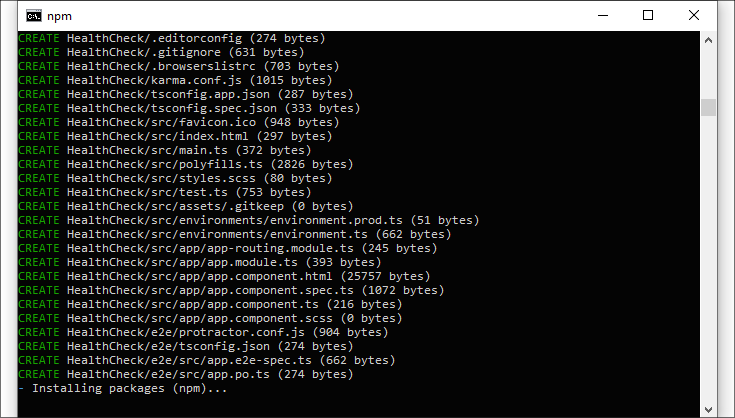
Right after that, the code generation process will start, with all the required npm packages being downloaded and installed accordingly:

Text

Description automatically generated

Figure 2.13: Creating a new Angular app

Wait for the tool to complete the task, and then do the following:

  • Type cd HealthCheck to enter the newly created folder
  • Execute the npm install and npm update commands to update the npm packages

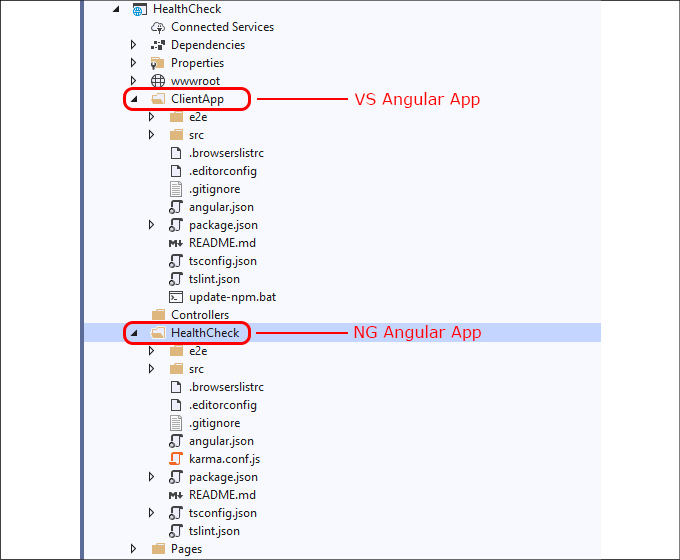
At the end of these tasks, reload your Visual Studio project and include the new /HealthCheck/ folder so that you'll be able to access it from the VS GUI, as shown in the following screenshot:

Immagine che contiene screenshot

Descrizione generata automaticamente

Figure 2.14: Examining our VS and NG Angular app folders

Now we have two differently generated Angular apps that we can compare; for the sake of convenience, we'll call them the VS app (Visual Studio app) and the NG app (Angular CLI app) from now on.

Comparing the Angular apps

If we take a look at the filesystem structure, we'll immediately be able to see a lot of similarities between the two apps: both of them feature roughly the same set of configuration files, with some minor differences related to the folder nesting level. For example, the NG app has the karma.conf.js file and all the various tsconfig.json files in the root folder, while the VS app has them within the /src/ folder, and so on. However, for the most part, the two apps seem very similar in terms of overall structure: this is definitely a good thing, because it means that our front-end code review is still valid!

If we take a closer look and start to compare the various file contents, we'll see that the major differences are in the following files:

  • package.json, which will potentially contain different package versions (the Angular CLI command will always use the latest Angular version available)
  • tsconfig.json, which will definitely contain some small differences in terms of TypeScript configuration and won't likely have the angularCompilerOptions section that we've added early on
  • All the files contained in the /app/ folder, due to the fact that the two sample apps have a very different look and feature set
  • The NG app features a separate app-routing.module.ts file (AppRoutingModule) that contains Angular's RouterModule, while the VS app implements the routing patterns within the main app.module.ts file (AppModule).

Loading and configuring the router in a separate, top-level module dedicated to routing and imported by the root AppModule has been an Angular best practice since Angular 10. Hence, we can definitely say that the NG app has a better approach; we'll use it to our advantage later on.

Luckily enough, none of these differences will prevent our project from running, as we'll be able to see in a short while.

Updating the Startup.cs file

If we want to launch the NG app instead of the VS app, we need to perform some changes to the Startup.cs file, which, as we know, is responsible for loading the front-end.

Open that file, scroll down to the ConfigureServices method, and change the following line (line 27 or so):

configuration.RootPath = "ClientApp/dist";

in the following way:

configuration.RootPath = "HealthCheck/dist";

Right after that, scroll down to the Configure method and do the same with the following line (line 66 or so):

spa.Options.SourcePath = "ClientApp";

Change it as follows:

spa.Options.SourcePath = "HealthCheck";

Alternatively, you can declare a new ClientApp read-only variable at the top of the file:

public class Startup
{
    /// <summary>
    /// The name of the folder that hosts the Angular app
    /// </summary>
    public static readonly string ClientApp = "HealthCheck";
[...]

And then change the above literals into more convenient references in the following way:

configuration.RootPath = string.Format("{0}/dist", ClientApp);
[...]
spa.Options.SourcePath = ClientApp;

Both of these approaches achieve what we want: they tell ASP.NET to run the NG app instead of the VS app.

Testing the NG Angular app

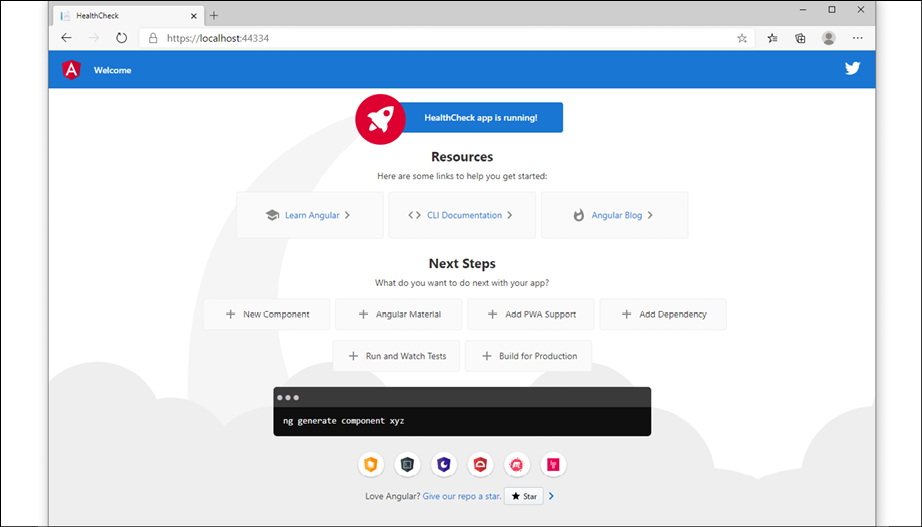
Let's now take a look at the NG app by hitting F5 to issue a debug run. If we've done everything properly, we should be greeted by the following welcome screen:

Immagine che contiene screenshot

Descrizione generata automaticamente

Figure 2.15: Testing the Angular app

Here we go: truth be told, the app created by the Angular CLI looks much prettier than the Visual Studio sample!

However, for the sake of simplicity, we'll just revert the changes that we just made to the Startup.cs file and switch back to the /ClientApp/, which will also be the app that we'll be using in the next chapters.

Those who want to keep using the new NG app are free to do that. All the code samples, updates and exercises that we'll encounter throughout the whole book are fully compatible with both apps… after all, we've just seen that they're basically the same thing! The only real difference will involve some minor path-related differences, which shouldn't be an issue for most readers. That said, the choice is yours: if you don't mind such additional work and a minor risk of headaches, you might as well stay with the NG app and keep your Startup.cs file as it is, otherwise switch back to the ClientApp literal before going further.

CONTINUE READING
83
Tech Concepts
36
Programming languages
73
Tech Tools
Icon Unlimited access to the largest independent learning library in tech of over 8,000 expert-authored tech books and videos.
Icon Innovative learning tools, including AI book assistants, code context explainers, and text-to-speech.
Icon 50+ new titles added per month and exclusive early access to books as they are being written.
ASP.NET Core 5 and Angular
notes
bookmark Notes and Bookmarks search Search in title playlist Add to playlist download Download options font-size Font size

Change the font size

margin-width Margin width

Change margin width

day-mode Day/Sepia/Night Modes

Change background colour

Close icon Search
Country selected

Close icon Your notes and bookmarks

Confirmation

Modal Close icon
claim successful

Buy this book with your credits?

Modal Close icon
Are you sure you want to buy this book with one of your credits?
Close
YES, BUY

Submit Your Feedback

Modal Close icon
Modal Close icon
Modal Close icon