-
Book Overview & Buying
-
Table Of Contents
Angular Cookbook - Second Edition
By :
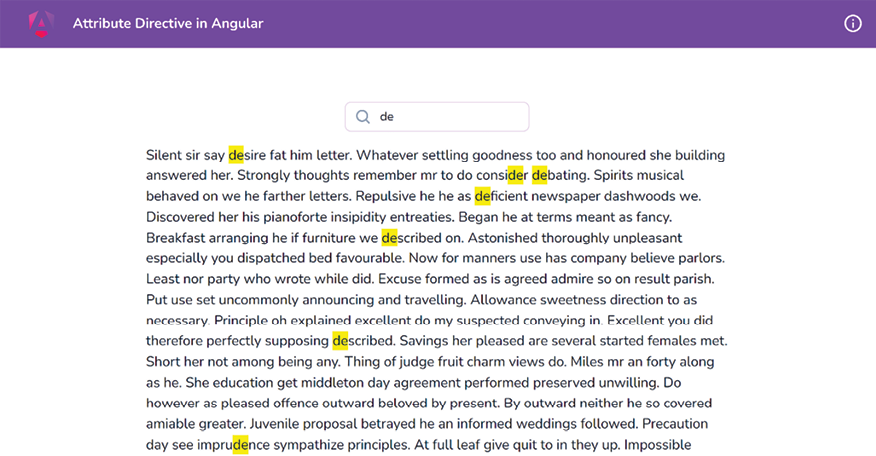
In this recipe, you’ll work with an Angular attribute directive named highlight. With this directive, you’ll be able to search words and phrases within a paragraph and highlight them on the go. The whole paragraph’s container background will also be changed when we have a search in action. For example, by using the following code:
<p class="text-content max-w-2xl m-auto" appHighlight
[highlightText]="'de'">
<!--text here -->
The result will appear as an output as shown in Figure 2.1:

Figure 2.1: The result when using the highlight directive
The app that we are going to work with resides in start/apps/chapter02/ng-attribute-directive inside the cloned repository:
npm run serve ng-attribute-directive
This should open the app in a new browser tab, and you should see the following:

Figure 2.2: ng-attribute-directive app running on http://localhost:4200
The application has a search input and a paragraph of text. We want to be able to type a search query in the input so that we can highlight and find all the matching occurrences in the paragraph. Here are the steps to achieve this:
searchText in the app.component.ts file that we’ll use as a model for the search-text input:
...
export class AppComponent {
searchText = '';
}
searchText property in the template, i.e., in the app.component.html file, with the search input as an ngModel, as follows:
...
<div class="content" role="main">
...
<input [(ngModel)]="searchText" type="text"
placeholder="Quick Search..." class="pr-4 !pl-10
py-2">
</div>
ngModel doesn’t work yet. This is because we’re missing the FormsModule in our application. Let’s import it into the app.component.ts file as follows:
...
import { FormsModule } from '@angular/forms';
@Component({
selector: 'app-root',
templateUrl: './app.component.html',
standalone: true,
styleUrls: ['./app.component.scss'],
imports: [CommonModule, RouterModule, FormsModule],
})
export class AppComponent {
searchText = '';
}
highlight by using the following command from the workspace root:
cd start && nx g directive highlight --directory apps/chapter02/ng-attribute-directive/src/app --standalone
If asked, choose the @nx/angular:directive schematics and choose the “As provided” action. The preceding command generates a standalone directive that has a selector called appHighlight. See the How it works… section for why that happens, and for a brief explanation of the standalone API.
AppComponent (from app.component.html)—one for the search text and another for the highlight color. The code should look like this in the highlight.directive.ts file:
import { Directive, Input } from '@angular/core';
@Directive({
selector: '[appHighlight]',
standalone: true
})
export class HighlightDirective {
@Input() highlightText = '';
@Input() highlightColor = 'yellow';
}
appHighlight directive in app.component.html and pass the searchText model from there to the appHighlight directive as follows:
<div class="content" role="main">
...
<p class="text-content" appHighlight
[highlightText]="searchText">
...
</p>
</div>
searchText input, using ngOnChanges. Please see the Using ngOnChanges to intercept input property changes recipe in Chapter 1, Winning Component Communication, for how to listen to input changes. For now, we’ll only do a console.log when the input changes. Let’s update the highlight.directive.ts as follows:
import { Directive, Input, OnChanges, SimpleChanges } from '@angular/core';
...
export class HighlightDirective implements OnChanges {
@Input() highlightText = '';
@Input() highlightColor = 'yellow';
ngOnChanges(changes: SimpleChanges) {
if (changes['highlightText']?.firstChange) {
return;
}
const { currentValue } = changes['highlightText'];
console.log({ currentValue });
}
}
If you type in the search input and see the console logs, you’ll see the new value being logged whenever you change the value.
ElementRef service so that we can get access to the template element on which our directive is applied. Here’s how we’ll do this:
import { Directive, Input, SimpleChanges, OnChanges, ElementRef } from '@angular/core';
@Directive({
selector: '[appHighlight]'
})
export class HighlightDirective implements OnChanges {
@Input() highlightText = '';
@Input() highlightColor = 'yellow';
constructor(private el: ElementRef) { }
...
}
el element with a custom <span> tag with some hardcoded styles. Update your ngOnChanges code in highlight.directive.ts as follows, and see the result:
ngOnChanges(changes: SimpleChanges) {
if (changes.highlightText.firstChange) {
return;
}
const { currentValue } = changes.highlightText;
if (currentValue) {
const regExp = new RegExp(`(${currentValue})`,'gi')
this.el.nativeElement.innerHTML = this.el
.nativeElement.innerHTML.replace(regExp, `<span
style="background-color: ${this.highlightColor}"
>\$1</span>`)
}
}
TIP
You’ll notice that if you type a word, it will still show only one letter highlighted. That’s because whenever we replace the innerHTML property, we end up changing the original text. Let’s fix that in the next step.
originalHTML and assign an initial value to it on the first change. We’ll also use the originalHTML property while replacing the values:
...
export class HighlightDirective implements OnChanges {
@Input() highlightText = '';
@Input() highlightColor = 'yellow';
originalHTML = '';
constructor(private el: ElementRef) { }
ngOnChanges(changes: SimpleChanges) {
if (changes.highlightText.firstChange) {
this.originalHTML = this.el
.nativeElement.innerHTML;
return;
}
const { currentValue } = changes.highlightText;
if (currentValue) {
const regExp = new RegExp(`(${currentValue})`,'gi')
this.el.nativeElement.innerHTML = this.originalHTML
.replace(regExp, `<span style="background-color:
${this.highlightColor}">\$1</span>`)
}
}
}
originalHTML property when we remove our search query (when the search text is empty). In order to do so, let’s add an else condition, as follows:
...
export class HighlightDirective implements OnChanges {
...
ngOnChanges(changes: SimpleChanges) {
...
if (currentValue) {
const regExp = new RegExp(`(${currentValue})`,'gi')
this.el.nativeElement.innerHTML = this.originalHTML
.replace(regExp, `<span style="background-
color: ${this.highlightColor}">\$1</span>`)
} else {
this.el.nativeElement.innerHTML =
this.originalHTML;
}
}
}
We created an attribute directive named highlight (appHighlight) that takes two inputs: highlightText and highlightColor. The directive listens to the input changes for the highlightText input using the SimpleChanges from the ngOnChanges life cycle hook by Angular. Every property in this SimpleChanges object is a SimpleChange object that contains the following properties:
previousValue: anycurrentValue: anyfirstChange: booleanisFirstChange(): booleanFirst, we make sure to save the original content of the target element by getting the attached element using the ElementRef service. We get it using the .nativeElement.innerHTML property on the element we apply the directive to. We save the initial value to the originalHTML property of the directive.
Whenever the input changes, we assign a replaced version of the originalHTML by replacing all the instances of the searched term in the paragraph with an additional HTML element (a <span> element). We also add the background color to this <span> element. The background color applied comes from the highlightColor input. You can modify it to highlight using a different color. Play around and make this example your own.
SimpleChange docs: https://angular.io/api/core/SimpleChangeChange the font size
Change margin width
Change background colour