-
Book Overview & Buying
-
Table Of Contents
Angular Cookbook - Second Edition
By :
In this recipe, you’ll write your first custom structural directive named showFor (or *appShowFor with the prefix). A structural directive is one that can add or remove elements from the DOM. So, with this directive, we will add the particular element to the DOM if a provided Boolean is true, and we will remove it after the specified time (provided as a number representing milliseconds).
The app that we are going to work with resides in start/apps/chapter02/ng-show-for-directive inside the cloned repository:
npm run serve ng-show-for-directive
This should open the app in a new browser tab, and you should see the following:

Figure 2.7: ng-show-for-directive app running on http://localhost:4200
cd start && nx g directive show-for --directory apps/chapter02/ng-show-for-directive/src/app/directives --standalone=false
If asked, choose the @nx/angular:component schematics and choose the “As provided” action.
*ngIf directive in the app.component.html file on the element with the class "dialog", we can use our *appShowFor directive:
...
<main class="content" role="main">
<button (click)="toggleDialog()">Toggle Dialog</button>
<div class="dialog" *appShowFor="showDialog">
<div class="dialog__heading">...</div>
<div class="dialog__body">...</div>
</div>
</main>
@Input properties inside the directive’s TypeScript file, one being a boolean property and one being a number. We’ll use a setter to intercept the Boolean value’s changes and will log the value to the console for now:
import { Directive, Input } from '@angular/core';
@Directive({
selector: '[appShowFor]',
})
export class ShowForDirective {
@Input() duration = 1500;
@Input() set appShowFor(value: boolean) {
console.log({ showForValue: value });
}
}

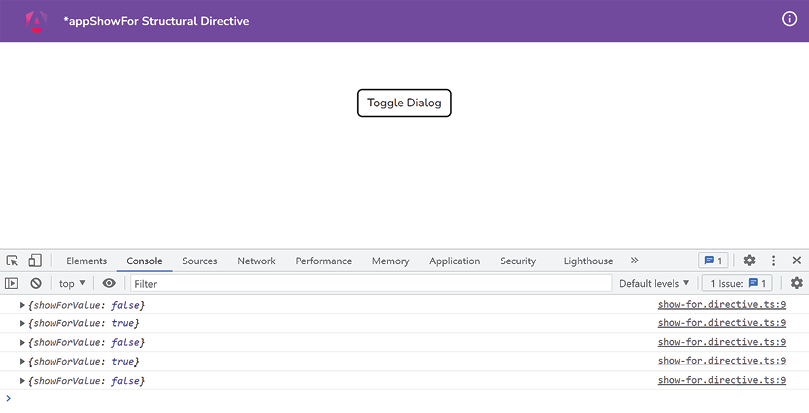
Figure 2.8: Console logs displaying changes for the appShowFor directive values
false and true respectively. For that, we first need the TemplateRef service and the ViewContainerRef service injected into the constructor of the if-not.directive.ts file. Let’s add these, as follows:
import { Directive, Input, TemplateRef, ViewContainerRef } from '@angular/core';
@Directive({
selector: '[appShowFor]'
})
export class ShowForDirective{
@Input() duration = 1500;
@Input() set appShowFor(value: boolean) {
console.log({ showForValue: value });
}
constructor(
private templateRef: TemplateRef<any>,
private viewContainerRef: ViewContainerRef
) {}
}
show method and we’ll call it when the value of the appShowFor property becomes true. The code should look as follows:
...
export class ShowForDirective {
@Input() duration = 1500;
@Input() set appShowFor(value: boolean) {
console.log({ showForValue: value });
if (value) {
this.show();
}
}
show() {
this.viewContainerRef.createEmbeddedView(
this.templateRef
);
}
constructor(...) {}
}
If you click the Toggle Dialog button now, you should be able to see the dialog as follows:

Figure 2.9: Dialog being shown using the show method
@Output() prop with an EventEmitter for this as we want the value of appShowFor that’s passed by the parent to be updated, instead of updating it within the directive. Modify the code as follows:
import { ... , EventEmitter } from '@angular/core';
...
export class ShowForDirective {
@Input() duration = 1500;
@Input() set appShowFor(value: boolean) {
...
}
@Output() elementHidden = new EventEmitter();
show() {...}
hide() {
this.viewContainerRef.clear();
}
constructor(...) {}
}
hide method there, let’s call it after the duration time saved in the duration property of the directive. This is so the dialog hides after that duration. Modify the code of the show method as follows:
show() {
this.viewContainerRef.createEmbeddedView(
this.templateRef
);
setTimeout(() => {
this.elementHidden.emit();
}, this.duration);
}
With this change, you’ll see that nothing happens if you click the Toggle Dialog button after the dialog is shown, i.e., it never gets hidden. For that, we need to listen to the elementHidden event emitter we just created.
app.component.html listen to the elementHidden event listener to change the value of the showDialog property as follows:
<div class="dialog" *appShowFor="showDialog"
(elementHidden)="toggleDialog()">
<div class="dialog__heading">
I am a Dialog
</div>
<div class="dialog__body">
And this is some random content
</div>
</div>
With this change, you’ll notice that it still doesn’t work. Yep! Because we need to call the hide method when the value of showDialog passed as the appShowFor prop is set to false.
hide method in the ShowForDirective (in the appShowFor property’s set method) when the value of appShowFor becomes false as follows:
@Input() set appShowFor(value: boolean) {
console.log({ showForValue: value });
if (value) {
this.show();
} else {
this.hide();
}
}
The thing is… this still won’t work because a structural directive in Angular can’t emit values. Or even if it does, the parent element won’t be able to listen to it. The following Stack Overflow question discusses why and links to an open GitHub issue in the Angular repository as well: https://stackoverflow.com/q/44235638.
app.component.html to use the directive in a different (expanded) way, as follows:
<main class="content" role="main">
<button (click)="toggleDialog()">Toggle Dialog</button>
<ng-template [appShowFor]="showDialog"
(elementHidden)="toggleDialog()">
<div class="dialog">
<div class="dialog__heading">
I am a Dialog
</div>
<div class="dialog__body">
And this is some random content
</div>
</div>
</ng-template>
</main>
The dialog should be hidden now. Yay! But wait. Try clicking the Toggle Dialog button lots of times quickly. You’ll see that the app goes crazy. That’s because we end up having too many setTimeout functions registered.
setTimeout if we toggle the dialog to manually hide it. Update the code for the ShowForDirective class as follows:
...
export class ShowForDirective {
...
timer!: ReturnType<typeof setTimeout>;
show() {
this.viewContainerRef.createEmbeddedView(
this.templateRef
);
this.timer = setTimeout(() => {
this.elementHidden.emit();
}, this.duration);
}
hide() {
clearTimeout(this.timer);
this.viewContainerRef.clear();
}
constructor(...) {}
}
Awesome! You’ll notice that even if you click the Toggle Dialog button fast and too many times, the app behaves correctly.
Structural directives in Angular are special for multiple reasons. First, they allow you to manipulate DOM elements—that is, not just showing and hiding but also adding and removing elements entirely from the DOM based on your needs. Moreover, they have the * prefix, which binds to all the magic Angular does behind the scenes. For example, Angular automatically provides the TemplateRef and ViewContainer for working with this directive. As an example, *ngIf and *ngFor are both structural directives that work behind the scenes with the <ng-template> directive containing the content you bind the directive to. They then create the required variables/properties for you in the scope of ng-template. In this recipe, we do the same. We use the TemplateRef service to access the <ng-template> directive that Angular creates for us behind the scenes, containing the host element to which our appShowFor directive is applied. We use the ViewContainerRef service to add the TemplateRef to the DOM via the createEmbeddedView method.
We do this when the value of the appShowFor property becomes true. Notice that we’re intercepting the property appShowFor using a setter. We learned about this in Chapter 1, Winning Components Communication. We then use a setTimeout to automatically notify the parent component that the value passed to the appShowFor property needs to be changed to false. We do this using an @Output() emitter named elementHidden. Notice that we’re not supposed to make it false within the directive. The parent component is supposed to do it and it will automatically reflect in the directive. Our directive is supposed to react to that change and hide (or remove) the TemplateRef from the ViewContainer. You can see that we do this in the hide method using the this.viewContainerRef.clear(); statement. One of the key things to learn from this recipe is that if we use syntactic sugar, i.e., *appShowFor, in the app.component.html, we can’t listen to the elementHidden event emitter. That’s because this is a quirk of Angular - there’s an open issue on GitHub about this (check the See also section). For this to work, we removed the syntactic sugar and expanded the syntax by using a <ng-template> to wrap our dialog’s HTML in step 11. Notice that we just used [appShowFor] to pass the showDialog variable instead of *appShowFor="showDialog". And we are also listening to the elementHidden event on the <ng-template> element itself.
Change the font size
Change margin width
Change background colour