Sign In Start Free Trial
Account

Add to playlist

Create a Playlist

Modal Close icon
You need to login to use this feature.
  • Book Overview & Buying Building SPAs with Django and HTML Over the Wire
  • Table Of Contents Toc
  • Feedback & Rating feedback
Building SPAs with Django and HTML Over the Wire

Building SPAs with Django and HTML Over the Wire

By : Andros Fenollosa
3.8 (6)
close
close
Building SPAs with Django and HTML Over the Wire

Building SPAs with Django and HTML Over the Wire

3.8 (6)
By: Andros Fenollosa

Overview of this book

The HTML over WebSockets approach simplifies single-page application (SPA) development and lets you bypass learning a JavaScript rendering framework such as React, Vue, or Angular, moving the logic to Python. This web application development book provides you with all the Django tools you need to simplify your developments with real-time results. You’ll learn state-of-the-art WebSocket techniques to realize real-time applications with minimal reliance on JavaScript. This book will also show you how to create a project with Docker from the ground up, test it, and deploy it on a server. You’ll learn how to create a project, add Docker, and discover development libraries, Django channels, and bidirectional communication, and from then, on you’ll create real projects of all kinds using HTML over WebSockets as a chat app or a blog with real-time comments. In addition, you’ll modernize your development techniques by moving from using an SSR model to creating web pages using WebSockets over HTML. With Django, you’ll be able to create SPAs with professional real-time projects where the logic is in Python. By the end of this Django book, you’ll be able to build real-time applications, as well as gaining a solid understanding of WebSockets with Django.
Table of Contents (14 chapters)
close
close
1
Part 1: Getting Started with Python
4
Part 2: WebSockets in Django
8
Part 3: HTML over WebSockets
11
Part 4: Simplifying the frontend with Stimulus

Installing Django

We already have a base with which to work with Python; now, it’s time to install the minimum dependencies and tools that will be practical in Django.

We will add the following content to requirements.txt, which is currently empty:

# Django
django===4.0
# Django Server
daphne===3.0.2
asgiref===3.4.1
# Manipulate images
Pillow===8.2.0
# Kit utilities
django-extensions===3.1.3
# PostgreSQL driver
psycopg2===2.9.1
# Django Channels
channels===3.0.4
# Redis Layer
channels_redis===3.2.0

You may not know some of them since they are part of the project that adds WebSocket to Django. Let’s review each one:

  • Django: This automates many important tasks, such as database connections, migrations, HTML rendering, sessions, and forms. In addition, being one of the most used and active frameworks, it gives us a high degree of security.
  • Daphne: An asynchronous server maintained by the Django team itself. We’ll need it to work with WebSocket, to emit or receive data without blocking the app.
  • asgiref: An ASGI library that needs Channels to work.
  • Pillow: The mandatory Django library for manipulating images.
  • django-extensions: A set of extensions that adds elements, such as jobs, script execution, database synchronization, and static storage in S3.
  • Psycopg2: The driver to connect to PostgreSQL, the database that we will use and is most recommended to use with Django.
  • Channels: Adds protocols and functionality for working with WebSocket to the heart of Django.
  • channels_redis: We must have a record of the connections that we have active and the groups to which they belong. Using a database that writes to the hard disk is an inefficient way to manage it. To solve this, we’ll connect with a Redis service later, as it works on volatile memory and is incredibly fast.

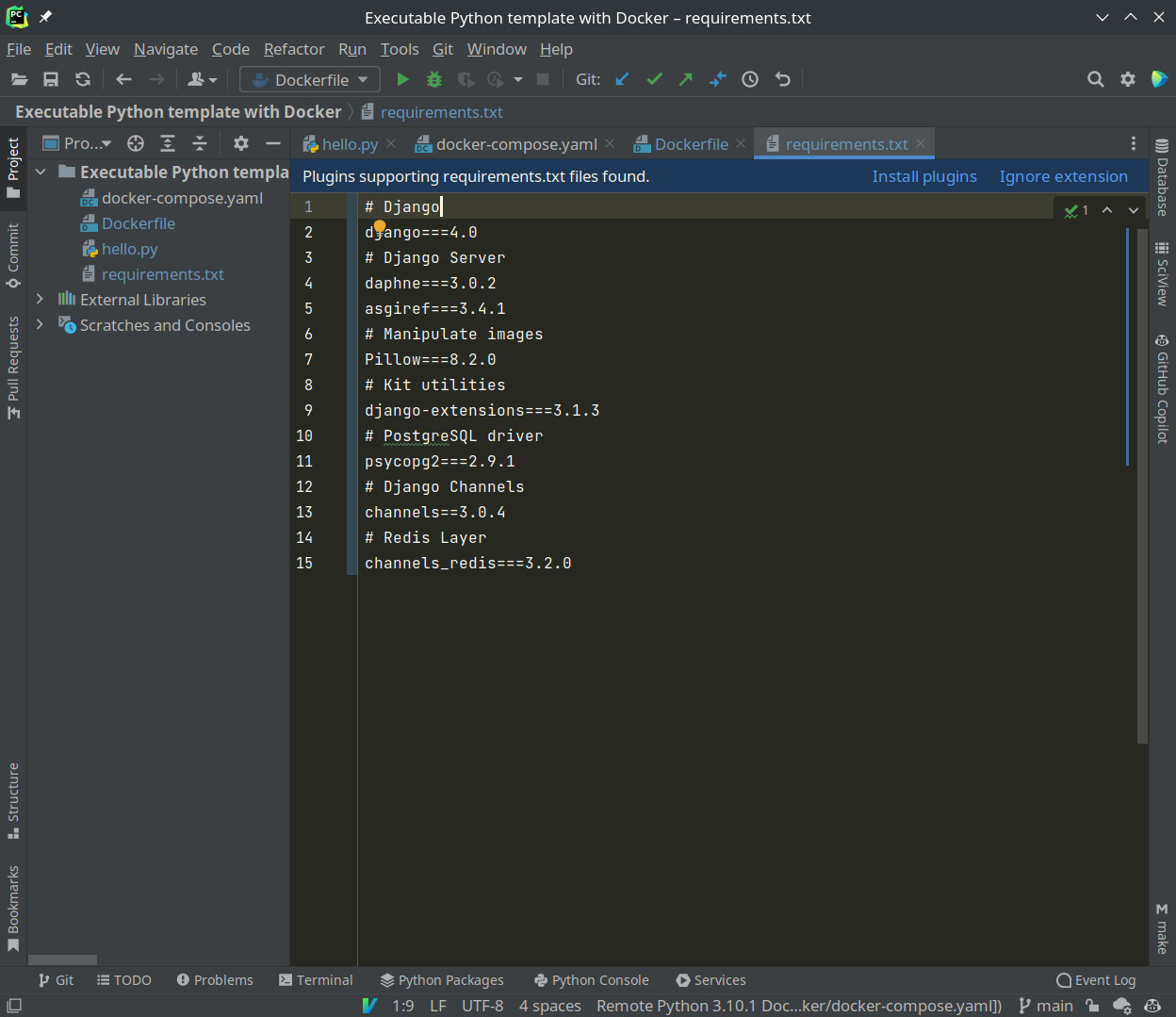
PyCharm may suggest you install a plugin, as shown in the following screenshot:

Figure 1.8 – PyCharm asking whether you want to install the new dependencies

Figure 1.8 – PyCharm asking whether you want to install the new dependencies

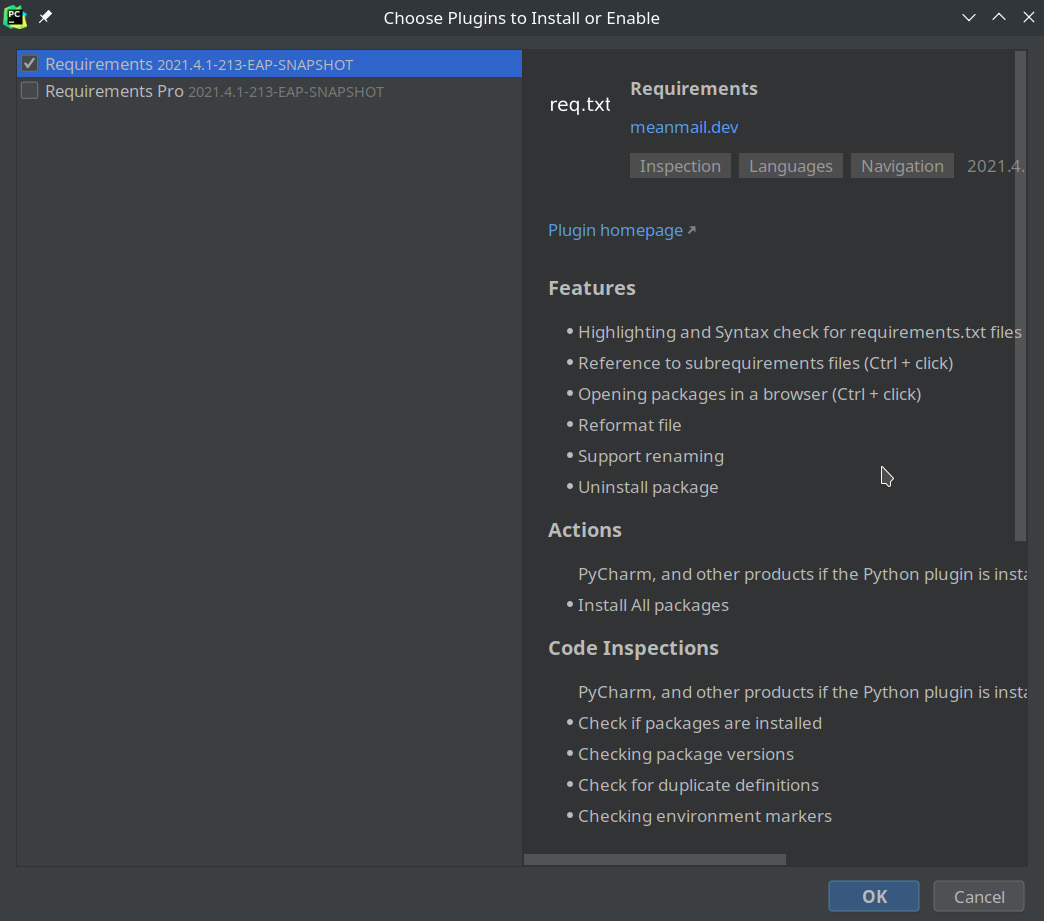
If you click on Install plugins, it will show you a window, like so:

Figure 1.9 – PyCharm asking whether you want to install the requirements plugin

Figure 1.9 – PyCharm asking whether you want to install the requirements plugin

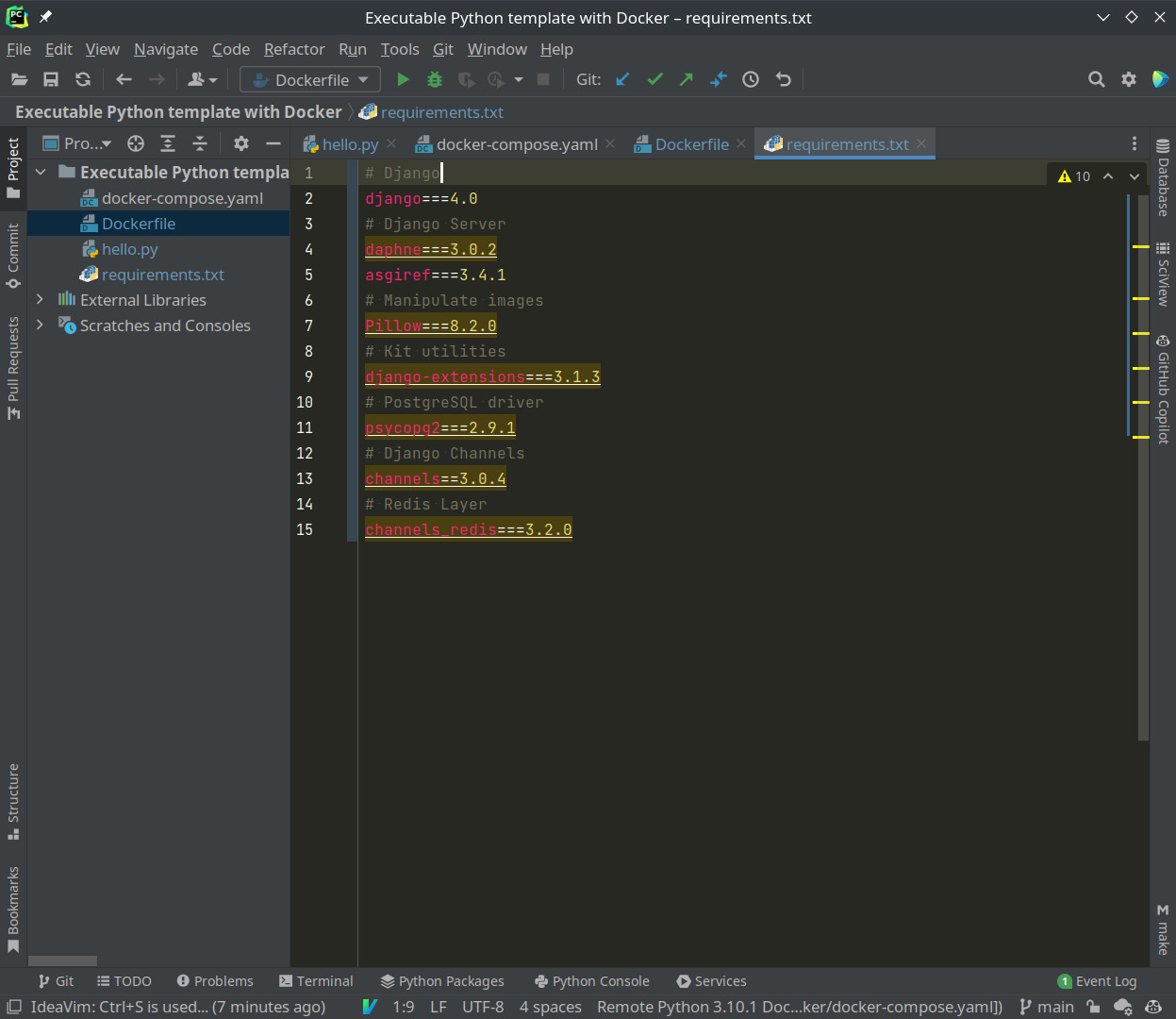
By clicking on the OK button, we can enjoy color codes for requirements.txt.

Figure 1.10 – Color codes thanks to the plugin

Figure 1.10 – Color codes thanks to the plugin

Now, we will recompile the image so that all the dependencies we have added are installed.

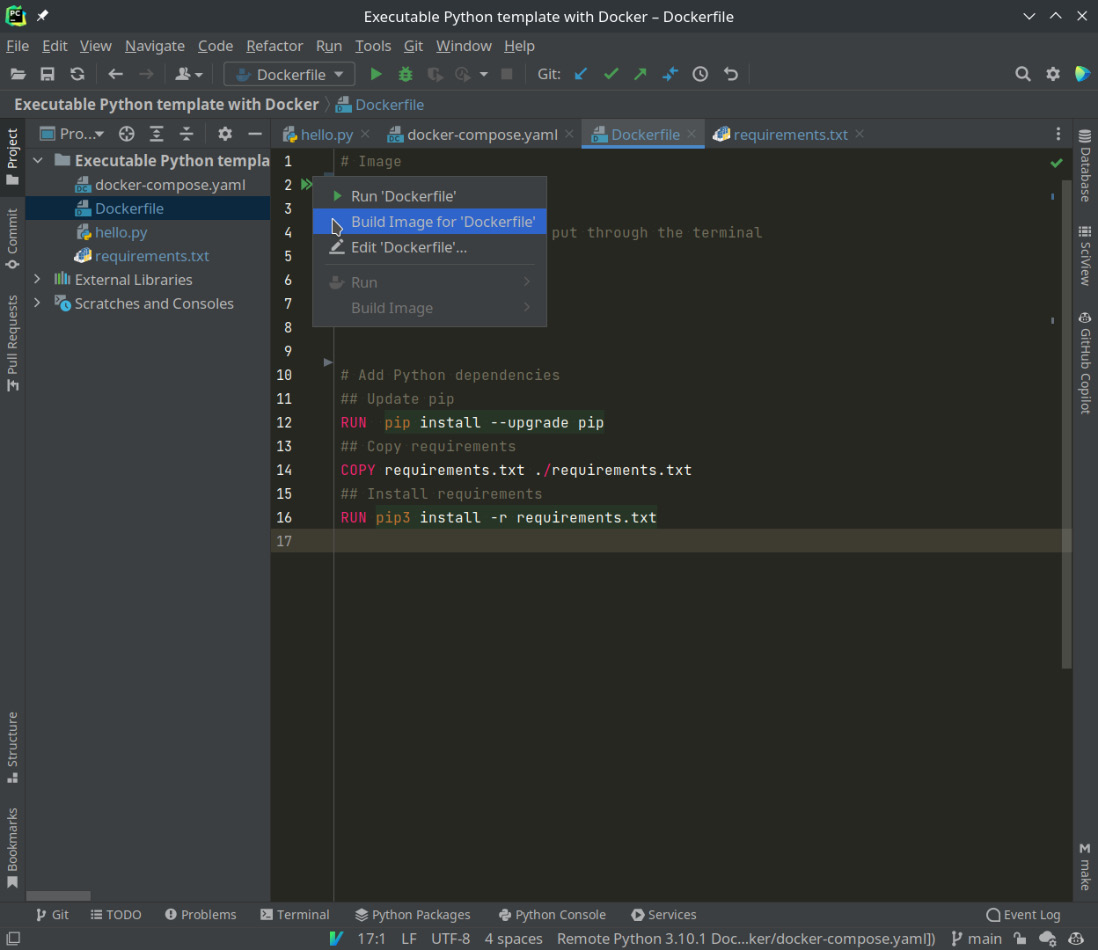
With PyCharm, this can be done in a visual way. Go to Dockerfile, right-click on the double arrow shown in the following screenshot, and select Build Image for ‘Dockerfile’:

Figure 1.11 – Compiling a Dockerfile image using PyCharm

Figure 1.11 – Compiling a Dockerfile image using PyCharm

If you are using the terminal or another editor, we will use docker-compose in the directory:

docker-compose build

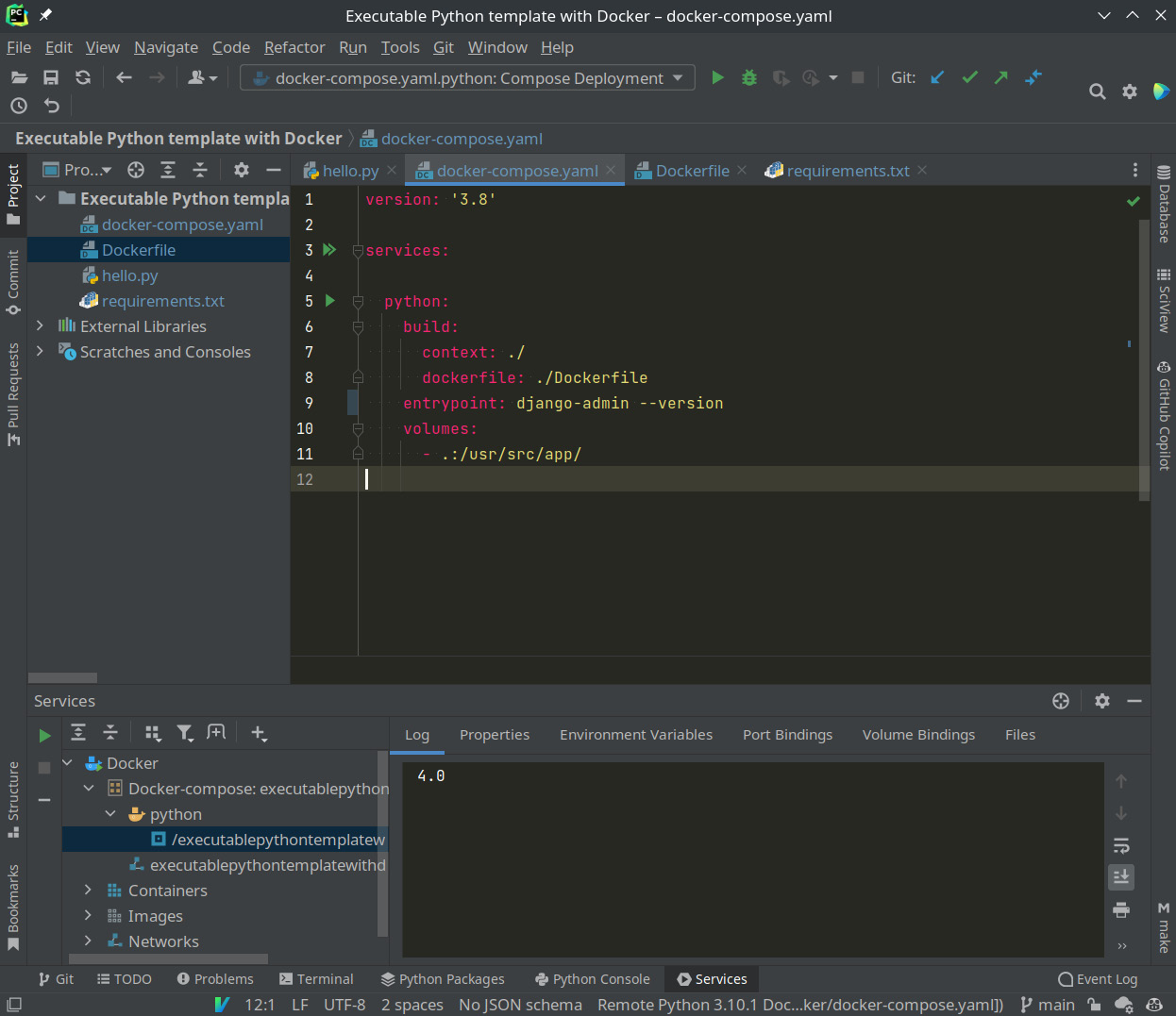
By recreating the image, we’ve integrated all the dependencies inside the image; now, Django has everything we need. To check that it’s installed and we have version 4, we’ll temporarily modify entrypoint:

Entrypoint: django-admin --version

And then, we’ll run the service.

Remember that you can do this by clicking on the green arrow next to Python (line 5 in Figure 1.12) or through docker-compose.

docker-compose up
Figure 1.12 – Checking which version of Django is installed

Figure 1.12 – Checking which version of Django is installed

In both cases, you can see that it returns 4.0 or the version specified in requirements.txt. We are ready!

All this work can serve as a template for future Python developments. Don’t lose it!

After creating a minimal template through the Django client, we’re going to configure it to launch the test server every time the service is up.

Visually different images
CONTINUE READING
83
Tech Concepts
36
Programming languages
73
Tech Tools
Icon Unlimited access to the largest independent learning library in tech of over 8,000 expert-authored tech books and videos.
Icon Innovative learning tools, including AI book assistants, code context explainers, and text-to-speech.
Icon 50+ new titles added per month and exclusive early access to books as they are being written.
Building SPAs with Django and HTML Over the Wire
notes
bookmark Notes and Bookmarks search Search in title playlist Add to playlist download Download options font-size Font size

Change the font size

margin-width Margin width

Change margin width

day-mode Day/Sepia/Night Modes

Change background colour

Close icon Search
Country selected

Close icon Your notes and bookmarks

Confirmation

Modal Close icon
claim successful

Buy this book with your credits?

Modal Close icon
Are you sure you want to buy this book with one of your credits?
Close
YES, BUY

Submit Your Feedback

Modal Close icon
Modal Close icon
Modal Close icon