Building modern apps and services with C# and .NET isn’t just about knowing the syntax—it’s about knowing the right tools for the job. Whether you’re building for web, desktop, or mobile, the .NET ecosystem offers a vast range of technologies. But with so many choices, it’s easy to get stuck in a narrow skillset. Apps and Services with .NET 10 helps you build real-world experience across the breadth of what .NET has to offer.
This edition covers practical implementations across a diverse set of technologies. You'll build APIs with ASP.NET Core Minimal API, gRPC, GraphQL, and SignalR, and create user-facing applications using Blazor for the web, Avalonia for desktop, and .NET MAUI for mobile. You’ll also explore native AOT (Ahead-of-Time) compilation for high-performance web services, along with caching, messaging, and long-running background tasks. Each chapter provides hands-on projects and real-world context for when and why to use each tool.
By the end, you’ll have a full-stack command of modern .NET. You’ll know how to select the right UI tech for your target platform, build APIs that scale, architect reliable backend services, and confidently adopt newer patterns. You won’t just understand the tools—you’ll know how to put them together to deliver robust, user-friendly, cross-platform apps in production environments.
*Email sign-up and proof of purchase required
How should you structure your projects? In this book, we will build multiple projects using different technologies that work together to provide a single solution. With large, complex solutions, you will often have many projects that need the same packages, and updating their versions every time a new version is released is a pain. Let’s review how we can manage this.
Project naming and port numbering conventions
If you complete all the coding tasks in this book, then you will end up with dozens of projects. Many of those will be websites and services that require port numbers for hosting on the localhost domain.
With large, complex solutions, it can be difficult to navigate the entire code. So, a good reason to structure your projects well is to make it easier to find components. It is good to have an overall name for your solution that reflects the application or solution.
In the 1990s, Microsoft registered Northwind as a fictional company name for use in database and code samples. It was first used as the sample database for their Access product and then also used in SQL Server. We will build multiple projects for this fictional company, so we will use the name Northwind as a prefix for all the project names.
Good practice: There are many ways to structure and name projects and solutions, for example, using a folder hierarchy as well as a naming convention. If you work in a team, make sure you know how your team does it.
It is good to have a naming convention for your projects in a solution so that any developer can tell what each one does instantly. A common choice is to use the type of project, for example, class library, console app, website, and so on, as shown in Table 1.8:
Name
Description
Northwind.Common
A class library project for common types like interfaces, enums, classes, records, and structs, used across multiple projects.
Northwind.EntityModels
A class library project for common EF Core entity models. Entity models are often used on both the server and client side, so it is best to separate dependencies on specific database providers.
Northwind.DataContext
A class library project for the EF Core database context with dependencies on specific database providers.
Northwind.WebApi.Service
An ASP.NET Core project for an HTTP API service. A good choice for integrating with websites because it can use any JavaScript library or Blazor to interact with the service.
Northwind.WebApi.Client.Console
A client to a web service. The last part of the name indicates that it is a console app.
Northwind.gRPC.Service
An ASP.NET Core project for a gRPC service.
Table 1.8: Example naming conventions for common project types
To enable you to run any of these projects simultaneously, we must make sure that we do not configure duplicated port numbers. I have used the following convention:
https://localhost:5[chapternumber]1/
http://localhost:5[chapternumber]2/
For example, for the encrypted connection to the website built in Chapter 10, Building and Securing Minimal API Web Services, I used port 5101, as shown in the following link:
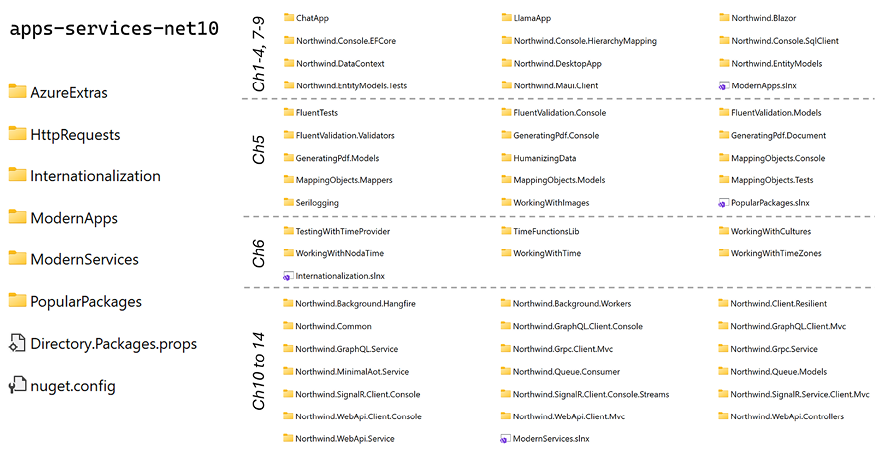
The folder structure that we will use in this book is shown in Figure 1.3:
Figure 1.3: Folder structure for all the solutions and projects created in this book
Central Package Management
By default, with the .NET SDK CLI and most code editor-created projects, if you need to reference a NuGet package, you add the reference to the package name and version directly in the project file, as shown in the following markup:
Central Package Management (CPM) is a feature that simplifies the management of NuGet package versions across multiple projects and solutions within a directory hierarchy. This is particularly useful for large solutions with many projects, where managing package versions individually can become cumbersome and error-prone.
Features and benefits of CPM
The key features and benefits of CPM include:
Centralized Control: CPM allows you to define package versions in a single file, typically Directory.Packages.props, which is placed in the root directory of a directory hierarchy that contains all your solutions and projects. This file centralizes the version information for all NuGet packages used across the projects in your solutions.
Consistency: Ensures consistent package versions across multiple projects. Having a single source of truth for package versions eliminates discrepancies that can occur when different projects specify different versions of the same package.
Simplified Updates: Updating a package version in a large solution becomes straightforward. You update the version in the central file, and all projects referencing that package automatically use the updated version. This significantly reduces the maintenance overhead.
Reduced Redundancy: Removes the need to specify package versions in individual project files (.csproj). This makes project files cleaner and easier to manage, as they no longer contain repetitive version information.
Good practice: It is important to regularly update NuGet packages and their dependencies to address security vulnerabilities.
Defining project properties to reuse version numbers
Microsoft packages usually have the same number each month, like 10.0.2 in February, 10.0.3 in March, and so on. You can define properties at the top of your Directory.Packages.props file and then reference these properties throughout the file. This approach keeps package versions consistent and makes updates easy.
For example, at the top of the Directory.Packages.props file, within a <ProjectGroup> tag, define your custom property and then reference it for the package version, as shown in the following markup:
<Project><PropertyGroup><MicrosoftPackageVersion>10.0.2</MicrosoftPackageVersion></PropertyGroup><ItemGroup><PackageVersionInclude="Microsoft.EntityFrameworkCore"Version="$(MicrosoftPackageVersion)" /><PackageVersionInclude="Microsoft.Extensions.Logging"Version="$(MicrosoftPackageVersion)" /><!-- Add more Microsoft packages as needed. --></ItemGroup><!-- Other packages with specific versions. --><ItemGroup><PackageVersionInclude="Newtonsoft.Json"Version="13.0.4" /></ItemGroup></Project>
Note the following about the preceding configuration:
Define a property: In the <PropertyGroup> element, the line <MicrosoftPackageVersion>10.0.2</MicrosoftPackageVersion> defines the property. This value can be changed once at the top of the file, and all references will update automatically.
Reference the property: Use the syntax $(PropertyName) to reference the defined property. All occurrences of $(MicrosoftPackageVersion) will resolve to the version number that you set.
When the monthly update rolls around, for example, from 10.0.2 to 10.0.3, you only have to update this number once.
You might want separate properties for related packages if they differ in version number, such as:
This allows independent updates if packages later diverge in their release cycles or versions.
After making changes, at the terminal or command prompt, run the following command:
dotnet restore
This will verify the correctness of your references and quickly alert you if you’ve introduced errors. By adopting this pattern combined with CPM, you simplify version management, reduce redundancy, and make your projects easier to maintain over time.
Good practice: Choose clear and consistent property names, like MicrosoftPackageVersion or AspNetCorePackageVersion, to easily distinguish between different package ecosystems. Check your Directory.Packages.props file into source control. Regularly update and test after changing versions to ensure compatibility.
Configuring CPM for this book’s projects
Let’s set up Central Package Management for a solution that we will use throughout the rest of the chapters in this book. Let’s go:
Create a new folder named apps-services-net10 that we will use for all the code in this book. For example, on Windows, create a folder: C:\apps-services-net10.
Good practice: For all the projects that you create for this book, keep your root path short and avoid using # in your folder and file names, or you might see compiler errors like RSG002: TargetPath not specified for additional file. For example, do not use C:\My C# projects\ as your root path!
In the apps-services-net10 folder, create a new file named Directory.Packages.props. At the command prompt or terminal, you can use the following command: dotnet new packagesprops
In Directory.Packages.props, modify its contents, as shown in the following markup:
<Project><PropertyGroup><ManagePackageVersionsCentrally>true
</ManagePackageVersionsCentrally><Net10>10.0.2</Net10><Avalonia>11.3.11</Avalonia><AI>10.2.0-preview.1.26063.2</AI><Hangfire>1.8.22</Hangfire><HotChocolate>15.1.11</HotChocolate></PropertyGroup><ItemGroupLabel="Common packages in multiple chapters."><!--For binding configuration from appsettings.json and environment variables--><PackageVersionInclude="Microsoft.Extensions.Configuration.Binder"Version="$(Net10)" /><PackageVersionInclude="Microsoft.Extensions.Configuration.Json"Version="$(Net10)" /><PackageVersionInclude="Microsoft.Extensions.Configuration.EnvironmentVariables"Version="$(Net10)" /><!--For HTTP hosting and resilience.--><PackageVersionInclude="Microsoft.Extensions.Hosting"Version="$(Net10)" /><PackageVersionInclude="Microsoft.Extensions.DependencyInjection"Version="$(Net10)" /><PackageVersionInclude="Microsoft.Extensions.Http"Version="$(Net10)" /><PackageVersionInclude="Microsoft.Extensions.Http.Resilience"Version="10.2.0" /><!--For logging to console.--><PackageVersionInclude="Microsoft.Extensions.Logging.Console"Version="$(Net10)" /><PackageVersionInclude="Microsoft.Extensions.Logging.Debug"Version="$(Net10)" /><PackageVersionInclude="Spectre.Console"Version="0.54.0" /><!--For unit testing.--><PackageVersionInclude="coverlet.collector"Version="6.0.4" /><PackageVersionInclude="Microsoft.NET.Test.Sdk"Version="18.0.1" /><PackageVersionInclude="xunit"Version="2.9.3" /><PackageVersionInclude="xunit.runner.visualstudio"Version="3.1.5" /><!--For JSON processing.--><PackageVersionInclude="Newtonsoft.Json"Version="13.0.4" /></ItemGroup><ItemGroupLabel="Chapter 1 Introducing Apps and Services with .NET"><PackageVersionInclude="BenchmarkDotNet"Version="0.15.8" /></ItemGroup><ItemGroupLabel="Chapter 2 Building Mobile Apps Using .NET MAUI."><PackageVersionInclude="Microsoft.Maui.Controls"Version="10.0.20" /><PackageVersionInclude="CommunityToolkit.Mvvm"Version="8.4.0" /><PackageVersionInclude="CommunityToolkit.Maui"Version="13.0.0" /></ItemGroup><ItemGroupLabel="Chapter 3 Building Desktop Apps Using Avalonia."><PackageVersionInclude="Avalonia"Version="$(Avalonia)" /><PackageVersionInclude="Avalonia.Desktop"Version="$(Avalonia)" /><PackageVersionInclude="Avalonia.Themes.Fluent"Version="$(Avalonia)" /><PackageVersionInclude="Avalonia.Fonts.Inter"Version="$(Avalonia)" /><PackageVersionInclude="Avalonia.Diagnostics"Version="$(Avalonia)" /></ItemGroup><ItemGroupLabel="Chapter 4 Building Web Apps Using Blazor."><PackageVersionInclude="Microsoft.AspNetCore.Components.WebAssembly.Server"Version="$(Net10)" /><PackageVersionInclude="Microsoft.AspNetCore.Components.WebAssembly"Version="$(Net10)" /><PackageVersionInclude="Microsoft.AspNetCore.Components.WebAssembly.DevServer"Version="$(Net10)" /><PackageVersionInclude="Microsoft.AspNetCore.Components.QuickGrid"Version="$(Net10)" /><PackageVersionInclude="Radzen.Blazor"Version="8.6.0" /></ItemGroup><ItemGroupLabel="Chapter 5 Using Popular Third-Party Libraries"><PackageVersionInclude="SixLabors.ImageSharp"Version="3.1.12" /><PackageVersionInclude="Humanizer"Version="3.0.1" /><PackageVersionInclude="Serilog"Version="4.3.0" /><PackageVersionInclude="Serilog.Sinks.Console"Version="6.1.1" /><PackageVersionInclude="Serilog.Sinks.File"Version="7.0.0" /><PackageVersionInclude="Serilog.Sinks.Async"Version="2.1.0" /><!-- AutoMapper 15 or later requires a licence. --><PackageVersionInclude="AutoMapper"Version="14.0.0" /><PackageVersionInclude="Mapster"Version="7.4.0" /><!--FluentAssertions 8.0.0 and later have restricted the licence.--><!--Minimum 7.2.0 (inclusive) up to maximum 8.0.0 (exclusive).--><PackageVersionInclude="FluentAssertions"Version="[7.2.0,8.0.0)" /><PackageVersionInclude="FluentValidation"Version="12.1.1" /><!-- The newest version with an MIT license (07/02/2024). --><PackageVersionInclude="QuestPDF"Version="2022.12.15" /><!-- A 2023.* or later version requires setting the Settings.License property. --><!-- <PackageReference Include="QuestPDF" Version="2025.7.1" /> --></ItemGroup><ItemGroupLabel="Chapter 6 Handling Dates, Times, and Internationalization"><!-- The newest version before the controversy. --><PackageVersionInclude="Moq"Version="4.18.4" /><PackageVersionInclude="Microsoft.Extensions.Localization"Version="$(Net10)" /><PackageVersionInclude="NodaTime"Version="3.3.0" /></ItemGroup><ItemGroupLabel="Chapter 7 Managing Relational Data Using SQL"><PackageVersionInclude="Microsoft.Data.SqlClient"Version="6.1.3" /><PackageVersionInclude="Npgsql"Version="10.0.1" /><PackageVersionInclude="Dapper"Version="2.1.66" /></ItemGroup><ItemGroupLabel="Chapter 8 Building Entity Models Using EF Core"><PackageVersionInclude="Microsoft.EntityFrameworkCore.Design"Version="$(Net10)" /><PackageVersionInclude="Microsoft.EntityFrameworkCore.SqlServer"Version="$(Net10)" /><PackageVersionInclude="Npgsql.EntityFrameworkCore.PostgreSQL"Version="10.0.0" /></ItemGroup><ItemGroupLabel="Chapter 9 Building an LLM-Based Chat Service"><PackageVersionInclude="Microsoft.Extensions.AI.OpenAI"Version="$(AI)" /><PackageVersionInclude="Microsoft.Extensions.AI"Version="10.1.1" /><PackageVersionInclude="Microsoft.Extensions.DataIngestion"Version="$(AI)" /><PackageVersionInclude="Microsoft.Extensions.DataIngestion.Markdig"Version="$(AI)" /><PackageVersionInclude="PdfPig"Version="0.1.13" /><PackageVersionInclude="Microsoft.ML.Tokenizers.Data.Cl100kBase"Version="1.0.1" /><PackageVersionInclude="Microsoft.ML.Tokenizers.Data.O200kBase"Version="1.0.1" /><PackageVersionInclude="Microsoft.SemanticKernel.Connectors.SqliteVec"Version="1.67.1-preview" /><PackageVersionInclude="ModelContextProtocol"Version="0.5.0-preview.1" /><PackageVersionInclude="OllamaSharp"Version="5.4.12" /></ItemGroup><ItemGroupLabel="Chapter 10 Building and Securing Minimal API Web Services"><PackageVersionInclude="Microsoft.AspNetCore.OpenApi"Version="$(Net10)" /><PackageVersionInclude="Scalar.AspNetCore"Version="2.12.6" /><PackageVersionInclude="AspNetCoreRateLimit"Version="5.0.0" /><PackageVersionInclude="Microsoft.AspNetCore.Authentication.JwtBearer"Version="$(Net10)" /></ItemGroup><ItemGroupLabel="Chapter 11 Caching, Queuing, and Resilient Background Services"><PackageVersionInclude="Microsoft.Extensions.Caching.Hybrid"Version="10.2.0" /><PackageVersionInclude="Microsoft.Extensions.Http.Polly"Version="$(Net10)" /><PackageVersionInclude="Polly.Contrib.WaitAndRetry"Version="1.1.1" /><PackageVersionInclude="RabbitMQ.Client"Version="7.2.0" /><PackageVersionInclude="Hangfire.Core"Version="$(Hangfire)" /><PackageVersionInclude="Hangfire.SqlServer"Version="$(Hangfire)" /><PackageVersionInclude="Hangfire.AspNetCore"Version="$(Hangfire)" /></ItemGroup><ItemGroupLabel="Chapter 12 Broadcasting Real-Time Communication Using SignalR"><PackageVersionInclude="Microsoft.AspNetCore.SignalR.Client"Version="$(Net10)" /></ItemGroup><ItemGroupLabel="Chapter 13 Combining Data Sources Using GraphQL"><PackageVersionInclude="HotChocolate.AspNetCore"Version="$(HotChocolate)" /><PackageVersionInclude="HotChocolate.Data.EntityFramework"Version="$(HotChocolate)" /><PackageVersionInclude="StrawberryShake.Server"Version="$(HotChocolate)" /></ItemGroup><ItemGroupLabel="Chapter 14 Building Efficient Microservices Using gRPC"><PackageVersionInclude="Google.Protobuf"Version="3.33.4" /><PackageVersionInclude="Grpc.AspNetCore"Version="2.76.0" /><PackageVersionInclude="Grpc.Net.ClientFactory"Version="2.76.0" /><PackageVersionInclude="Grpc.Tools"Version="2.76.0" /><PackageVersionInclude="Microsoft.AspNetCore.Grpc.JsonTranscoding"Version="$(Net10)" /></ItemGroup><ItemGroupLabel="Chapter X1 Managing NoSQL Data Using Azure Cosmos DB"><PackageVersionInclude="Microsoft.Azure.Cosmos"Version="3.53.1" /><PackageVersionInclude="Gremlin.net"Version="3.7.4" /></ItemGroup><ItemGroupLabel="Chapter X2 Building Serverless Nanoservices Using Azure Functions"><PackageVersionInclude="NCrontab.Signed"Version="3.4.0" /><PackageVersionInclude="Microsoft.Azure.Functions.Extensions"Version="1.1.0" /><PackageVersionInclude="Microsoft.Azure.Functions.Worker"Version="2.1.0" /><PackageVersionInclude="Microsoft.Azure.Functions.Worker.Sdk"Version="2.0.5" /><PackageVersionInclude="Microsoft.Azure.Functions.Worker.Extensions.Http"Version="3.3.0" /><PackageVersionInclude="Microsoft.Azure.Functions.Worker.Extensions.Timer"Version="4.3.1" /><PackageVersionInclude="Microsoft.Azure.Functions.Worker.Extensions.Storage.Queues"Version="5.5.3" /><PackageVersionInclude="Microsoft.Azure.Functions.Worker.Extensions.Storage.Blobs"Version="6.8.0" /><PackageVersionInclude="SixLabors.ImageSharp.Drawing"Version="2.1.7" /></ItemGroup></Project>
Warning! The <ManagePackageVersionsCentrally> element and its true value must go all on one line. Also, you cannot use floating wildcard version numbers like 10.0-* as you can in an individual project. Wildcards are useful to automatically get the latest patch version, for example, monthly package updates on Patch Tuesday. But with CPM you must manually update the versions.
For any projects that we add underneath the folder containing this file, we can reference the packages without explicitly specifying the version, as shown in the following markup:
You should regularly review and update the package versions in the Directory.Packages.props file to ensure that you are using the latest stable releases with important bug fixes and performance improvements.
Good practice: I recommend that you set a monthly event in your calendar for the second Wednesday of each month. This will occur after the second Tuesday of each month, which is Patch Tuesday when Microsoft releases bug fixes and patches for .NET and related packages.
For example, throughout 2026 there are likely to be new versions each month, so you can go to the NuGet page for each of your packages. You can then update individual package versions if necessary, for example, as shown in the following markup:
<ItemGroupLabel="For EF Core."><PackageVersionInclude="Microsoft.EntityFrameworkCore.SqlServer"Version="10.0.3" />
Or, if you have defined custom properties referenced by multiple packages, update those version numbers, as shown highlighted in the following markup:
Before updating package versions, check for any breaking changes in the release notes of the packages. Test your solution thoroughly after updating to ensure compatibility.
Educate your team and document the purpose and usage of the Directory.Packages.props file to ensure everyone understands how to manage package versions centrally.
In each individual project file you can override an individual package version by using the VersionOverride attribute on a <PackageReference /> element, as shown highlighted in the following markup:
This can be useful if a newer version introduces a regression bug so you can force the use of an older version without the bug until the bug is fixed in a later patch version.
Warning! If you see error NU1008 The following PackageReference items cannot define a value for Version: PackageName. Projects using Central Package Management must define a Version value on a PackageVersion item., then remove the version attribute from the package reference in your project file. You can learn more at the following link: https://learn.microsoft.com/en-us/nuget/reference/errors-and-warnings/nu1008.
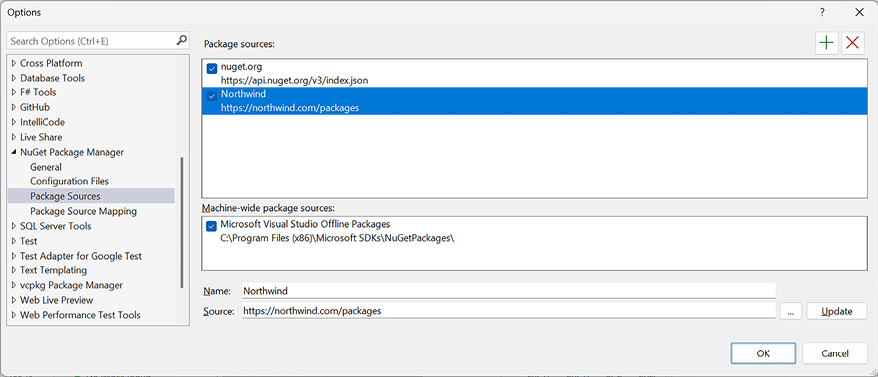
If you use CPM and you have more than one package source configured for your code editor, as shown in Figure 1.4, then you will see NuGet Warning NU1507. For example, if you have both the default package source (https://api.nuget.org/v3/index.json) and a custom package source configured:
There are 2 package sources defined in your configuration. When using central package management, please map your package sources with package source mapping (https://aka.ms/nuget-package-source-mapping) or specify a single package source. The following sources are defined: https://api.nuget.org/v3/index.json, https://contoso.myget.org/F/development/.
Figure 1.4: Visual Studio with two NuGet package sources configured
Package Source Mapping (PSM) can help safeguard your software supply chain if you use a mix of public and private package sources as in the preceding example.
By default, NuGet will search all configured package sources when it needs to download a package. When a package exists on multiple sources, it may not be deterministic which source the package will be downloaded from. With PSM, you can filter, per package, which source(s) NuGet will search.
PSM is supported by Visual Studio 2022, .NET 6 and later, and NuGet 6 and later. Older tooling will ignore the PSM configuration.
Now let’s see how to enable PSM.
Enabling Package Source Mapping
To enable PSM, you must have a nuget.config file.
Good practice: Create a nuget.config file at the root of your source code directory hierarchy.
In a PSM file, there are two parts: defining package sources, and mapping package sources to packages. All requested packages must map to one or more sources by matching a defined package pattern. In other words, once you have defined a packageSourceMapping element, you must explicitly define which sources every package – including transitive packages – will be restored from.
For example, if you want most packages to be sourced from the default nuget.org site, but there are some private packages that must be sourced from your organization’s website, you would define the two package sources, and set the mapping (assuming all your private packages are named Northwind.Something), as shown in the following markup:
<?xml version="1.0" encoding="utf-8"?><configuration><packageSources><!-- <clear /> ensures no additional sources are inherited from another config file. --><clear /><!-- key can be any identifier for your source. --><addkey="nuget.org"value="https://api.nuget.org/v3/index.json" /><addkey="Northwind"value="https://northwind.com/packages" /></packageSources><!-- All packages sourced from nuget.org except Northwind packages. --><packageSourceMapping><!-- key value for <packageSource> should match key values from <packageSources> element --><packageSourcekey="nuget.org"><packagepattern="*" /></packageSource><packageSourcekey="Northwind"><packagepattern="Northwind.*" /></packageSource></packageSourceMapping></configuration>
Let’s create a nuget.config for all the solutions and projects in this book that will use nuget.org as the source for all packages:
In the apps-services-net10 folder, create a new file named nuget.config.
In nuget.config, modify its contents, as shown in the following markup:
<?xml version="1.0" encoding="utf-8"?><configuration><!-- <clear /> ensures no additional sources are inherited from another config file. --><packageSources><clear /><!-- key can be any identifier for your source. --><addkey="nuget.org"value="https://api.nuget.org/v3/index.json" /></packageSources><!-- All packages sourced from nuget.org. --><packageSourceMapping><!-- key value for <packageSource> should match key values from <packageSources> element --><packageSourcekey="nuget.org"><packagepattern="*" /></packageSource></packageSourceMapping></configuration>
By default, compiler warnings may appear if there are potential problems with your code when you first build a project, but they do not prevent compilation, and they are hidden if you rebuild. Warnings are given for a reason, so ignoring warnings encourages poor development practices.
Some developers would prefer to be forced to fix warnings, so .NET provides a project setting to do this, as shown highlighted in the following markup:
I have enabled the option to treat warnings as errors in (almost) all the solutions in the GitHub repository.
The exceptions are the gRPC projects. This is due to a combination of factors. In .NET 7 or later, the compiler will warn if you compile source files that contain only lowercase letters in the name of a type. For example, if you define a person class, as shown in the following code:
publicclassperson
{
}
This compiler warning has been introduced so that a future version of C# can safely add a new keyword knowing it will not conflict with the name of a type that you have used, because only C# keywords should contain only lowercase letters.
Unfortunately, the Google tools for generating C# source files from .proto files generate aliases for class names that only contain lowercase letters, as shown in the following code:
If you treat warnings as errors, then the compiler complains and refuses to compile the source code, as shown in the following output:
Error CS8981 The type name 'pb' only contains lower-cased ascii characters. Such names may become reserved for the language. Northwind.Grpc.Service C:\apps-services-net10\Chapter14\Northwind.Grpc.Service\obj\Debug\net10.0\Protos\Greet.cs
Good Practice: Always treat warnings as errors in your .NET projects (except for gRPC projects until Google updates their code generation tools).
If you find that you get too many errors after enabling this, you can disable specific warnings by using the <WarningsNotAsErrors> element with a comma-separated list of warning codes, as shown in the following markup:
Now that you have set up your development environment and configured central package management for your projects, let’s build an entity model for use in the rest of the book to provide data for the apps that you will build.
Read this chapter and the full book FREE of cost - No Credit card required!
Plus access over 8,000 other expert tech books and videos just by signing up - No commitment!
CONTINUE READING
83
Tech Concepts
36
Programming languages
73
Tech Tools
Unlimited access to the largest independent learning library in tech of over 8,000 expert-authored tech books and videos.
Innovative learning tools, including AI book assistants, code context explainers, and text-to-speech.
50+ new titles added per month and exclusive early access to books as they are being written.





 Free Chapter