-
Book Overview & Buying
-
Table Of Contents
Rust Web Programming - Third Edition
By :
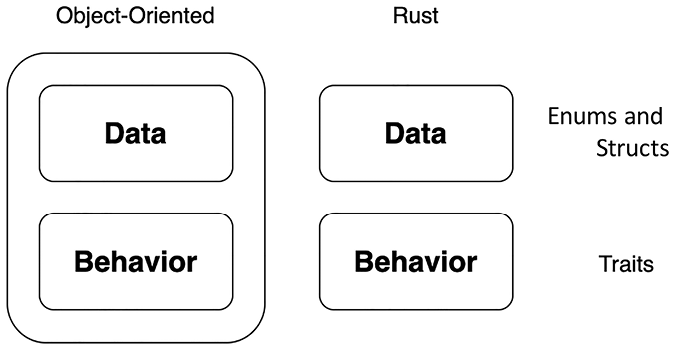
In modern high-level dynamic languages, objects have been the bedrock for building big applications and solving complex problems, and for good reason. Objects enable us to encapsulate data, functionality, and behavior. In Rust, we do not have objects. However, we do have structs that can hold data in fields. We can then manage the functionality of these structs and group them together with traits. This is a powerful approach, and it gives us the benefits of objects without the high coupling, as highlighted in the following figure:

Figure 1.9 – Difference between Rust structs and objects
We will start with something basic by creating a Human struct with the following code:
#[derive(Debug)]
struct Human<'a> {
name: &'a str,
age: i8,
current_thought: &'a str
}
In the preceding code, we can see that our string literal fields have the same lifetime as the struct itself. We have also applied the Debug trait to the Human struct, so we can print it out and see everything. We can then create the Human struct and print it out, using the following code:
fn main() {
let developer = Human{
name: "Maxwell Flitton",
age: 34,
current_thought: "nothing"
};
println!("{:?}", developer);
println!("{}", developer.name);
}
Running the preceding code will give us the following printout:
Human { name: "Maxwell Flitton", age: 34, current_thought: "nothing" }
Maxwell Flitton
We can see that our fields are what we expect. However, we can change our string slice fields to strings to get rid of lifetime parameters. We may also want to add another field where we can reference another Human struct under a friend field. However, we may also have no friends. We can account for this by creating an enum that is either a friend or not and assigning it to a friend field, as seen in the following code:
#[derive(Debug)]
enum Friend {
HUMAN(Human),
NIL
}
#[derive(Debug)]
struct Human {
name: String,
age: i8,
current_thought: String,
friend: Friend
}
We can then define the Human struct initially with no friends, just to see if it works with the following code:
let developer = Human{
name: "Maxwell Flitton".to_string(),
age: 32,
current_thought: "nothing".to_string(),
friend: Friend::NIL
};
However, when we run the compiler, it does not work. I would like to think this is because the compiler cannot believe that I have no friends. But alas, it has to do with the compiler not knowing how much memory to allocate for this declaration. This is shown through the following error code:
enum Friend { HUMAN(Human), NIL}#[derive(Debug)]
^^^^^^^^^^^ ----- recursive without indirection
|
recursive type has infinite size
Because of the enum, theoretically, the memory needed to store this variable could be infinite. One Human struct could reference another Human struct as a friend field, which could in turn reference another Human struct, resulting in a potentially infinite number of Human structs being linked together through the friend field. We can solve this problem with pointers. Instead of storing all the data of a Human struct in the friend field, we store a memory address that we know has a maximum value because it’s a standard integer. This memory address points to where another Human struct is stored in the memory. As a result, the program knows exactly how much memory to allocate when it crosses a Human struct, irrespective of whether the Human struct has a friend field or not. This can be achieved by using a Box struct, which is essentially a smart pointer for our enum, with the following code:
#[derive(Debug)]
enum Friend {
HUMAN(Box<Human>),
NIL
}
So now, our enum states whether the friend exists or not, and if so, it has a memory address if we need to extract information about this friend. We can achieve this with the following code:
fn main() {
let another_developer = Human{
name: "Caroline Morton".to_string(),
age:30,
current_thought: "I need to code!!".to_string(),
friend: Friend::NIL
};
let developer = Human{
name: "Maxwell Flitton".to_string(),
age: 34,
current_thought: "nothing".to_string(),
friend: Friend::HUMAN(Box::new(another_developer))
};
match &developer.friend {
Friend::HUMAN(data) => {
println!("{}", data.name);
},
Friend::NIL => {}
}
}
In the preceding code, we can see that we have created one Human struct, and then another Human struct with a reference to the first Human struct as a friend field. We then access the second Human struct’s friend through the friend field. Remember, we must handle both possibilities, as the friend field could be a nil value.
While it is exciting that friends can be made, if we take a step back, we can see that there is a lot of code written for each human we create. This is not helpful if we must create a lot of humans in a program. We can reduce this by implementing some functionality for our struct. We will essentially create a constructor for the struct with extra functions, so we can add optional values if we want. We will also make the thought field optional. So a basic struct with a constructor populating only the most essential fields can be achieved with the following code:
#[derive(Debug)]
struct Human {
name: String,
age: i8,
current_thought: Option<String>,
friend: Friend
}
impl Human {
fn new(name: &str, age: i8) -> Human {
return Human{
name: name.to_string(),
age: age,
current_thought: None,
friend: Friend::NIL
}
}
}
Therefore, creating a new human now only takes the following line of code:
let developer = Human::new("Maxwell Flitton", 34);
This will have the following field values:
"Maxwell Flitton"34NoneNILWe can add more functions to the implement block for adding friends and a current thought with the following code:
fn with_thought(mut self, thought: &str) -> Human {
self.current_thought = Some(thought.to_string());
return self
}
fn with_friend(mut self, friend: Box<Human>) -> Human {
self.friend = Friend::HUMAN(friend);
return self
}
In the preceding code, we can see that we pass in a mutable version of the struct that is calling these functions. These functions can be chained because they return the struct that called them. If we want to create a developer with a thought, we can do this with the following code:
let developer = Human::new("Maxwell Flitton", 34).with_thought(
"I love Rust!");
Note that a function that does not require self as a parameter can be called with ::, while a function that does require self as a parameter can be called with a simple dot, .. If we want to create a developer with a friend, it can be done using the following code:
let developer_friend = Human::new("Caroline Morton", 30);
let developer = Human::new("Maxwell Flitton", 34)
.with_thought("I love Rust!")
.with_friend(Box::new(developer_friend));
println!("{:?}", developer);
Running the code will result in the following parameters for developer:
Name: "Maxwell Flitton"
Age: 34
Current Thought: Some("I love Rust!")
Friend: HUMAN(Human { name: "Caroline Morton", age: 30,
current_thought: None, friend: NIL })
We can see that structs combined with enums and functions that have been implemented with these structs can be powerful building blocks. We can define fields and functionality with only a small amount of code if we have defined our structs well. However, writing the same functionality for multiple structs can be time-consuming and result in a lot of repeated code. If you have worked with objects before, you may have utilized inheritance for that.
Rust goes one better. It has traits, which we will explore in the next chapter.
Building structs cheatsheet
struct Human { name: String, age: i8 }).impl block for struct initialization.:: for static methods and . for instance methods. Add methods to the impl block to chain function calls (e.g., with_thought).