-
Book Overview & Buying
-
Table Of Contents
Front-End Development Projects with Vue.js
By :
Asynchronous functions in JavaScript are defined by the async function syntax and return an AsyncFunction object. These functions operate asynchronously via the event loop, using an implicit promise, which is an object that may return a result in the future. Vue.js uses this JavaScript behavior to allow you to declare asynchronous blocks of code inside methods by including the async keyword in front of a method. You can then chain then() and catch() functions or try the {} syntax inside these Vue methods and return the results.
Axios is a popular JavaScript library that allows you to make external requests for data using Node.js. It has wide browser support making it a versatile library when doing HTTP or API requests. We will be using this library in the next exercise.
In this exercise, you will asynchronously fetch data from an external API source and display it in the frontend using computed props.
To access the code files for this exercise, refer to https://packt.live/353md9h.
Exercise 2.06 folder, and run the following commands to install axios:> cd Exercise2.06/ > code . > yarn > yarn add axios > yarn serve
Go to https://localhost:8080.
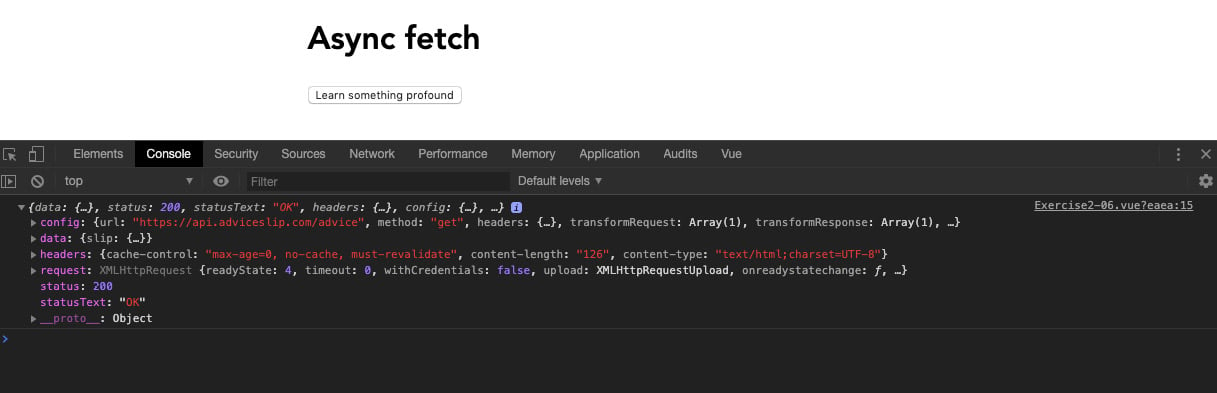
axios into our component and creating a method called getApi(). Use axios to call a response from https://api.adviceslip.com/advice and console.log the result. Include a button that has a click event bound to the getApi() call:<template>
<div class="container">
<h1>Async fetch</h1>
<button @click="getApi()">Learn something profound</button>
</div>
</template>
<script>
import axios from 'axios'
export default {
methods: {
async getApi() {
return axios.get('https://api.adviceslip.com/advice'). then((response) => {
console.log(response)
})
},
},
}
</script>
<style lang="scss" scoped>
.container {
margin: 0 auto;
padding: 30px;
max-width: 600px;
font-family: 'Avenir', Helvetica, Arial, sans-serif;
}
blockquote {
position: relative;
width: 100%;
margin: 50px auto;
padding: 1.2em 30px 1.2em 30px;
background: #ededed;
border-left: 8px solid #78c0a8;
font-size: 24px;
color: #555555;
line-height: 1.6;
}
</style>The output of the preceding code will be as follows:

Figure 2.12: Screen displaying a very large object in the console
response object. Assign this data object to a Vue data prop called response that we can reuse:export default {
data() {
return {
axiosResponse: {},
}
},
methods: {
async getApi() {
return axios.get('https://api.adviceslip.com/advice'). then(response => {
this.axiosResponse = response.data
})
},
},
}quote from inside the response prop object using a computed prop that will update every time the response prop changes. Use a ternary operator to perform a conditional statement to check whether the response prop contains the slip object to avoid errors:<template>
<div class="container">
<h1>Async fetch</h1>
<button @click="getApi()">Learn something profound</button>
<blockquote v-if="quote">{{ quote }}</blockquote>
</div>
</template>
<script>
import axios from 'axios'
export default {
data() {
return {
axiosResponse: {},
}
},
computed: {
quote() {
return this.axiosResponse && this.axiosResponse.slip
? this.axiosResponse.slip.advice
: null
},
},
methods: {
async getApi() {
return axios.get('https://api.adviceslip.com/advice'). then(response => {
this.axiosResponse = response.data
})
},
},
}
</script>Figure 2.13 displays the output generated by the preceding code:

Figure 2.13: Screen displaying the quote output in your template
loading data prop so the user can see when the UI is loading. Set loading to false by default. Inside the getApi method, set loading to true, and in the then() chain, set it back to false after 4 seconds using the setTimeout function. You can use a ternary operator to change the button text between the loading state and its default state:<template>
<div class="container">
<h1>Async fetch</h1>
<button @click="getApi()">{{
loading ? 'Loading...' : 'Learn something profound'
}}</button>
<blockquote v-if="quote">{{ quote }}</blockquote>
</div>
</template>
<script>
import axios from 'axios'
export default {
data() {
return {
loading: false,
axiosResponse: {},
}
},
computed: {
quote() {
return this.axiosResponse && this.axiosResponse.slip
? this.axiosResponse.slip.advice
: null
},
},
methods: {
async getApi() {
this.loading = true
return axios.get('https://api.adviceslip.com/advice'). then(response => {
this.axiosResponse = response.data
setTimeout(() => {
this.loading = false
}, 4000);
})
},
},
}
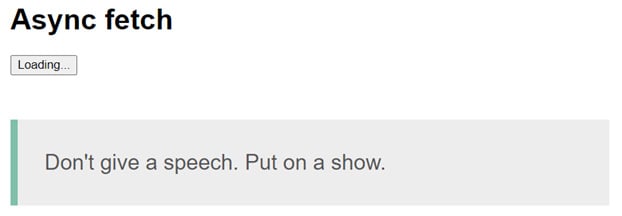
</script>The output of the preceding code will be as follows:
Figure 2.14: Screen displaying the loading button state output in your template
In this exercise, we saw how we can fetch data from an external source, assign it to a computed prop, display it in our template, and apply a loading state to our content.
In this activity, we will build a blog that lists articles from an API source. This will test your knowledge of Vue by using all the basic functions of a Single-File Component (SFC) and async methods to fetch remote data from an API and use computed properties to organize deep nested object structures.
Contentful is a headless content management system (CMS) that allows you to manage content separately to your code repository. You can consume this content using the API inside as many code repositories as you need. For example, you may have a blog website that acts as a primary source of information, but your clients want a standalone page on a different domain that only pulls in the most recent featured articles. Using a headless CMS inherently allows you to develop these two separate code bases and use the same updated data source.
This activity will be using the headless CMS Contentful. The access keys and endpoints will be listed in the solution.
The following steps will help you complete the activity:
babel presets.contentful dependency into your project.data props to output the user's name, job title, and description.SCSS to style the page.The expected outcome is as follows:
Figure 2.15: Expected outcome with Contentful blog posts
Note
The solution for this activity can be found via this link.
After the activity has been completed, you should be able to use async methods to pull remote data from an API source into your Vue components. You will find that computed props are a sophisticated way of breaking down the information into smaller chunks of reusable data.
Change the font size
Change margin width
Change background colour