Sign In Start Free Trial
Account

Add to playlist

Create a Playlist

Modal Close icon
You need to login to use this feature.
  • Book Overview & Buying Apache Roller 4.0 - Beginner's Guide
  • Table Of Contents Toc
Apache Roller 4.0 - Beginner's Guide

Apache Roller 4.0 - Beginner's Guide

By : Alfonso Vidal Romero
4 (1)
close
close
Apache Roller 4.0 - Beginner's Guide

Apache Roller 4.0 - Beginner's Guide

4 (1)
By: Alfonso Vidal Romero

Overview of this book

Apache Roller enables you to build a fully-featured, multi-user blog server apt for all kinds of blogging sites. It is an ideal tool to create your own blogging network with unlimited users and blogs, forums, photo galleries, and more! While it is exciting to have a list of interesting features it can offer you, it might be a little difficult to get started with it by your self. This book will teach you how to get started with Apache Roller and make the most of all its features using step-by-step, detailed instructions. You will learn how to establish your internet presence with an Apache Roller blog and use the latest web tools to enhance your posts and attract visitors. You will also learn how to promote your blog on popular social bookmarking services and customize it to suit your need. This hands-on and practical book introduces you to Apache Roller. Starting off with the configuration and installation of your own blog, you'll then quickly learn how to add interesting content to your blog with the help of plenty of examples. You'll also learn how to change your blog's visual appearance with the help of Roller themes and templates and how to create a community of blogs for you and your colleagues or friends in your Apache Roller blog server. The book also looks at ways you can manage your community, and keep your site safe and secure, ensuring that it is a spam-free, enjoyable community for your users.
Table of Contents (16 chapters)
close
close
Apache Roller 4.0
Credits
Foreword
About the Author
About the Reviewers
Preface
1
Pop Quiz Answers
2
Index

Time for action — Microsoft employee blogs

In this exercise, we'll visit the Microsoft Community Blogs website, where you can see what Microsoft employees are writing in their blogs.

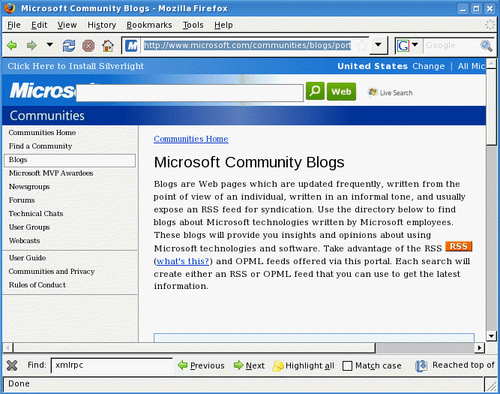
  1. Type http://www.microsoft.com/communities/blogs in the address bar of your web browser. Next, the Microsoft Community Blogs page will appear:
    Time for action — Microsoft employee blogs
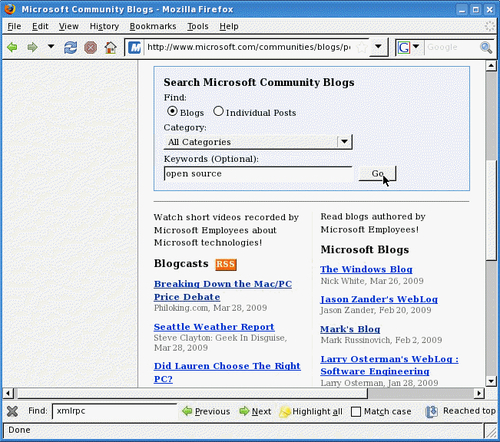
  2. Scroll down the page until you see a search box and a list of blogs with recent posts:
    Time for action — Microsoft employee blogs
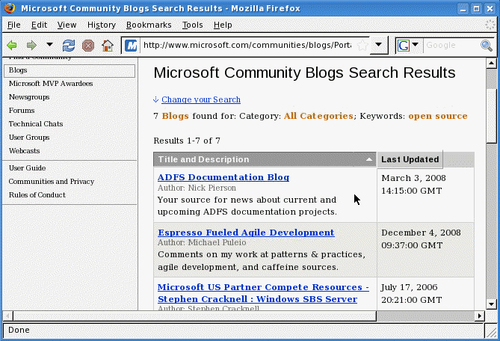
  3. Type open source in the Keywords (Optional) field inside Search Microsoft Community Blogs and click on the Go button. After a few seconds, you will see a list of all the blogs related to the search word(s) you typed:
    Time for action — Microsoft employee blogs
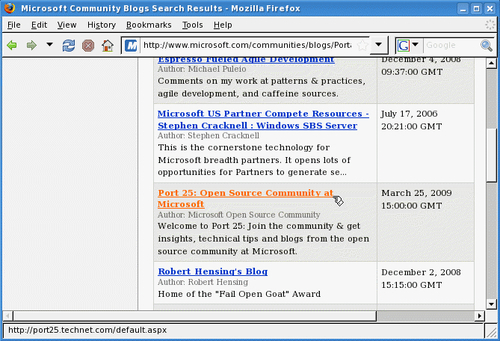
  4. Scroll down the list until you find the Port 25: Open Source Community at Microsoft blog, as shown in the following screenshot:
Time for action — Microsoft employee blogs

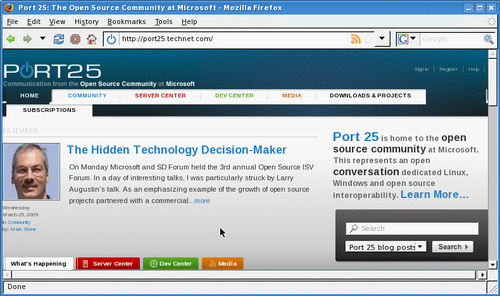
If you can't find it in the list, you can type the following URL: http://port25.technet.com. Next, the Port 25 home page will appear, as shown in the next screenshot (it's very likely that your screen will have a different post on the front page, as this blog changes almost everyday):

Time for action — Microsoft employee blogs

What just happened?

In this last exercise, you saw how Microsoft is making use of blogs so that its employees can communicate the latest news about Microsoft's posture on open source to the world. Port 25 is a weblog dedicated to the open source community at Microsoft. Here you'll find discussions and posts on open source projects that Microsoft is collaborating with, or intends to collaborate with. However, Port 25 is just one little piece of the vast universe of employee blogs floating around. Some blogs are hosted on Microsoft websites, and others are hosted on employees' personal sites. All in all, you'll find a lot of interesting things about Microsoft and also about its employees' hobbies, personal experiences, and thoughts in general. This is a trend that's expanding through a lot of big companies nowadays.

Share experiences with other users

As we saw in previous exercises, blogs are a very powerful way to communicate with other people. That's the reason why big companies such as Microsoft let their employees use blogs to communicate within the company's premises (internal blogs) or with the rest of the world (external or personal blogs). For the open source community, blogs are the best tool to share their experiences and expertise on using open source software such as Linux, Apache Roller, WordPress, the Apache Web server, Tomcat, MySQL, PHP, and Java Web applications, and much more. For example, if you are working on an open source application, you can invite other fellow programmers and web designers through your blog to collaborate with you. With Apache Roller, you can create a multiuser weblog where several users can post messages (including yourself), and keep up-to-date on every aspect of the software you are developing. Then, you can release downloads so that other people can test your software and post comments on your blog about it. And all of this without even having to move away from your PC!

CONTINUE READING
83
Tech Concepts
36
Programming languages
73
Tech Tools
Icon Unlimited access to the largest independent learning library in tech of over 8,000 expert-authored tech books and videos.
Icon Innovative learning tools, including AI book assistants, code context explainers, and text-to-speech.
Icon 50+ new titles added per month and exclusive early access to books as they are being written.
Apache Roller 4.0 - Beginner's Guide
notes
bookmark Notes and Bookmarks search Search in title playlist Add to playlist font-size Font size

Change the font size

margin-width Margin width

Change margin width

day-mode Day/Sepia/Night Modes

Change background colour

Close icon Search
Country selected

Close icon Your notes and bookmarks

Confirmation

Modal Close icon
claim successful

Buy this book with your credits?

Modal Close icon
Are you sure you want to buy this book with one of your credits?
Close
YES, BUY

Submit Your Feedback

Modal Close icon
Modal Close icon
Modal Close icon