Sign In Start Free Trial
Account

Add to playlist

Create a Playlist

Modal Close icon
You need to login to use this feature.
  • Book Overview & Buying Celtx: Open Source Screenwriting Beginner's Guide
  • Table Of Contents Toc
Celtx: Open Source Screenwriting Beginner's Guide

Celtx: Open Source Screenwriting Beginner's Guide

By : Ralph Roberts
4.6 (9)
close
close
Celtx: Open Source Screenwriting Beginner's Guide

Celtx: Open Source Screenwriting Beginner's Guide

4.6 (9)
By: Ralph Roberts

Overview of this book

This is a beginner's guide —a hand-holding fun ride with step-by-step instructions and illustrative screenshots. If you want to write a professional script or screenplay using the open source tool Celtx, this book is for you. You need not have any previous knowledge of Celtx or any other writing software.
Table of Contents (18 chapters)
close
close
13
A. List of Recommended Books on Screenwriting and Productions and Online Resources
14
B. Celtx's New Web Look and Smartphone Apps
15
C. Future Development of Celtx
17
Index

Time for action - adding media files

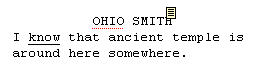
In Chapter 2, we learned that we could insert notes into a script (see the little note icon next to Ohio Smith's name in the following screenshot):

Time for action - adding media files

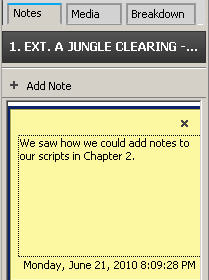
Clicking on the note icon brings up the note, showing it in the right-most column of the Celtx script screen. We click the Notes tab to both add and read notes. Now, what's the name of the tab next to Notes? Media! See it in the following screenshot:

Time for action - adding media files

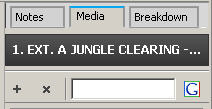
Insert a vertical bar in a script by moving the I-beam mouse cursor to the desired point and left-clicking. In this case, I've click after temple in the short Ohio Smith example. Now go over to the right column of the Celtx screen and click on the Media tab. We get a screen similar to the following screenshot:

Time for action - adding media files

The white writing that we see on the black background in the preceding screenshot shows the scene title. The + icon below the scene title lets us add an image or other media file and the x icon deletes it.

Now, I want to add a picture of an ancient...

CONTINUE READING
83
Tech Concepts
36
Programming languages
73
Tech Tools
Icon Unlimited access to the largest independent learning library in tech of over 8,000 expert-authored tech books and videos.
Icon Innovative learning tools, including AI book assistants, code context explainers, and text-to-speech.
Icon 50+ new titles added per month and exclusive early access to books as they are being written.
Celtx: Open Source Screenwriting Beginner's Guide
notes
bookmark Notes and Bookmarks search Search in title playlist Add to playlist font-size Font size

Change the font size

margin-width Margin width

Change margin width

day-mode Day/Sepia/Night Modes

Change background colour

Close icon Search
Country selected

Close icon Your notes and bookmarks

Confirmation

Modal Close icon
claim successful

Buy this book with your credits?

Modal Close icon
Are you sure you want to buy this book with one of your credits?
Close
YES, BUY

Submit Your Feedback

Modal Close icon
Modal Close icon
Modal Close icon