Sign In Start Free Trial
Account

Add to playlist

Create a Playlist

Modal Close icon
You need to login to use this feature.
  • Book Overview & Buying Mastering Drupal 8
  • Table Of Contents Toc
Mastering Drupal 8

Mastering Drupal 8

By : Sean Montague, Chaz Chumley, William Hurley
4.2 (5)
close
close
Mastering Drupal 8

Mastering Drupal 8

4.2 (5)
By: Sean Montague, Chaz Chumley, William Hurley

Overview of this book

Drupal is an open source content management system trusted by governments and organizations around the globe to run their websites. It brings with it extensive content authoring tools, reliable performance, and a proven track record of security. The community of more than 1,000,000 developers, designers, editors, and others have developed and maintained a wealth of modules, themes, and other add-ons to help you build a dynamic web experience. Drupal 8 is the latest release of the Drupal built on the Symfony2 framework. This is the largest change to the Drupal project in its history. The entire API of Drupal has been rebuilt using Symfony and everything from the administrative UI to themes to custom module development has been affected. This book will cover everything you need to plan and build a complete website using Drupal 8. It will provide a clear and concise walkthrough of the more than 200 new features and improvements introduced in Drupal core. In this book, you will learn advanced site building techniques, create and modify themes using Twig, create custom modules using the new Drupal API, explore the new REST and Multilingual functionality, import, and export Configuration, and learn how to migrate from earlier versions of Drupal.
Table of Contents (17 chapters)
close
close

Responsive admin


First off, Drupal 8 is responsive out of the box, meaning that the default Bartik theme, the Seven administration theme, and even the Admin toolbar scale and resize based on the device we are viewing our site on.

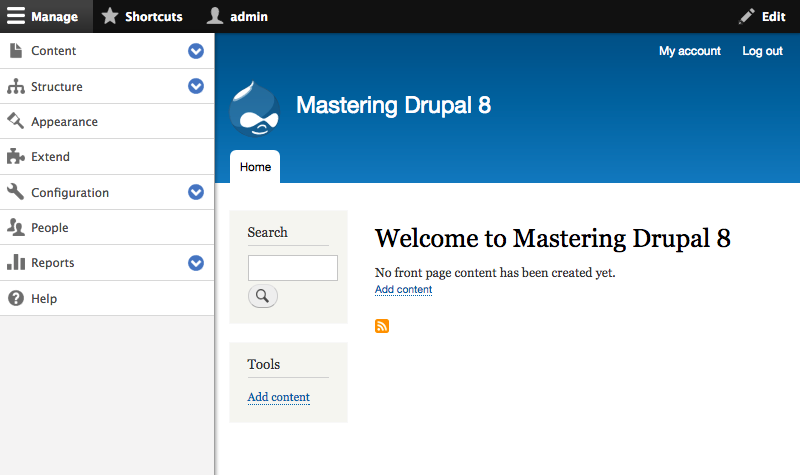
We can see this in action by logging in to our Drupal instance and then navigating to our homepage. If we begin to resize the browser window, eventually we will notice the orientation of the Admin toolbar change from a horizontal bar to a vertical bar:

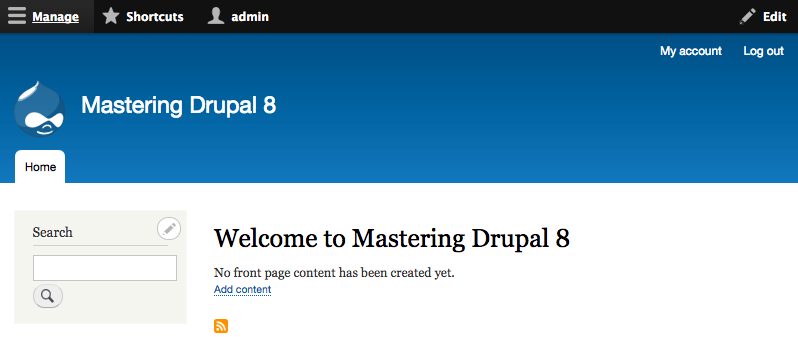
Once the Admin toolbar is at a vertical orientation, we can collapse it into the horizontal bar by clicking on the Manage link at the top left-hand side. This allows for more administration space on the screen.

Clicking on the Manage link again will re-open the toolbar to allow us to continue navigating to anywhere within Drupal.

By expanding the browser window back to a normal desktop orientation, the Admin toolbar will convert back to a horizontal orientation.

The Admin toolbar is not the only responsive change. If we...

CONTINUE READING
83
Tech Concepts
36
Programming languages
73
Tech Tools
Icon Unlimited access to the largest independent learning library in tech of over 8,000 expert-authored tech books and videos.
Icon Innovative learning tools, including AI book assistants, code context explainers, and text-to-speech.
Icon 50+ new titles added per month and exclusive early access to books as they are being written.
Mastering Drupal 8
notes
bookmark Notes and Bookmarks search Search in title playlist Add to playlist download Download options font-size Font size

Change the font size

margin-width Margin width

Change margin width

day-mode Day/Sepia/Night Modes

Change background colour

Close icon Search
Country selected

Close icon Your notes and bookmarks

Confirmation

Modal Close icon
claim successful

Buy this book with your credits?

Modal Close icon
Are you sure you want to buy this book with one of your credits?
Close
YES, BUY

Submit Your Feedback

Modal Close icon
Modal Close icon
Modal Close icon