Sign In Start Free Trial
Account

Add to playlist

Create a Playlist

Modal Close icon
You need to login to use this feature.
  • Book Overview & Buying Learning Veeam Backup & Replication for VMware vSphere
  • Table Of Contents Toc
Learning Veeam Backup & Replication for VMware vSphere

Learning Veeam Backup & Replication for VMware vSphere

By : Christian Mohn
4.4 (10)
close
close
Learning Veeam Backup & Replication for VMware vSphere

Learning Veeam Backup & Replication for VMware vSphere

4.4 (10)
By: Christian Mohn

Overview of this book

Table of Contents (13 chapters)
close
close

Backup modes


When you back up VMs, there are two methods available to you: incremental backup and reversed incremental backup.

Incremental backup

Incremental backup is the default backup option and is often also referred to as forward incremental backup. When using this method, a full backup is performed on the first run (.vbk), and subsequent backups only contain the changes detected since the last backup, whether it was full or incremental. These changes are stored in the .vib files, accompanying the VMs' .vbk file.

As illustrated in the following diagram, this option requires the least storage space in your backup repository:
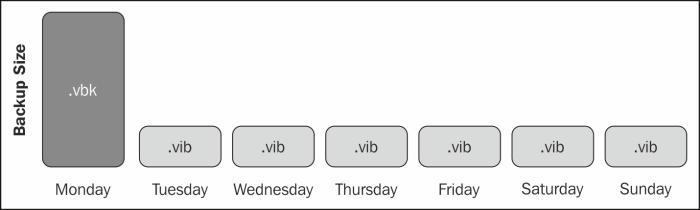
This is an efficient way of performing backups since you only store one full copy, and after that, it's just increments. It does, however, have an impact when you need to restore a backup. In order to restore a VM, or even a file, Veeam Backup & Replication needs to combine all the increments since the last full backup to find the desired restore point when restoring...

CONTINUE READING
83
Tech Concepts
36
Programming languages
73
Tech Tools
Icon Unlimited access to the largest independent learning library in tech of over 8,000 expert-authored tech books and videos.
Icon Innovative learning tools, including AI book assistants, code context explainers, and text-to-speech.
Icon 50+ new titles added per month and exclusive early access to books as they are being written.
Learning Veeam Backup & Replication for VMware vSphere
notes
bookmark Notes and Bookmarks search Search in title playlist Add to playlist font-size Font size

Change the font size

margin-width Margin width

Change margin width

day-mode Day/Sepia/Night Modes

Change background colour

Close icon Search
Country selected

Close icon Your notes and bookmarks

Confirmation

Modal Close icon
claim successful

Buy this book with your credits?

Modal Close icon
Are you sure you want to buy this book with one of your credits?
Close
YES, BUY

Submit Your Feedback

Modal Close icon
Modal Close icon
Modal Close icon