Sign In Start Free Trial
Account

Add to playlist

Create a Playlist

Modal Close icon
You need to login to use this feature.
  • Book Overview & Buying Learning Veeam Backup & Replication for VMware vSphere
  • Table Of Contents Toc
Learning Veeam Backup & Replication for VMware vSphere

Learning Veeam Backup & Replication for VMware vSphere

By : Christian Mohn
4.4 (10)
close
close
Learning Veeam Backup & Replication for VMware vSphere

Learning Veeam Backup & Replication for VMware vSphere

4.4 (10)
By: Christian Mohn

Overview of this book

Table of Contents (13 chapters)
close
close

Performing a replica failover/failback


In order to perform a replica failover or failback, the following steps are required:

  1. Click on the Replicas node and find the replica jobs. Right-click on the one you want to failover to, and select Failover Now….

  2. The Failover Wizard opens, where you can select from the VMs contained in the replication job you want to failover. If you want to failover to an earlier restore point, click on Point… to select a specific one. By default, the most recent one is restored. Click Next to continue.

  3. As usual, you will be prompted for a reason why this job is to be performed; fill one in for tracking purposes, and click on Next to start the job and then monitor it in the Log window.
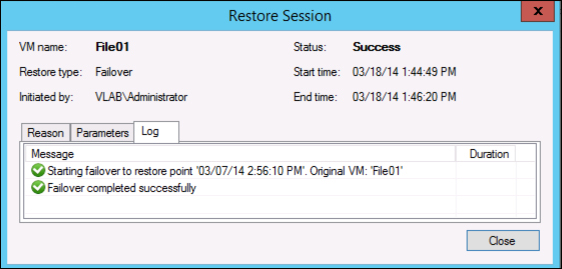
  4. Once it completes the failover process, the failed over VM(s) are available in the infrastructure and have taken over for the source VMs. You now have two choices on how to proceed as outlined in the introduction to replication. You can either choose to do a permanent failover or failback...

CONTINUE READING
83
Tech Concepts
36
Programming languages
73
Tech Tools
Icon Unlimited access to the largest independent learning library in tech of over 8,000 expert-authored tech books and videos.
Icon Innovative learning tools, including AI book assistants, code context explainers, and text-to-speech.
Icon 50+ new titles added per month and exclusive early access to books as they are being written.
Learning Veeam Backup & Replication for VMware vSphere
notes
bookmark Notes and Bookmarks search Search in title playlist Add to playlist font-size Font size

Change the font size

margin-width Margin width

Change margin width

day-mode Day/Sepia/Night Modes

Change background colour

Close icon Search
Country selected

Close icon Your notes and bookmarks

Confirmation

Modal Close icon
claim successful

Buy this book with your credits?

Modal Close icon
Are you sure you want to buy this book with one of your credits?
Close
YES, BUY

Submit Your Feedback

Modal Close icon
Modal Close icon
Modal Close icon