Sign In Start Free Trial
Account

Add to playlist

Create a Playlist

Modal Close icon
You need to login to use this feature.
  • Book Overview & Buying Hyper-V Best Practices
  • Table Of Contents Toc
Hyper-V Best Practices

Hyper-V Best Practices

By : Benedict Berger
4.8 (6)
close
close
Hyper-V Best Practices

Hyper-V Best Practices

4.8 (6)
By: Benedict Berger

Overview of this book

This book is intended for those who already have some basic experience with Hyper-V and now want to gain additional capabilities and knowledge of Hyper-V. If you have used Hyper-V in a lab environment before and now want to close the knowledge gap to transfer your Hyper-V environment to production, this is the book for you!
Table of Contents (10 chapters)
close
close
9
Index

Planning your environment

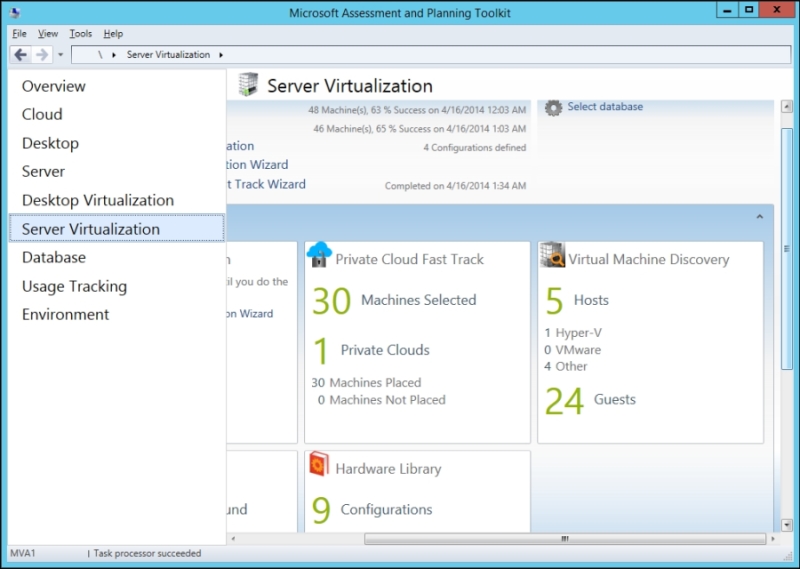
Besides the organizational skill needed for a successful Hyper-V project, there are some helpful tools that can help in most cases with the technical details. How many hosts will I need for my Hyper-V setup? How many CPUs and how much RAM is needed? What bandwidth is needed on my network? To answer these questions, I commonly use the free Solution Accelerator, Microsoft Assessment and Planning Toolkit (MAP Toolkit) by Microsoft (downloadable at the shortlink, http://bit.ly/1lzt2mJ). The MAP Toolkit is shown in the following screenshot:

Planning your environment

The easy-to-use MAP Toolkit does a full inventory of your existing environment, including performance counters over time. After running the wizards in your existing infrastructure, you will get an overview, a detailed report of the existing hardware and software infrastructure, and—most importantly—a measure of how these are used in your data center as of today, including used CPU cycles, memory, Storage I/O, and network usage. MAP even includes a planning wizard to plan the hardware requirements of your future Hyper-V hosts based on your current workloads and hardware configurations.

After having a basic understanding of the current usage and future needs of your hardware, it's time to choose the appropriate servers to run Hyper-V and its virtual machines. The good news is that all major server vendors have hardware in their portfolio that performs well for this task, so choose whatever vendor you like; there is just one thing you absolutely need to make sure of. The chosen hardware should be on the Windows Server Catalog and be certified for Windows Server 2012 R2 (shortlink http://bit.ly/1gII6h7). This way, you are making sure that your hardware has undergone extensive testing for Windows Server 2012 R2 with Hyper-V. You will be able to open a support call at Microsoft in case you ever run into problems using this hardware with Hyper-V. If you are going to use an older version of Hyper-V (which you should avoid, but licenses might force you to), select the corresponding host OS on the hardware catalog. Make sure that your host setup includes the necessary adapters to comply with your chosen storage (refer to Chapter 4, Storage Best Practices) and network designs (refer to Chapter 5, Network Best Practices).

Which CPU vendor you choose won't make a huge difference; just make sure that you stick to one, because mixed CPU vendors won't allow you to use live migration between Hyper-V hosts. Be sure that the chosen CPU models have support for server virtualization (Intel VT/AMD-V) and Data Execution Prevention (XD/NX) enabled. I strongly recommend that you use hyperthreading-enabled CPUs for server virtualization with active Second Level Address Translation (SLAT). Both are hardware-accelerated CPU features that add more performance to Hyper-V. For best performance, make sure to buy CPU models from the newest certified Enterprise Server line of the vendor of your choice. Due to the current licensing of Windows Server 2012 R2 Datacenter and several other products, I recommend that you choose CPUs with as many cores per socket as financially reasonable. As of early 2014, the sweet spot was around eight cores per socket for ideal value for money.

To choose the right RAM for your Hyper-V hosts, make sure that it supports Error Checking and Correction (ECC) RAM and choose modules large enough to fit with the amount designed into your hosts. As RAM is very inexpensive these days, you should choose the bigger modules in case of any doubts to ensure growth in future.

For your storage and networking options, see the corresponding chapters of this book. However, to host the Hyper-V management partition, I strongly recommend that you use two local SSDs or HDDs in Raid1 and not share the disks with virtual machines or other data. I have experienced the best results with these local hard drives and have found some problems with remote boot scenarios due to the higher complexity of boot-from-SAN setups—which is also a possible, and supported, but not preferred scenario. You don't need high-performance disks for the OS; all I/O performance should be added to the VM storage.

Another important topic is to choose fewer bigger boxes over many small Hyper-V hosts. This enables more efficient management. However, while needing a failover resource in a cluster, a Hyper-V cluster should consist of at least three nodes; otherwise 50 percent of your hardware is reserved for failover scenarios.

Refer to Chapter 6, Hyper-V Performance Tuning, it includes advanced hardware sizing guidelines for performance tuning.

CONTINUE READING
83
Tech Concepts
36
Programming languages
73
Tech Tools
Icon Unlimited access to the largest independent learning library in tech of over 8,000 expert-authored tech books and videos.
Icon Innovative learning tools, including AI book assistants, code context explainers, and text-to-speech.
Icon 50+ new titles added per month and exclusive early access to books as they are being written.
Hyper-V Best Practices
notes
bookmark Notes and Bookmarks search Search in title playlist Add to playlist font-size Font size

Change the font size

margin-width Margin width

Change margin width

day-mode Day/Sepia/Night Modes

Change background colour

Close icon Search
Country selected

Close icon Your notes and bookmarks

Confirmation

Modal Close icon
claim successful

Buy this book with your credits?

Modal Close icon
Are you sure you want to buy this book with one of your credits?
Close
YES, BUY

Submit Your Feedback

Modal Close icon
Modal Close icon
Modal Close icon