Sign In Start Free Trial
Account

Add to playlist

Create a Playlist

Modal Close icon
You need to login to use this feature.
  • Book Overview & Buying WildFly Configuration, Deployment, and Administration - Second Edition
  • Table Of Contents Toc
  • Feedback & Rating feedback
WildFly Configuration, Deployment, and Administration - Second Edition

WildFly Configuration, Deployment, and Administration - Second Edition - Second Edition

4.4 (5)
close
close
WildFly Configuration, Deployment, and Administration - Second Edition

WildFly Configuration, Deployment, and Administration - Second Edition

4.4 (5)

Overview of this book

This book is aimed at Java developers, system administrators, application testers using WildFly, and anyone who performs a DevOps role. Whether you are completely new to WildFly or just require an understanding of WildFly's new features, this book is for you.
Table of Contents (14 chapters)
close
close
13
Index

Starting up and stopping a domain


Starting up a WildFly domain is simply a matter of running the JBOSS_HOME\bin\domain.sh script (JBOSS_HOME\bin\domain.bat on Windows). In a matter of seconds, your domain will be up and running. Have a look at the following screenshot:
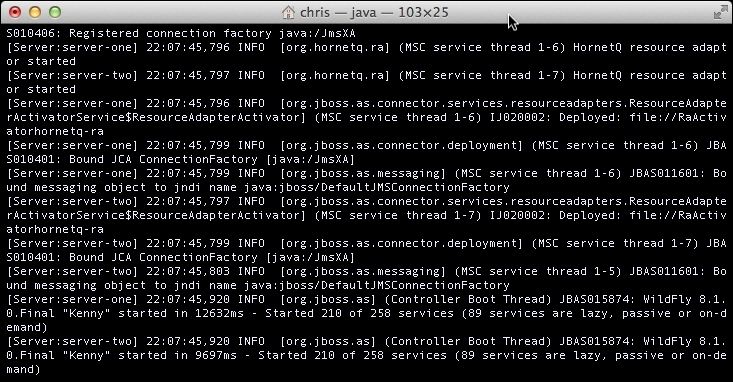
In order to stop the application server domain, you can either use the Ctrl + C shortcut in the same window in which you started the domain, or you can use the command-line client and issue the shutdown command to the host controller.

Unix/Linux users can issue the following command:

./jboss-cli.sh --connect command=/host=master:shutdown

Windows users can issue the following command:

jboss-cli.bat --connect command=/host=master:shutdown

Note

The default host name is master, and it is defined in the host.xml, file which is located in the JBOSS_HOME\domain\configuration folder. We will learn more about it in the next section.

Once the domain starts, several log files are created within the JBOSS_HOME\domain\log directory. The host...

Visually different images
CONTINUE READING
83
Tech Concepts
36
Programming languages
73
Tech Tools
Icon Unlimited access to the largest independent learning library in tech of over 8,000 expert-authored tech books and videos.
Icon Innovative learning tools, including AI book assistants, code context explainers, and text-to-speech.
Icon 50+ new titles added per month and exclusive early access to books as they are being written.
WildFly Configuration, Deployment, and Administration - Second Edition
notes
bookmark Notes and Bookmarks search Search in title playlist Add to playlist font-size Font size

Change the font size

margin-width Margin width

Change margin width

day-mode Day/Sepia/Night Modes

Change background colour

Close icon Search
Country selected

Close icon Your notes and bookmarks

Confirmation

Modal Close icon
claim successful

Buy this book with your credits?

Modal Close icon
Are you sure you want to buy this book with one of your credits?
Close
YES, BUY

Submit Your Feedback

Modal Close icon
Modal Close icon
Modal Close icon