Sign In Start Free Trial
Account

Add to playlist

Create a Playlist

Modal Close icon
You need to login to use this feature.
  • Book Overview & Buying Apache Maven Cookbook
  • Table Of Contents Toc
  • Feedback & Rating feedback
Apache Maven Cookbook

Apache Maven Cookbook

By : Raghuram Bharathan
4.2 (5)
close
close
Apache Maven Cookbook

Apache Maven Cookbook

4.2 (5)
By: Raghuram Bharathan

Overview of this book

If you are a Java developer or a manager who has experience with Apache Maven and want to extend your knowledge, then this is the ideal book for you. Apache Maven Cookbook is for those who want to learn how Apache Maven can be used for build automation. It is also meant for those familiar with Apache Maven, but want to understand the finer nuances of Maven and solve specific problems.
Table of Contents (13 chapters)
close
close
12
Index

Understanding the standard directory layout

When we built our sample Java project earlier, we saw files being compiled, tests being run, and a JAR being generated. We do not know where these artifacts were created.

How to do it...

Let's find where the artifacts were created by performing the following steps:

  1. Go to the folder that has the sample Maven project.
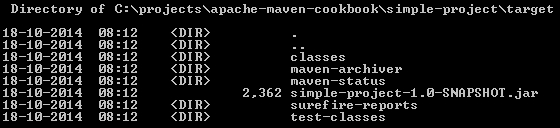
  2. Open the target subfolder that was created:
    How to do it...

How it works...

When Maven runs, it puts all the contents that it generates into a separate folder. This is to distinguish it from any user-generated content. Let us examine the contents of this folder:

  • The classes folder: Compiled source files are placed in this folder. This folder will also contain resources, such as XML and property files that are part of the source, placed in src/main/resources.
  • The test-classes folder: Compiled test source files are available in this folder. In addition, it also contains test resources, which are files required for the purpose of testing, but not for running the project.
  • The surefire-reports folder: Test reports are separately placed in this folder. Typically, both XML and HTML report formats are available. The latter can be opened in the browser, while the former can be integrated with a code coverage tool.
  • The output .jar file: The generated project artifact is also present in this folder.
  • Two other folders—maven-archiver and maven-status—hold information used by Maven during the build.
Visually different images
CONTINUE READING
83
Tech Concepts
36
Programming languages
73
Tech Tools
Icon Unlimited access to the largest independent learning library in tech of over 8,000 expert-authored tech books and videos.
Icon Innovative learning tools, including AI book assistants, code context explainers, and text-to-speech.
Icon 50+ new titles added per month and exclusive early access to books as they are being written.
Apache Maven Cookbook
notes
bookmark Notes and Bookmarks search Search in title playlist Add to playlist download Download options font-size Font size

Change the font size

margin-width Margin width

Change margin width

day-mode Day/Sepia/Night Modes

Change background colour

Close icon Search
Country selected

Close icon Your notes and bookmarks

Confirmation

Modal Close icon
claim successful

Buy this book with your credits?

Modal Close icon
Are you sure you want to buy this book with one of your credits?
Close
YES, BUY

Submit Your Feedback

Modal Close icon
Modal Close icon
Modal Close icon