Sign In Start Free Trial
Account

Add to playlist

Create a Playlist

Modal Close icon
You need to login to use this feature.
  • Book Overview & Buying Designing and Implementing Microsoft Azure Networking Solutions
  • Table Of Contents Toc
Designing and Implementing Microsoft Azure Networking Solutions

Designing and Implementing Microsoft Azure Networking Solutions

By : David Okeyode
4.6 (20)
close
close
Designing and Implementing Microsoft Azure Networking Solutions

Designing and Implementing Microsoft Azure Networking Solutions

4.6 (20)
By: David Okeyode

Overview of this book

Designing and Implementing Microsoft Azure Networking Solutions is a comprehensive guide that covers every aspect of the AZ-700 exam to help you fully prepare to take the certification exam. Packed with essential information, this book is a valuable resource for Azure cloud professionals, helping you build practical skills to design and implement name resolution, VNet routing, cross-VNet connectivity, and hybrid network connectivity using the VPN Gateway and the ExpressRoute Gateway. It provides step-by-step instructions to design and implement an Azure Virtual WAN architecture for enterprise use cases. Additionally, the book offers detailed guidance on network security design and implementation, application delivery services, private platform service connectivity, and monitoring networks in Azure. Throughout the book, you’ll find hands-on labs carefully integrated to align with the exam objectives of the Azure Network Engineer certification (AZ-700), complemented by practice questions at the end of each chapter, allowing you to test your knowledge. By the end of this book, you’ll have mastered the fundamentals of Azure networking and be ready to take the AZ-700 exam.
Table of Contents (17 chapters)
close
close
1
Part 1: Design and Implement Core Networking Infrastructure in Azure
6
Part 2: Design, Implement, and Manage Hybrid Networking
11
Part 3: Design and Implement Traffic Management and Network Monitoring

Hands-on exercise – determining the VM location and sizes for future exercises

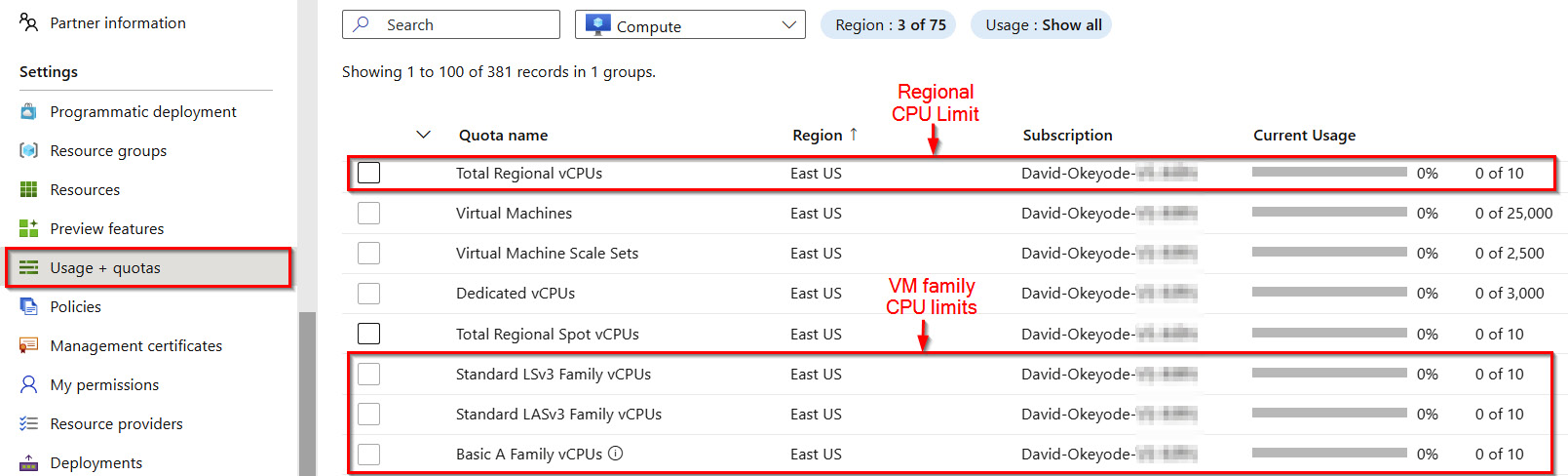
To complete some of the hands-on exercises in this book (such as the exercise after this one), you will need to deploy VMs for testing. In Azure, not all VM sizes are available in all subscription regions! There are also CPU quota limits for VM families and subscription regions (Figure 1.34).

Figure 1.34 – Regional and VM family CPU limits per subscription

Figure 1.34 – Regional and VM family CPU limits per subscription

In this exercise, you will evaluate your subscription to determine the VM sizes and locations to use for the exercises in the upcoming chapters of this book. Here are the tasks that you will complete in this exercise:

  • Task 1: Determining the CPU quota limits for recommended subscription regions
  • Task 2: Determining the VM size availability for recommended subscription regions

For the hands-on exercise, I will be defaulting to the East US and West US Azure regions as these are the regions that I have used throughout the rest of the book. While I recommend that you also use these regions, you do not need to stick with this recommendation. There is nothing particular about them. If you decide to use other regions instead, simply replace the values as you run the specified commands. You can obtain a list of Azure locations with the az account list-locations -o table Azure CLI command.

Let’s get into this!

Task 1 – determining the CPU quota limits for recommended subscription regions

The steps are as follows:

  1. Open a web browser and go to the Azure Portal at https://portal.azure.com. Sign in with your admin user account credentials.
  2. In the Azure Portal, click on the Cloud Shell icon in the top right corner of the screen, as shown in Figure 1.35.
Figure 1.35 – Click the icon to open Cloud Shell

Figure 1.35 – Click the icon to open Cloud Shell

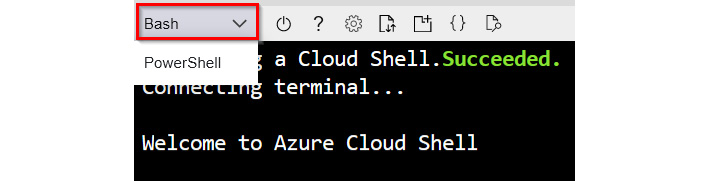
  1. Ensure you have Bash selected for your environment as we will be working with Azure CLI commands:
Figure 1.36 – Select the Bash shell environment

Figure 1.36 – Select the Bash shell environment

  1. Use the following two commands to verify the CPU quota limit for the East US and West US Azure regions. If you plan on using different regions, remember to replace the value for the location parameter with the regions that you are planning to use:
    az vm list-usage --location eastus --output table
    az vm list-usage --location westus --output table
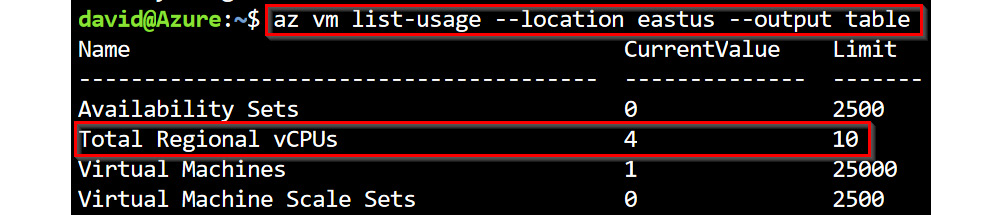
  2. In the output of the commands in step 4, review the Total Regional vCPUs usage and limit to ensure that you have sufficient CPU quota available in the region. Figure 1.37 shows a limit of 10 vCPUs for the East US region in my subscription and current usage of 4 vCPUs (by existing VM deployments). This means that I can only deploy additional 6 vCPUs in the region. The only exceptions to this are if I remove existing VM resources to free up usage or raise a Microsoft support ticket to increase the limit for that region in my subscription. To follow the hands-on exercises, ensure that you have a minimum of 6 vCPUs available in both regions!
Figure 1.37 – The total regional vCPU usage

Figure 1.37 – The total regional vCPU usage

  1. Still in the output of the commands in step 4, review the Standard BS Family vCPUs usage and limit to ensure that you have sufficient CPU quota for the VM size family that we will be using in the hands-on exercises. Figure 1.37 shows a limit of 10 vCPUs for the East US region in my subscription and current usage of 0 vCPUs. I will be defaulting to this VM family size in the exercise chapters. If you plan on using a different VM family, ensure that you have sufficient vCPU quota for it in the regions that you plan to use.
Figure 1.38 – Standard BS VM Family regional vCPU usage

Figure 1.38 – Standard BS VM Family regional vCPU usage

  1. In Cloud Shell, use the following two commands to verify available sizes for the Standard_B VM family in the East US and West US Azure regions. I will be defaulting to a VM size in this VM family. If you plan on using different regions, remember to replace the value for the location parameter with the regions that you are planning to use:
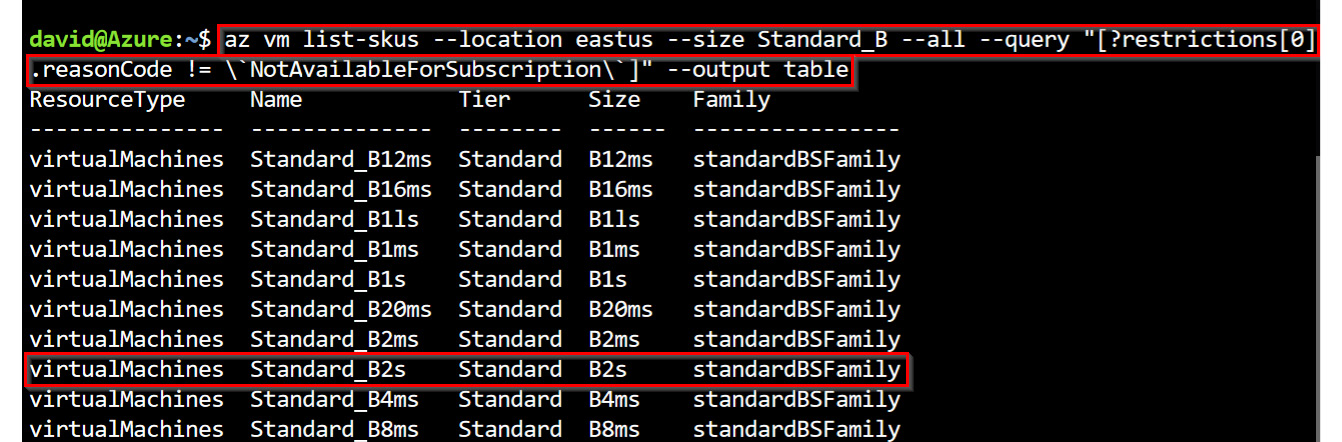
    az vm list-skus --location eastus --size Standard_B --all --query "[?restrictions[0].reasonCode != \`NotAvailableForSubscription\`]" --output table
    az vm list-skus --location westus --size Standard_B --all --query "[?restrictions[0].reasonCode != \`NotAvailableForSubscription\`]" --output table
  2. In the output of the commands in step 7, review to ensure that the Standard_B2s VM size has no restrictions in both regions. Figure 1.39 shows that the size is available for my subscription in the East US region. Leave Cloud Shell open for the next exercise.
Figure 1.39 – The Standard_B2s VM size availability check

Figure 1.39 – The Standard_B2s VM size availability check

Now that you have verified the regions and VM size that you will be using, make a note of these as you will be needing them in the upcoming exercises in this chapter and in the rest of the chapters of this book.

CONTINUE READING
83
Tech Concepts
36
Programming languages
73
Tech Tools
Icon Unlimited access to the largest independent learning library in tech of over 8,000 expert-authored tech books and videos.
Icon Innovative learning tools, including AI book assistants, code context explainers, and text-to-speech.
Icon 50+ new titles added per month and exclusive early access to books as they are being written.
Designing and Implementing Microsoft Azure Networking Solutions
notes
bookmark Notes and Bookmarks search Search in title playlist Add to playlist download Download options font-size Font size

Change the font size

margin-width Margin width

Change margin width

day-mode Day/Sepia/Night Modes

Change background colour

Close icon Search
Country selected

Close icon Your notes and bookmarks

Confirmation

Modal Close icon
claim successful

Buy this book with your credits?

Modal Close icon
Are you sure you want to buy this book with one of your credits?
Close
YES, BUY

Submit Your Feedback

Modal Close icon
Modal Close icon
Modal Close icon