Sign In Start Free Trial
Account

Add to playlist

Create a Playlist

Modal Close icon
You need to login to use this feature.
  • Book Overview & Buying VMware ThinApp 4.7 Essentials
  • Table Of Contents Toc
VMware ThinApp 4.7 Essentials

VMware ThinApp 4.7 Essentials

By : Peter Bjork
5 (13)
close
close
VMware ThinApp 4.7 Essentials

VMware ThinApp 4.7 Essentials

5 (13)
By: Peter Bjork

Overview of this book

VMware ThinApp 4.7 is an application virtualization and portable application creator which allows users to package conventional applications so that they are portable. "VMware ThinApp 4.7 Essentials" shows you how to deploy ThinApp packages in order to improve the portability, manageability and compatibility of applications by encapsulating them from the underlying operating system on which they are executed. Application virtualization improves the portability, manageability and compatibility of applications by encapsulating them from the underlying operating system on which they are executed. VMware ThinApp 4.7 is an application virtualization and portable application creator which allows users to package conventional applications so that they are portable. ThinApp eliminates application conflicts, reducing the need and cost of recoding and regression testing. In this book you will learn about how application virtualization works and how to deploy ThinApp packages. You will learn how to update and tweak ThinApp Projects before distribution. This book will then cover design and implementation considerations for future ThinApp projects.
Table of Contents (15 chapters)
close
close
VMware ThinApp 4.7 Essentials
Credits
About the Author
About the Reviewers
www.PacktPub.com
Preface
2
Index

Using thinreg.exe to register your applications


thinreg.exe is the tool used to register a package in order to give it the look and feel of a locally-installed application. Registering a package will register file types, protocols, and object types, create shortcuts and add the package to Add or Remove Programs. You can run any application packaged using ThinApp by simply clicking on an entry point, but running the application will not register the application.

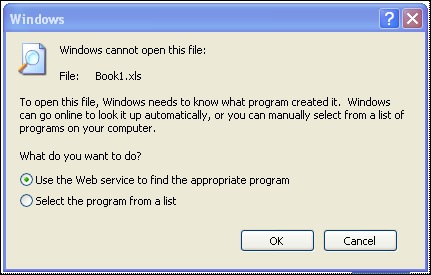
Running Excel packaged with ThinApp does not register the .xls file type. The operating system does not know how to handle the Excel file.

When the user double-clicks on the Book1.xls file, they are presented with the not so user-friendly dialog box shown in the previous screenshot.

You can register an application by running thinreg.exe and point it to the package. When we use our previous Excel example, the code snippet will look as follows:

thinreg.exe "Z:\ThinApp\Applications\Microsoft Office Excel 2003.exe"

You can run thinreg...

Visually different images
CONTINUE READING
83
Tech Concepts
36
Programming languages
73
Tech Tools
Icon Unlimited access to the largest independent learning library in tech of over 8,000 expert-authored tech books and videos.
Icon Innovative learning tools, including AI book assistants, code context explainers, and text-to-speech.
Icon 50+ new titles added per month and exclusive early access to books as they are being written.
VMware ThinApp 4.7 Essentials
notes
bookmark Notes and Bookmarks search Search in title playlist Add to playlist font-size Font size

Change the font size

margin-width Margin width

Change margin width

day-mode Day/Sepia/Night Modes

Change background colour

Close icon Search
Country selected

Close icon Your notes and bookmarks

Confirmation

Modal Close icon
claim successful

Buy this book with your credits?

Modal Close icon
Are you sure you want to buy this book with one of your credits?
Close
YES, BUY

Submit Your Feedback

Modal Close icon
Modal Close icon
Modal Close icon