Sign In Start Free Trial
Account

Add to playlist

Create a Playlist

Modal Close icon
You need to login to use this feature.
  • Book Overview & Buying Mastering QlikView Data Visualization
  • Table Of Contents Toc
Mastering QlikView Data Visualization

Mastering QlikView Data Visualization

By : Pover
5 (2)
close
close
Mastering QlikView Data Visualization

Mastering QlikView Data Visualization

5 (2)
By: Pover

Overview of this book

Just because you know how to swing a hammer doesn't mean you know how to build a house. Now that you've learned how to use QlikView, it's time to learn how to develop meaningful QlikView applications that deliver what your business users need. You will explore the requirements and the data from several business departments in order to deliver the most amazing analysis and data visualizations. In doing so, you will practice using advanced QlikView functions, chart object property options, and extensions to solve real-world challenges.
Table of Contents (13 chapters)
close
close
12
Index

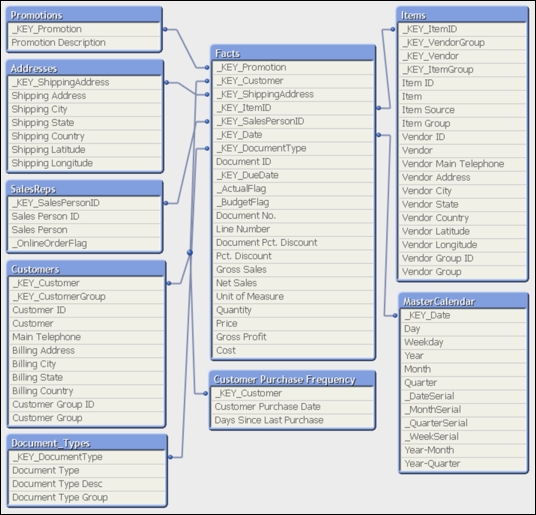
Sales perspective data model


Our company sells gadgets to customers throughout the United States and our sales perspective data model is based on data from an ERP system. The following figure shows the data model that we are going to work with throughout this chapter:

Exercise 2.1

With the following steps, let's migrate the sales perspective container from the book's exercise files to where we've installed QDF on our computers and start to explore the data together:

  1. In the Ch. 2 folder of the book's exercise files, copy the container called 1001.Sales_Perspective to the QDF folder that is located on your computer. By default, the QDF folder will be C:\Qlik\SourceDate.

  2. In the QDF folder, open the VariableEditor Shortcut in the 0.Administration container.

  3. Click Container Map Editor. If the button hangs, then enable the Open Databases in Read and Write mode in the Setting tab of the Edit Script window and try again.

  4. In the container map table, go to the empty line after 99.Shared_Folders, and under...

CONTINUE READING
83
Tech Concepts
36
Programming languages
73
Tech Tools
Icon Unlimited access to the largest independent learning library in tech of over 8,000 expert-authored tech books and videos.
Icon Innovative learning tools, including AI book assistants, code context explainers, and text-to-speech.
Icon 50+ new titles added per month and exclusive early access to books as they are being written.
Mastering QlikView Data Visualization
notes
bookmark Notes and Bookmarks search Search in title playlist Add to playlist font-size Font size

Change the font size

margin-width Margin width

Change margin width

day-mode Day/Sepia/Night Modes

Change background colour

Close icon Search
Country selected

Close icon Your notes and bookmarks

Confirmation

Modal Close icon
claim successful

Buy this book with your credits?

Modal Close icon
Are you sure you want to buy this book with one of your credits?
Close
YES, BUY

Submit Your Feedback

Modal Close icon
Modal Close icon
Modal Close icon