Sign In Start Free Trial
Account

Add to playlist

Create a Playlist

Modal Close icon
You need to login to use this feature.
  • Book Overview & Buying Mathematica Data Analysis
  • Table Of Contents Toc
Mathematica Data Analysis

Mathematica Data Analysis

By : Sergiy Suchok
5 (1)
close
close
Mathematica Data Analysis

Mathematica Data Analysis

5 (1)
By: Sergiy Suchok

Overview of this book

There are many algorithms for data analysis and it’s not always possible to quickly choose the best one for each case. Implementation of the algorithms takes a lot of time. With the help of Mathematica, you can quickly get a result from the use of a particular method, because this system contains almost all the known algorithms for data analysis. If you are not a programmer but you need to analyze data, this book will show you the capabilities of Mathematica when just few strings of intelligible code help to solve huge tasks from statistical issues to pattern recognition. If you're a programmer, with the help of this book, you will learn how to use the library of algorithms implemented in Mathematica in your programs, as well as how to write algorithm testing procedure. With each chapter, you'll be more immersed in the special world of Mathematica. Along with intuitive queries for data processing, we will highlight the nuances and features of this system, allowing you to build effective analysis systems. With the help of this book, you will learn how to optimize the computations by combining your libraries with the Mathematica kernel.
Table of Contents (10 chapters)
close
close
9
Index

Importing data in Mathematica


In order to import data into Mathematica, the Import function is used. Let's see how this feature is used in practice.

If you need to simply import the file, you can do it as follows:

Import["file_name"]

However, in practice, it is much more useful to use additional parameters of this function. Let's consider the following example.

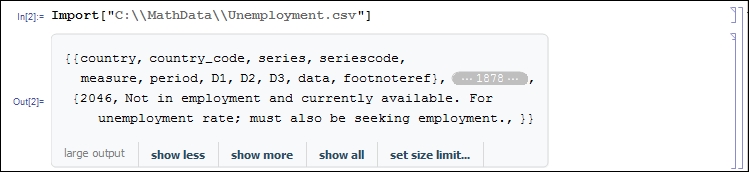
Let's suppose we need to import the data on unemployment. We will take the information from the http://unstats.un.org/unsd/mbs/app/DataSearchTable.aspx page in the Topic list, select EMPLOYMENT, UNEMPLOYMENT AND EARNINGS and in the Table list select 11 Unemployment. Then, select all the countries with the Shift button. After that download data by clicking on the Get data button and then clicking on the Download in CSV button, and save it into the C:\MathData\Unemployment.csv file.

In order to import data, let's select the Import function:

Note

Note that in Mathematica, \ is a special character. This is why in order to specify the path correctly...

CONTINUE READING
83
Tech Concepts
36
Programming languages
73
Tech Tools
Icon Unlimited access to the largest independent learning library in tech of over 8,000 expert-authored tech books and videos.
Icon Innovative learning tools, including AI book assistants, code context explainers, and text-to-speech.
Icon 50+ new titles added per month and exclusive early access to books as they are being written.
Mathematica Data Analysis
notes
bookmark Notes and Bookmarks search Search in title playlist Add to playlist font-size Font size

Change the font size

margin-width Margin width

Change margin width

day-mode Day/Sepia/Night Modes

Change background colour

Close icon Search
Country selected

Close icon Your notes and bookmarks

Confirmation

Modal Close icon
claim successful

Buy this book with your credits?

Modal Close icon
Are you sure you want to buy this book with one of your credits?
Close
YES, BUY

Submit Your Feedback

Modal Close icon
Modal Close icon
Modal Close icon